17
CUSTOMIZING TV SETTINGS
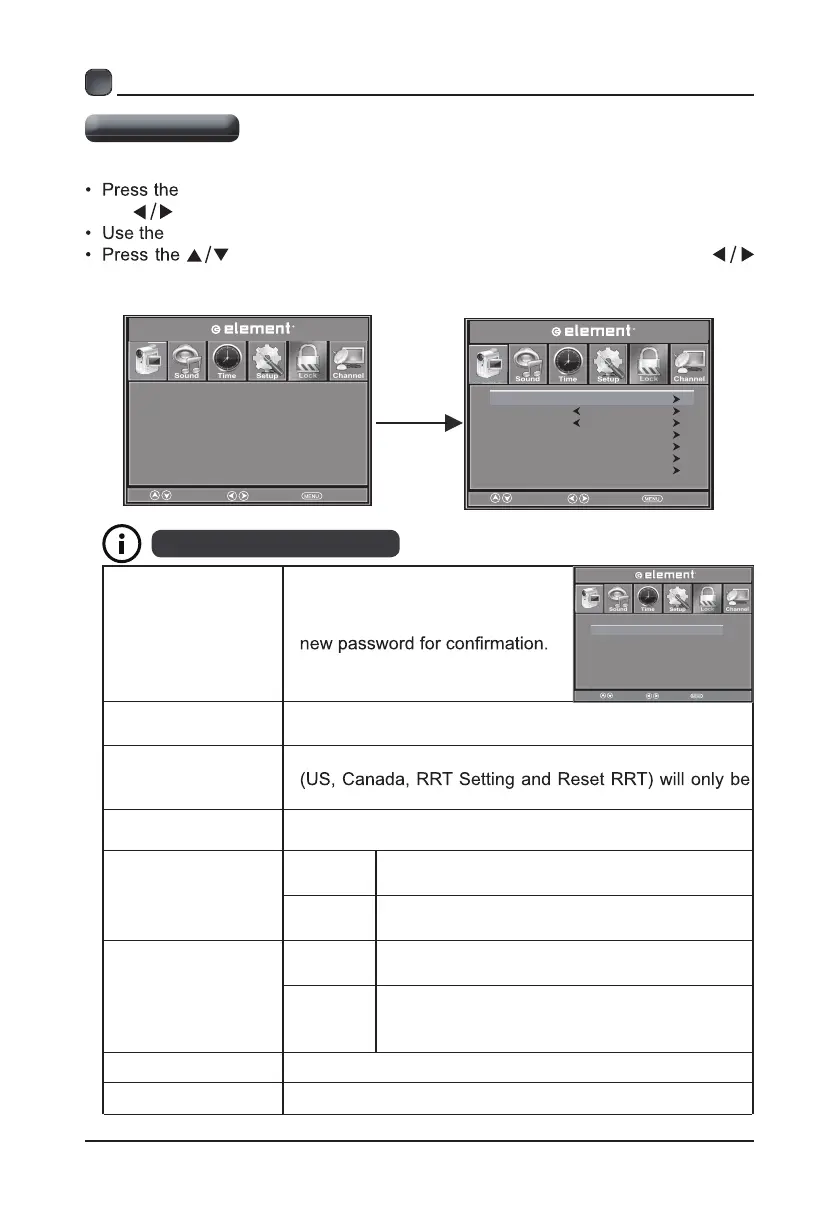
MENU button on the main unit or on the remote control and then press
the
buttons to select Lock menu.
0-9 buttons to input 4-digit password to enter the Lock menu.
buttons to select the following options and then press the
buttons to adjust each option’s setting.
The default password is "0000".
Input 4-digit
password
Lock Settings
Change Password
Use 0-9 buttons to input the old
password and then input the
new 4-digit password. Re-enter
System Lock
Select to turn On/Off system lock. The following options
accessible when you turn the system lock on.
US Rating
TV
TV RATING: Press button to
lock
or
unlock TV rating.
MPAA
Select MPAA rating among: ,G,
PG, PG-
13, R, NC-17,or X.
Canada Rating
Canada
English
Select MPAA rating for English-speaking
Canada among: C, C8+, G, PG, 14+, 18+.
Canada
French
Select MPAA rating for Quebec Canada
among:
G, 8 ans+, 13 ans+, 16 ans+, 18
ans+.
RRT Setting Set Rating Region Table.
Reset RRT Select to reset the RR
T
setting.
Enter Password
----
Change Password
Key Lock
System Lock
Input Block
US Rating
Canada Rating
RRT Setting
Reset RRT
Off
ON
Enter New Password
Confirm Password
0-9 Return
----
----
Select
Move EXIT
Select
Move EXIT
Key Loc k
Turn on and lock the TV button
Input Block Encrypt ratings of TV channels to prevent access
Select
Move EXIT
Picture
Picture
Picture
Sound
Lock
Lock
Lock
OK


 To Next Page