PC AUDIO-
VGA
PC AUDIO-
VGA
9
YPbPr Connection()Component()Component
Connect the YPbPr output of the DVD or VCR to the YPbPr input on the set. The picture quality is
improved; compared to connecting a regular VCR to the video input. Connect the Audio output of
the DVD or VCR to the Audio input jacks on the set using the RCA cable.
Match the jacks colors Y is green Pb is blue Pr is red Audio left is white and Audio right is red
Select component input source using the SOURCE button on the remote control.
:,,, .
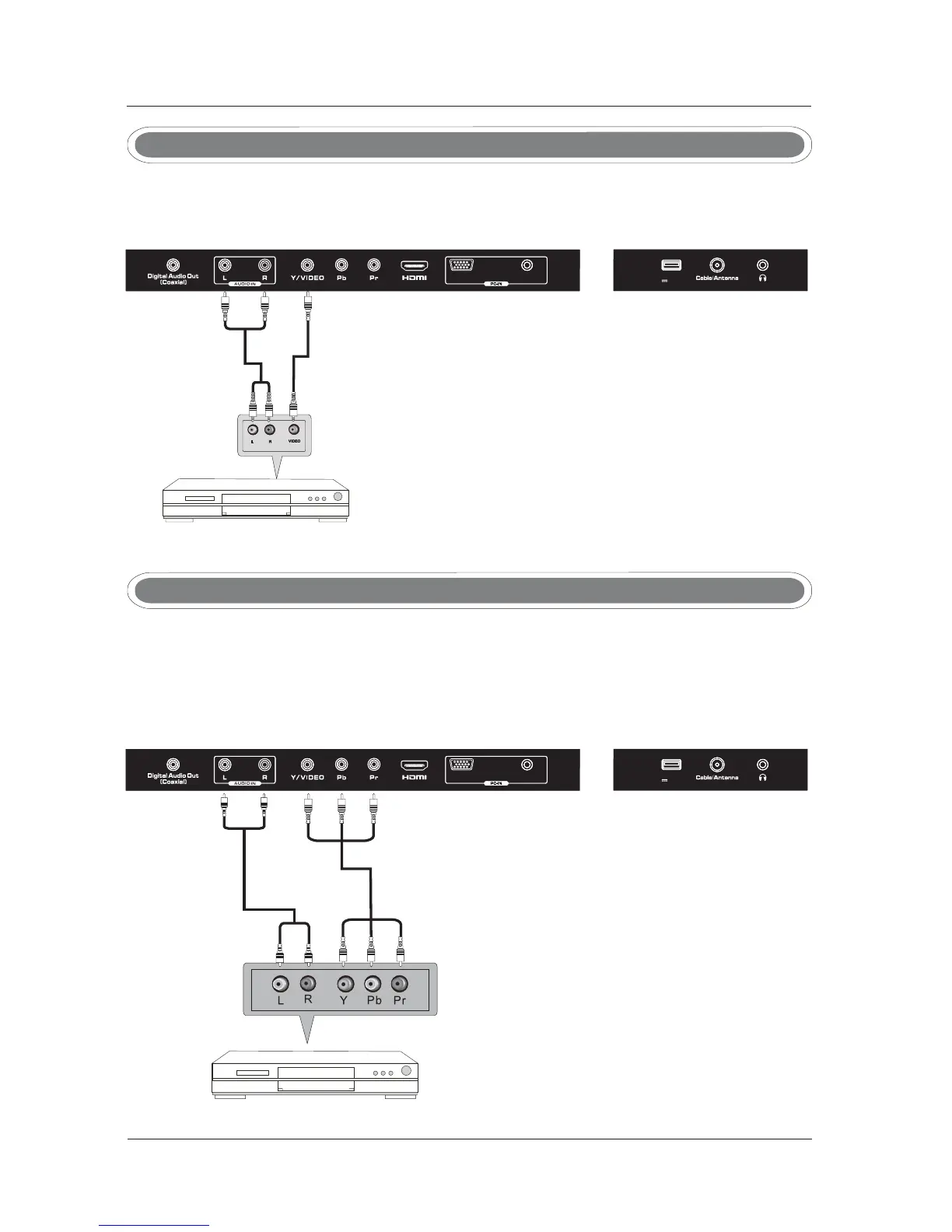
Connect the VIDEO and AUDIO output jack of the DVD or VCR to the jacks on the set usingVIDEO
the RCA cable. Match the jack colors: Video is green, Audio left is white, and Audio right is red.
Select the AV input source using the SOURCE button on the remote control.
AV Connection
TV INSTALL TION DRAWINGSA
Video Cable
DVDorVCR
DVDorVCRBack
DVDorVCR
DVDorVCRBack
YPbPr Cable
Audio Cable
TV Back
TV Back
Audio Cable
USB
5V 500mA
USB
5V 500mA



 To Next Page