1560 DIGITAL ISOLASJONSMÅLER MED KONTINUITET 23
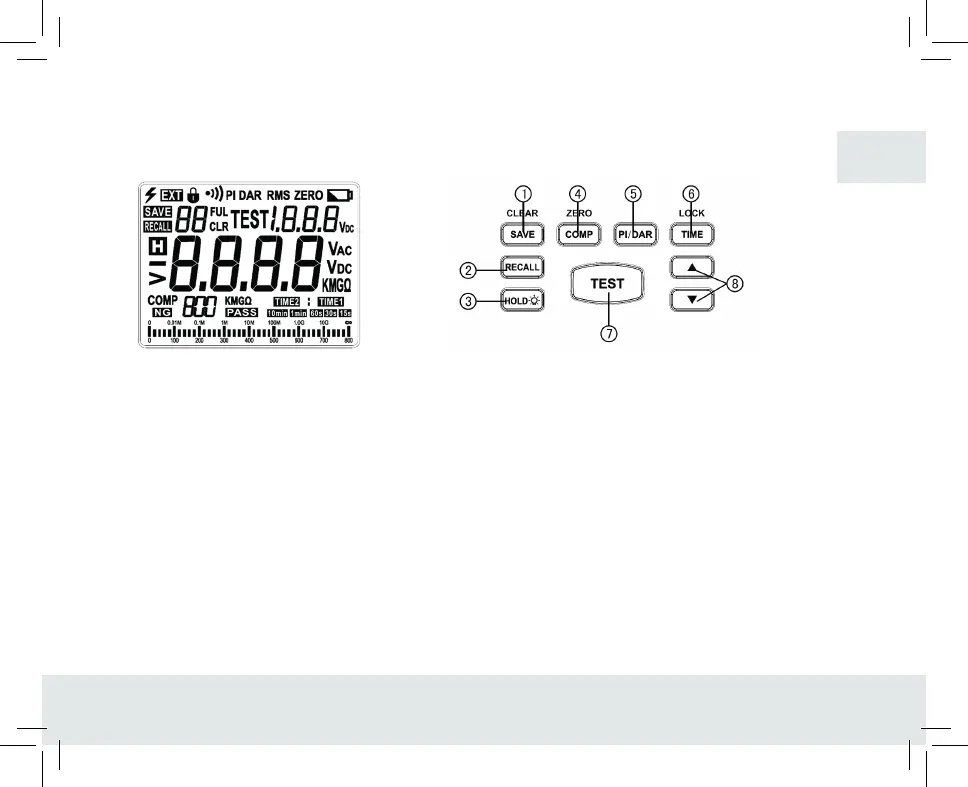
VI. LCD Screen (See figure 2)
VII. Key function (see figure 3)
1. SAVE/ CLEAR
With a short press,select SAVE (Save) function to save the current measured data; Under the RECALL
interface,with a long press on the button “SAVE/CLEAR” about 3s, all saved data will be cleared when
“CLR” occurs on the display screen.
2. RECALL
With a short press on the button, the previously saved measured values are retrieved, and exit the function
after another press.
3. HOLD/ BLACKLIGHT
With a short press on the button,enter the reading hold measurement mode,and after another press, exit the
mode.With a long press on the button, the backlight is turned on and remains on constantly, after another
long press,it will be turned off.
FIGURE 2 FIGURE 3
GB


 To Next Page