26
1560 DIGITAL ISOLASJONSMÅLER MED KONTINUITET
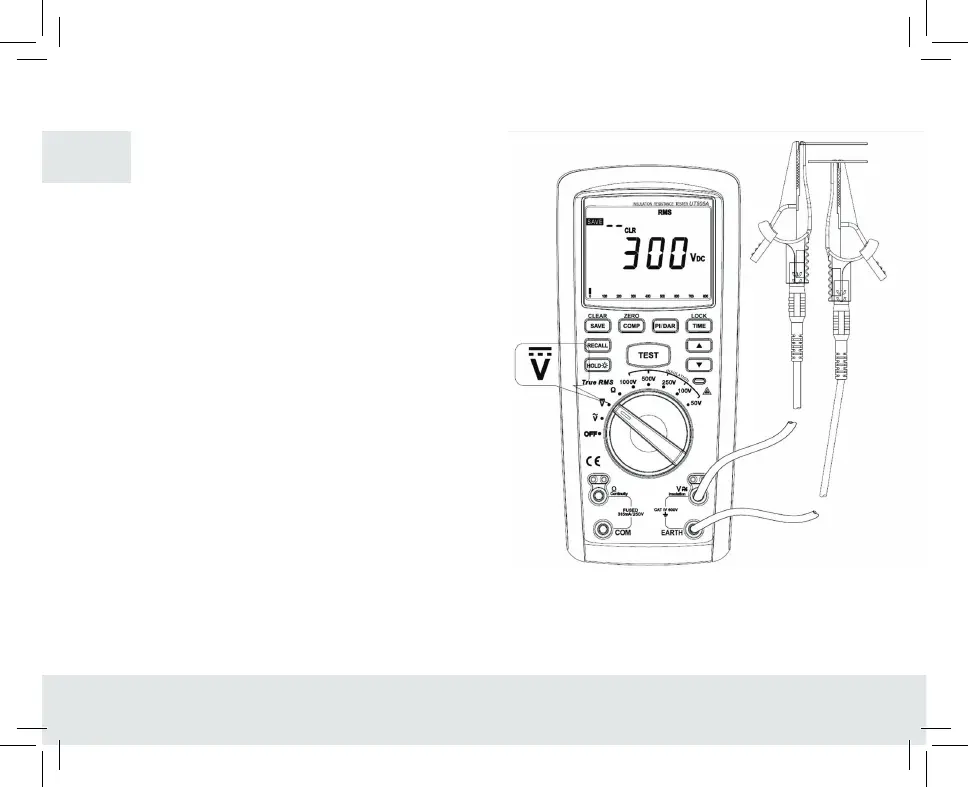
2. DC voltage measurement (see figure 5)
1. Insert red test pen in•v• jack (red hole) and black test
pen in”EARTH”jack (black hole).
2. Push the rotating switch to the gear and connect test pen
in parallel with the power source or to both ends of the load
to be measured.
3. Directly read the measured voltage value from display.
4. To save the measured voltage value during measurement,
just push the button “SAVE”.
Warning:
- Do not input the voltage higher than 1000V since higher
voltage may cause damage to the instrument.
- Take special care to avoid electric shocking while measuring
high voltage and if necessary, wear the insulation gloves.
- After completing measurement operation, disconnect the test
pen from the circuits to be measured.
- When the measured voltage is higher than the safety voltage
60V/DC, the meter display screen will display high voltage
warning promt when the input overvoltage is higher than
1000V, the meter will automatically output high voltage
warning promt wich would flash on the top left corner of screen
for warning
FIGURE 5
GB


 To Next Page