28
1560 DIGITAL ISOLASJONSMÅLER MED KONTINUITET
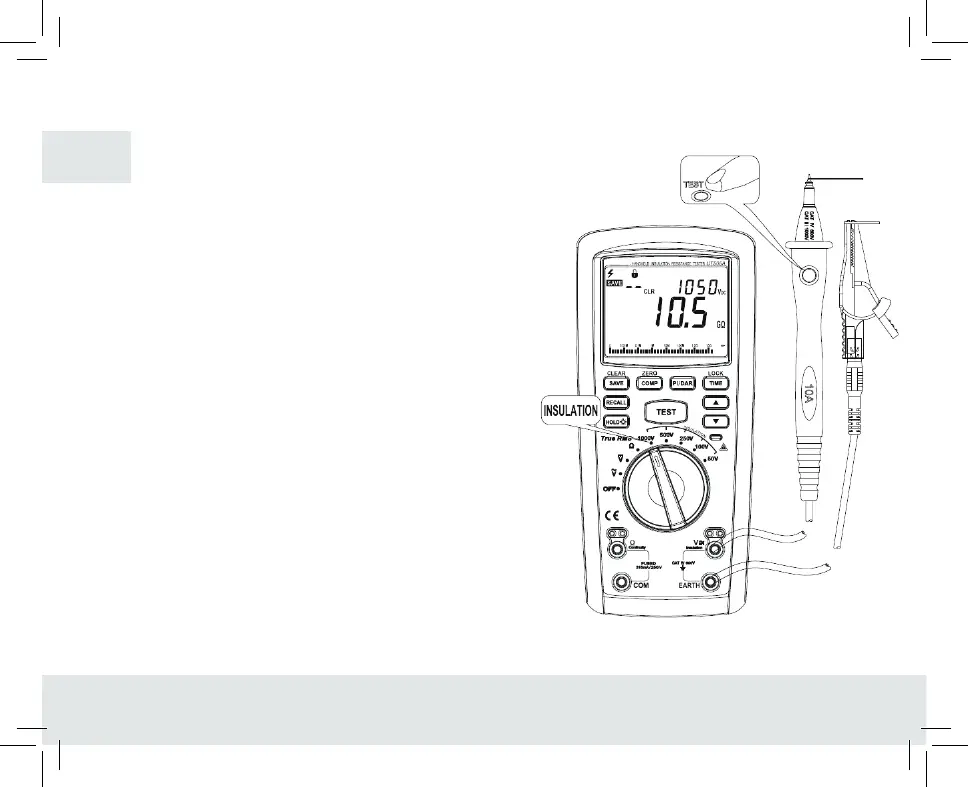
4. . Measurement of insulation resistance (see figure7)
1. Insert red test pen in “ VV” jack (red hole) an black test pen in
“EARTH” jack (black hole).
2. Rotate the rotary switch to INSULATION (insulation resistance area),
select the required test voltage and connect the test pen in parallel
with the circuit to be measured.
3. After pressing down “TEST” (test),view the current resistance
value from the main display area on the display and the test
voltage in the auxiliar,y display area. Meanwhile, the screen will
flash and display the high-voltage warning symbol when the test
voltage isnigher than 30V, then you can press down the test
button.
4. After pressing down ‘’TEST’ button, LCD screen will blink
displaying high-voltage warning symbol in case of high-voltage
output, in addition, the red alarm light beside the alarm
symbol on the case is turned on.
5. To save the current measured value during measurement,
just push the button “SAVE”.
Note:
- It is required to ensure prior to measurement that the object to be
measured is electrically neutral, or otherwise resulting in inaccurate
measurement.
- Prior to test, the instrument will judge if the object to be measured is
electrified higher than 25V,if so, LCD displays high-voltage symbol
and measurement is forbidden.
- When the resistance exceeds the maximum display range, the
instrument screen would display the symbol “>”± and the maximum
resistance of the current range.
FIGURE 7
GB


 To Next Page