EasyManua.ls Logo

Elitech STC-1000Pro TH - Button Operation; Button Functions and Modes; Operation; Safety Precautions for Operation

Elitech STC-1000Pro TH
18 pages
Print Icon
To Next Page IconTo Next Page
To Previous Page IconTo Previous Page
Loading...
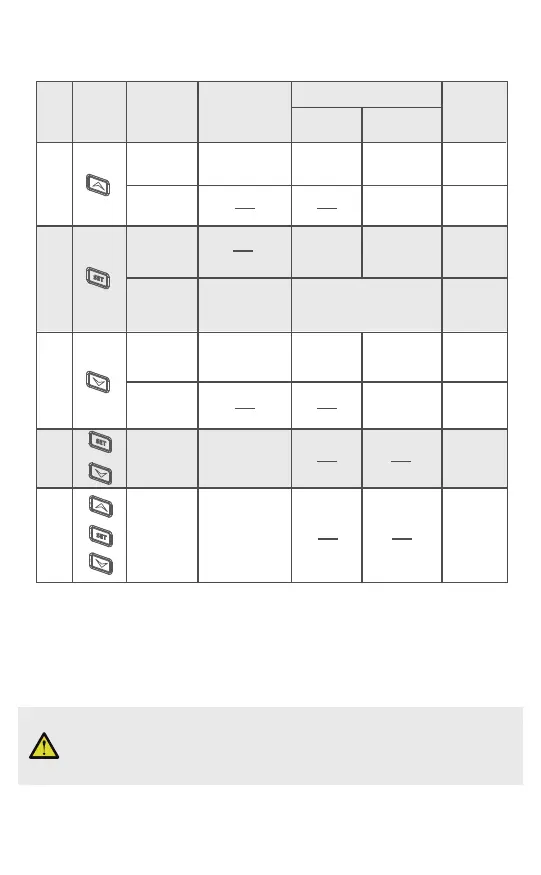
2.3 Button Operation
Incorrect operation may cause serious damage to you or your device.
Please make sure you read and understand the following procedures
before starting.
3. Operation
S/N Button
Operating
Non-setting
mode
Setting mode
Number
flashing
Number
non-flashing
Remarks
Table 3
1
2
3
4
5
Press
Press
Number
non-flashing
Non-setting mode
Number
flashing
View parameter
value
Previous
parameter
Increases
Continuous
increases
Press and
hold
Press
Press and
hold
Press and
hold for
5 seconds
Press and
hold for
5 seconds
Press and
hold for 3
seconds
Setting mode
View parameter
value
Wi-Fi reset
Equipment
reset
Next
parameter
Decreases
Continuous
decreases
Only for
STC-1000
WiFi TH
+
+
+
-5-

Related product manuals