EasyManua.ls Logo

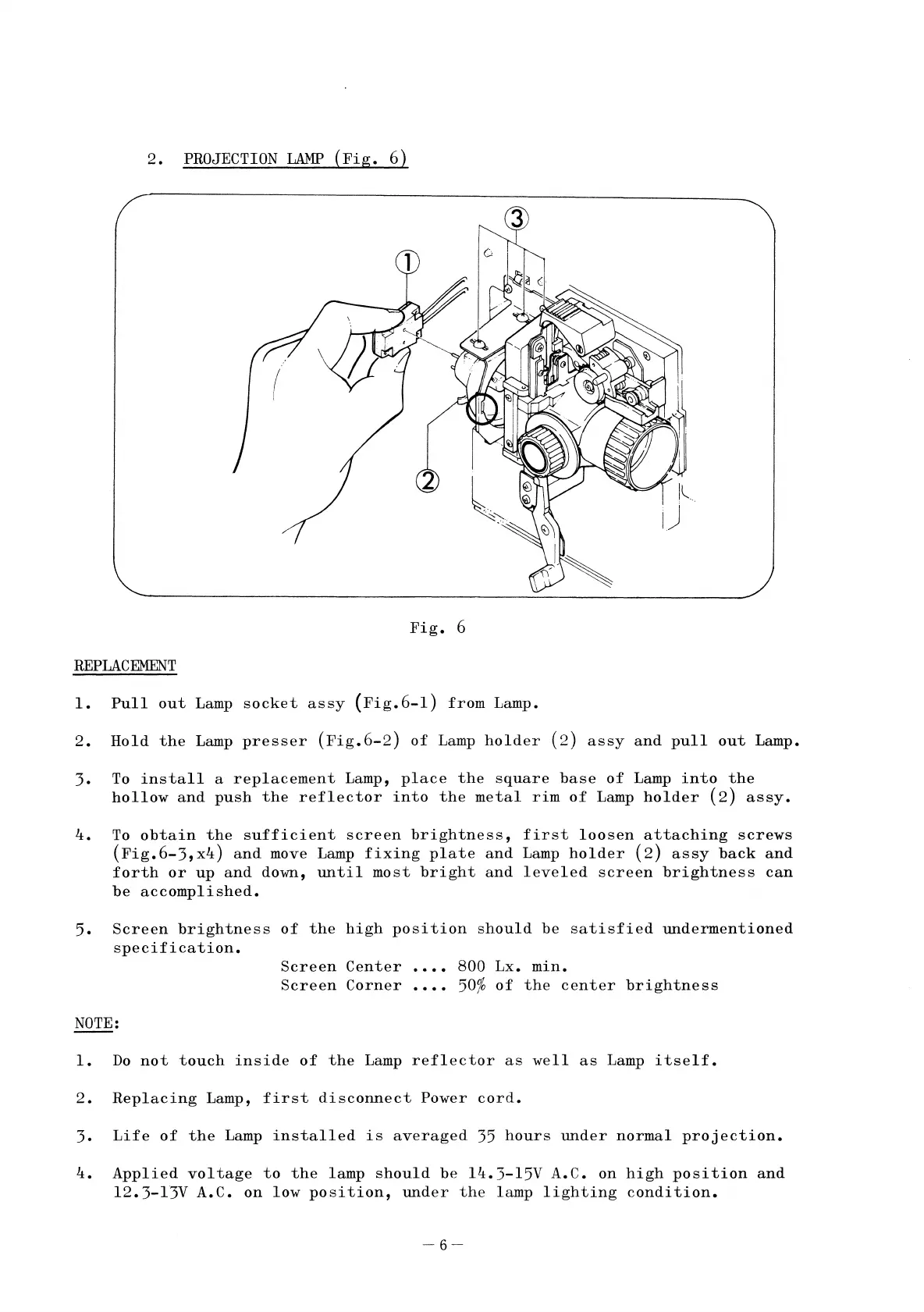
Elmo ST-1200 - 2. PROJECTION LAMP (Fig. 6)

Elmo ST-1200
41 pages
Print Icon
To Next Page IconTo Next Page
To Previous Page IconTo Previous Page
Loading...
2.
PROJECTION
LAMP
(Fig.
6)
Fig.
6
REPLACEMENT
1.
Pullout
Lamp
socket
assy
(Fig.6-1)
from
Lamp.
2.
Hold
the
Lamp
presser
(Fig.6-2)
of
Lamp
holder
(2)
assy
and
pullout
Lamp.
3.
To
install
a
replacement
Lamp,
place
the
square
base
of
Lamp
into
the
hollow
and
push
the
reflector
into
the
metal
rim
of
Lamp
holder
(2)
assy.
4.
To
obtain
the
sufficient
screen
brightness,
first
loosen
attaching
screws
(Fig.6-3,x4)
and
move Lamp
fixing
plate
and
Lamp
holder
(2)
assy
back
and
forth
or
up
and
down,
until
most
bright
and
leveled
screen
brightness
can
be
accomplished.
5.
Screen
brightness
of
the
high
position
should
be
satisfied
undermentioned
specification.
NOTE:
Screen
Center
Screen
Corner
800
Lx.
min.
50%
of
the
center
brightness
1.
Do
not
touch
inside
of
the
Lamp
reflector
as
well
as
Lamp
itself.
2.
Replacing
Lamp,
first
disconnect
Power
cord.
3.
Life
of
the
Lamp
installed
is
averaged
35
hours
under
normal
projection.
4.
Applied
voltage
to
the
lamp
should
be
14.3-15V
A.C.
on
high
position
and
12.3-13V
A.C.
on
low
position,
under
the
lamp
lighting
condition.
-6-

Related product manuals