EasyManua.ls Logo

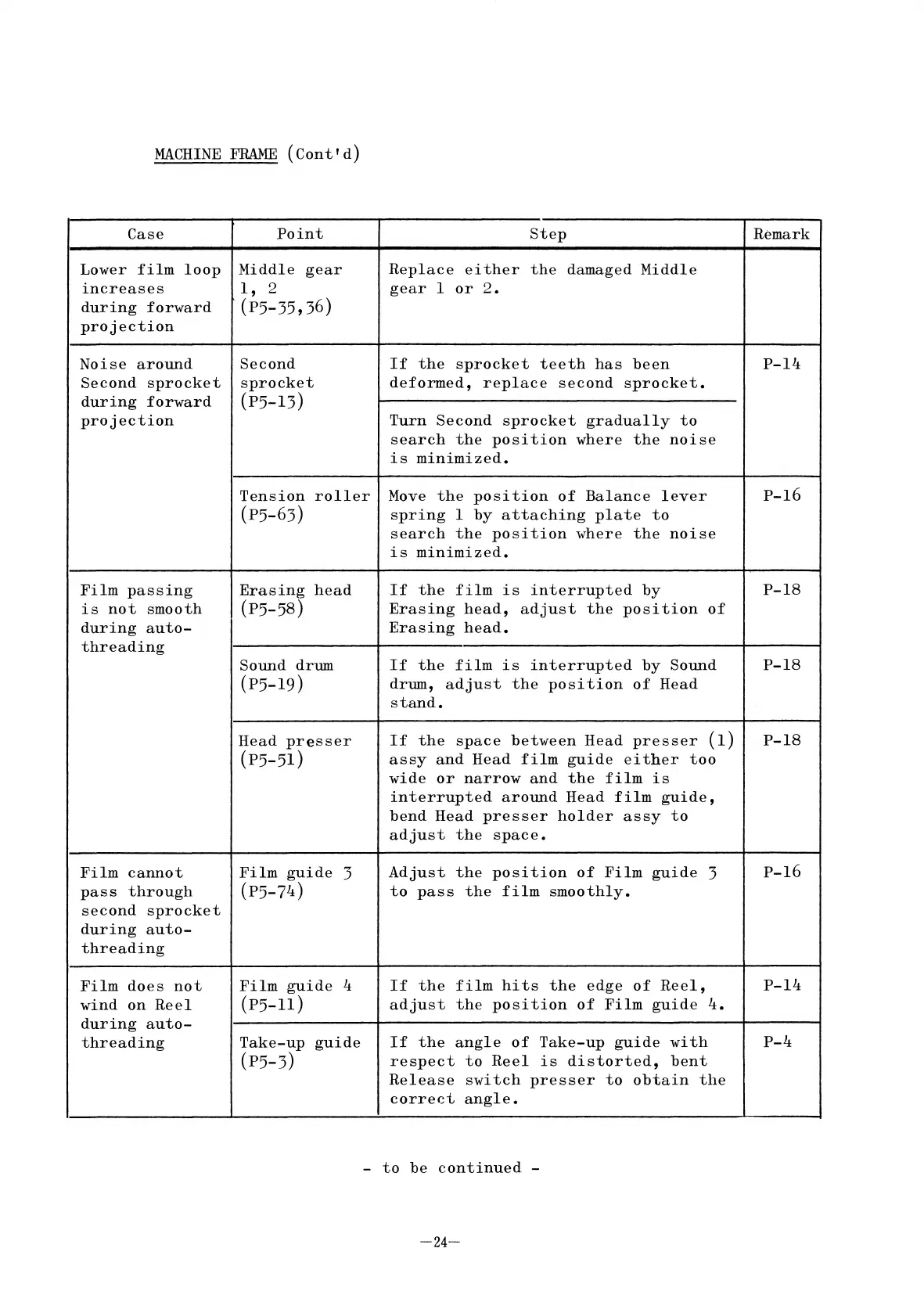
Elmo ST-1200 - Lower film loop increases during forward projection; Noise around Second sprocket during forward projection; Film passing is not smooth during auto-threading; Film cannot pass through second sprocket during auto-threading

Elmo ST-1200
41 pages
Print Icon
To Next Page IconTo Next Page
To Previous Page IconTo Previous Page
Loading...
MACHINE
FRAME
(Cont'd)
Case
Lower
film
loop
increases
during
forward
projection
Noise
around
Second
sprocket
during
forward
projection
Film
passing
is
not
smooth
during
auto-
threading
Film
cannot
pass
through
second
sprocket
during
auto-
threading
Film
does
not
wind
on
Reel
during
auto-
threading
Point
Middle
gear
1,
2
(P5-35,36)
Second
sprocket
(P5-13)
Tension
roller
(P5-63)
Erasing
head
(p5-5S)
Sound drum
(P5-19)
Head
presser
(p5-51)
Film
guide
3
(P5-74)
Film
guide
4
(P5-11)
Take-up
guide
(p5-3)
step
Replace
either
the
damaged
Middle
gear
1
or
2.
If
the
sprocket
teeth
has
been
deformed,
replace
second
sprocket.
Turn
Second
sprocket
gradually
to
search
the
position
where
the
noise
is
minimized.
Move
the
position
of
Balance
lever
spring
1
by
attaching
plate
to
search
the
position
where
the
noise
is
minimized.
If
the
film
is
interrupted
by
Erasing
head,
adjust
the
position
of
Erasing
head.
If
the
film
is
interrupted
by
Sound
drum,
adjust
the
position
of
Head
stand.
If
the
space
between
Head
presser
(1)
assy
and
Head
film
guide
either
too
wide
or
narrow
and
the
film
is
interrupted
around
Head
film
guide,
bend
Head
presser
holder
assy
to
adjust
the
space.
Adjust
the
position
of
Film
guide
3
to
pass
the
film
smoothly.
If
the
film
hits
the
edge
of
Reel,
adjust
the
position
of
Film
guide
4.
If
the
angle
of
Take-up
guide
with
respect
to
Reel
is
distorted,
bent
Release
switch
presser
to
obtain
the
correct
angle.
Remark
P-14
p-16
P-lS
P-lS
P-lS
p-16
P-14
P-4
-
to
be
continued
-
-24-

Related product manuals