18
MODEL 520
MECHANICAL ADJUSTMENT
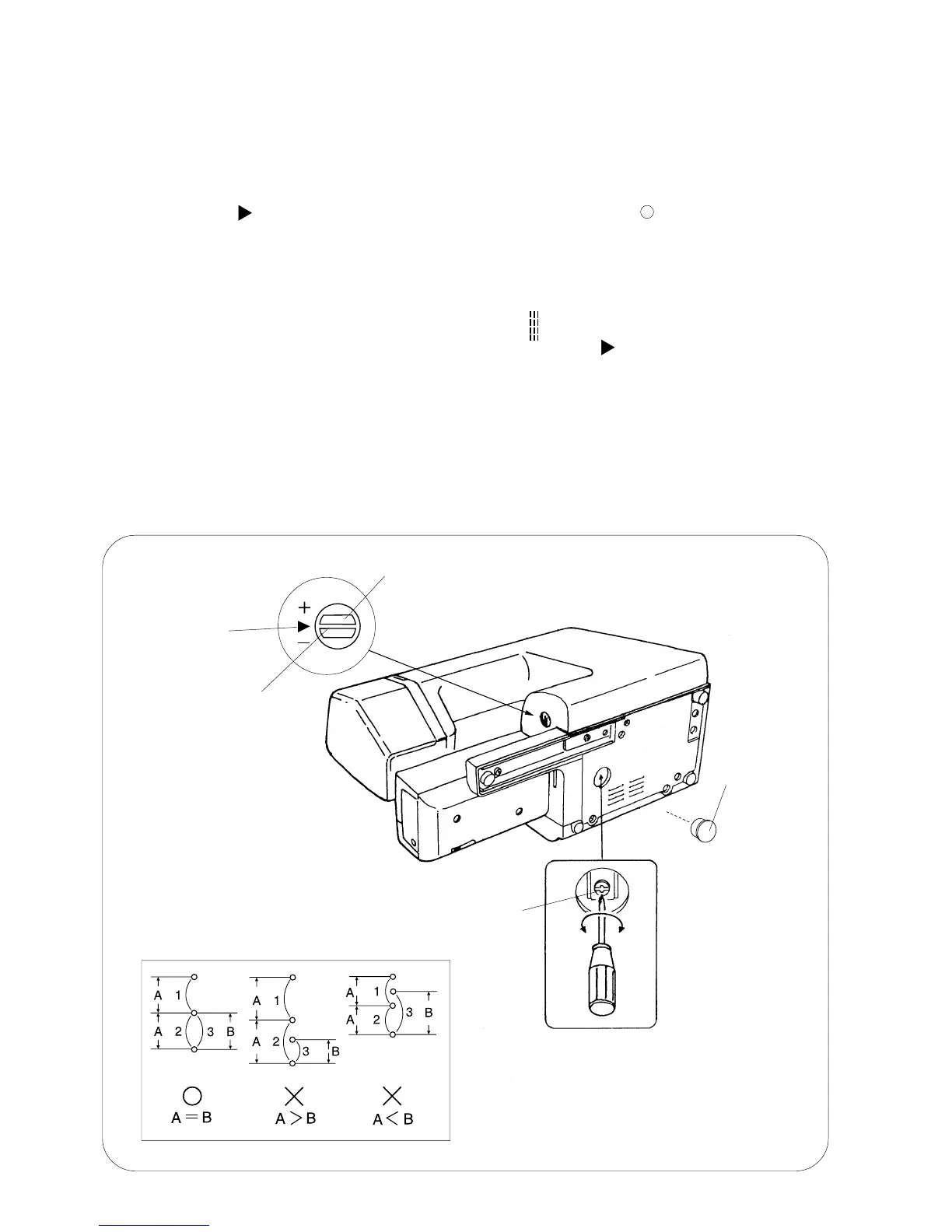
STRETCH STITCH FEED BALANCE
When a stretch stitch pattern is sewn with the feed balancing dial position set at the standard
setting mark " ", the stitch pattern should look like the one marked with a " " (A=B) in the
diagram below.
If forward and backward feeding is unbalanced (A.B or A,B), adjust as follows.
ADJUSTMENT PROCEDURE:
1. Turn the power switch on and select the stitch pattern " ".
2. Set the slit of the feed balancing dial to the standard setting mark " " on the front cover.
3. Put a piece of paper under the presser foot and lower it.
Turning the handwheel toward you, and check the needle mark at "A" and "B".
4. Remove the cap.
5. If A>B, turn the adjusting screw counterclockwise "C".
6. When A<B, turn the adjusting screw clockwise "D".
7. Attach the cap.
D
C
Adjusting screw
Cap
Feed balancing dial
Indication line
Standard setting
mark













 To Next Page