CMS200 Product Manual, Issue 6
www.nexo.com Page 25
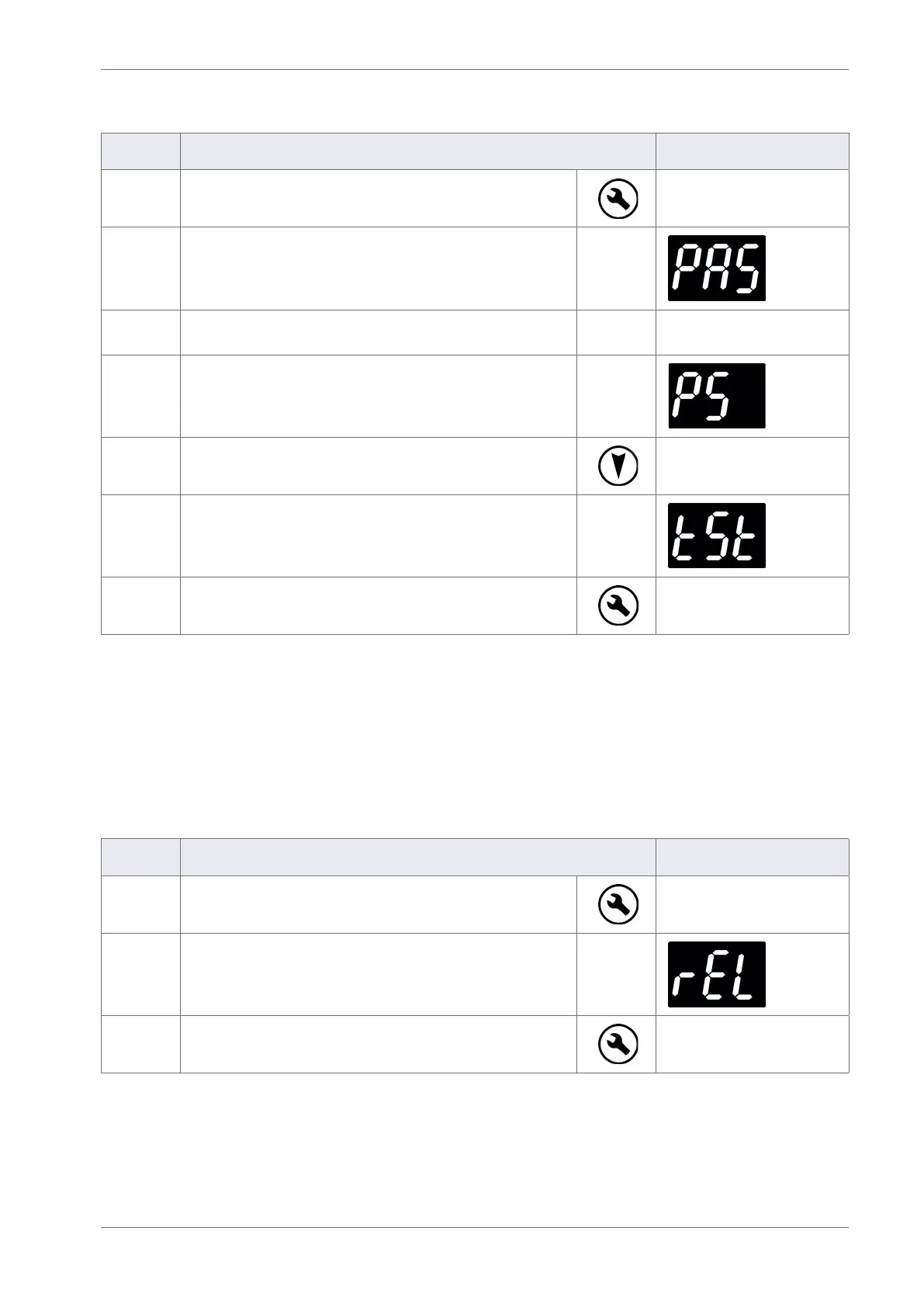
3.6.1 Entering the test routine menu
Step Action Display
1 Press the Set button
2 The display shows:
3
Enter the appropriate password to access the main
menu.
4 The display shows:
5 Press the Down button to scroll to the test (tSt) menu
6 The display shows:
7 Press the Set button to enter the test menu.
Once in the test menu it is possible to select which test to use. Using the Up and Down buttons to scroll
between tests, Set to select the test required and Defrost to return to the test menu.
3.6.2 The relay test
The relay test (rEL) is used to test the function of the relays and buzzer within the controller and can also be
used to diagnose problems with the cooler components - such as compressor and lights - before beginning
work on the cooler.
Step Action Display
1
From the test section (tSt) of the main menu:
Press the Set button to enter the test menu.
2 The display shows:
3 Press the Set button to select the relay test menu.



 To Next Page