Common Functions
Downloading and Installing Apps
3.
7 8
5 6
3
2
4
10
9
1
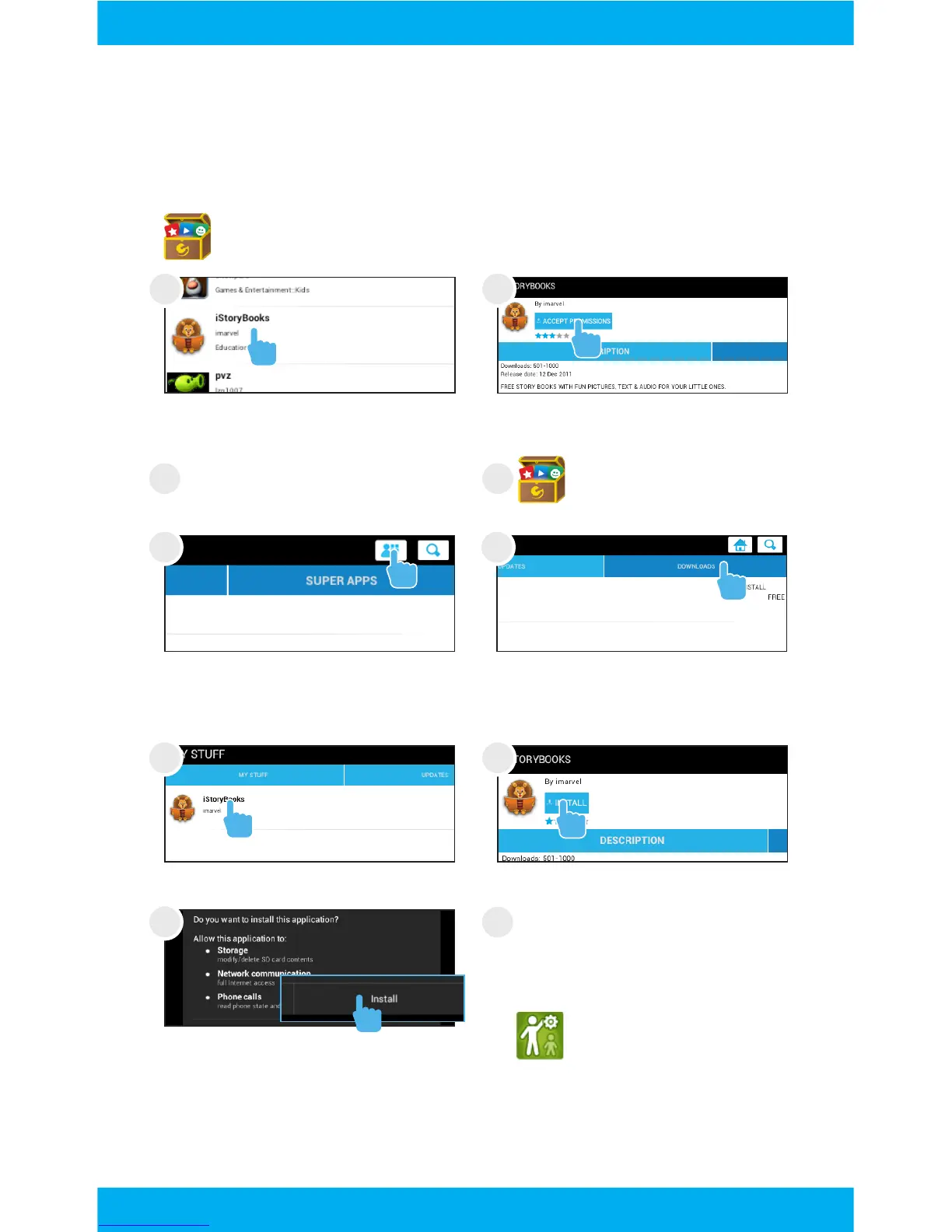
Tap the App Mall icon.
Tap an app. Tap Install.
Tap the My Account icon in
the top right corner.
Tap downloads to see the
apps that have been down-
loaded but not installed.
Apps can be downloaded in Kid Mode, but you must exit Kid
Mode to install the app.
Exit Kid Mode.
Tap the App Mall icon
Tap the app you want to
download.
Tap Accept Permissions.
Use the Parent Dashboard
app to make the app avail-
able in Kid Mode. See the Ed-
iting Available Apps Section.
Tip: If you install too many apps, you may run out of memory.
You can uninstall an app and download it again later.
Tap Install.
10



 To Next Page