26
15. SETUP
Pump’s initial setup
Apart of choosen working mode, the pump must be prepared to operate by setting the main parameters into “SETUP” menu.
To enter into this menu please follow the “Quick Guide through menu” at page 20.
CC per Stroke.
Enter here the cc/stroke value obtained during “Test” mode (calibration).
Use “UP” key to increase of one unit the blinking digit “_”.
Press “RIGHT” key to skip on next digit.
Press “E” key to save data and “ESC” exit to main menu.
Otherwise press “ESC” to discard data and exit to main menu.
SET [01]
CC/ST
CC/ST
10.00
Key
E
SET [02]
TEST
Calibration.
This procedure defines the cc quantity (cubical centimeters) that the pump feed
every single injection. To determine this value the pump must be calibrated.
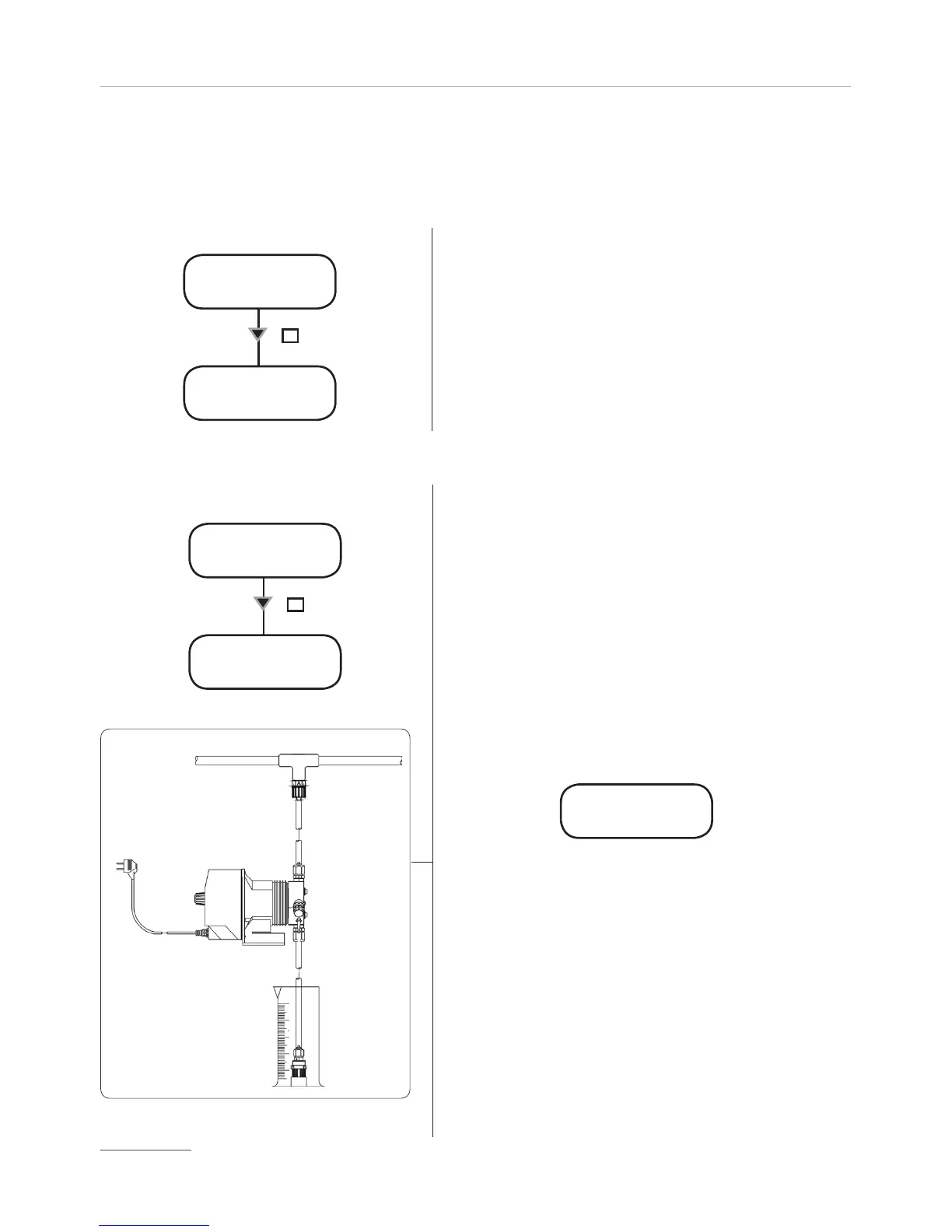
1) Install the pump on plant and insert the suction hose (with its level
probe / foot filter) into a BEKER “test-tube”.
If pump’s model is self-priming put the venting hose into the “test-tube“ too.
2) Power up the pump and turn the flow’s knob to required position.
3) Fill up the “test-tube” with the chemical until to reach a known value.
4) From setup menu choose “TEST”, and insert 20”. This value is the strokes
that the pump will produce during the procedure.
6) Press “E”. The pump will begin to produce the 20 strokes and to suck the
chemical from the “test-tube”.
7) At the end of 20 strokes the pump will stop. Read the value of chemical left
into “test-tube”.
8) Substract the initial value to the left value.
9) Divide the result with the ST value (20).
10) Type this value into “CC/ST” (Set [01]) as previously described.
11) If obtained result is too small or too big, please, try to change strokes
value (20).
TEST ON
ST 020
TEST OFF
ST 020
Key
E


 To Next Page