28
“Stand-By” signal.
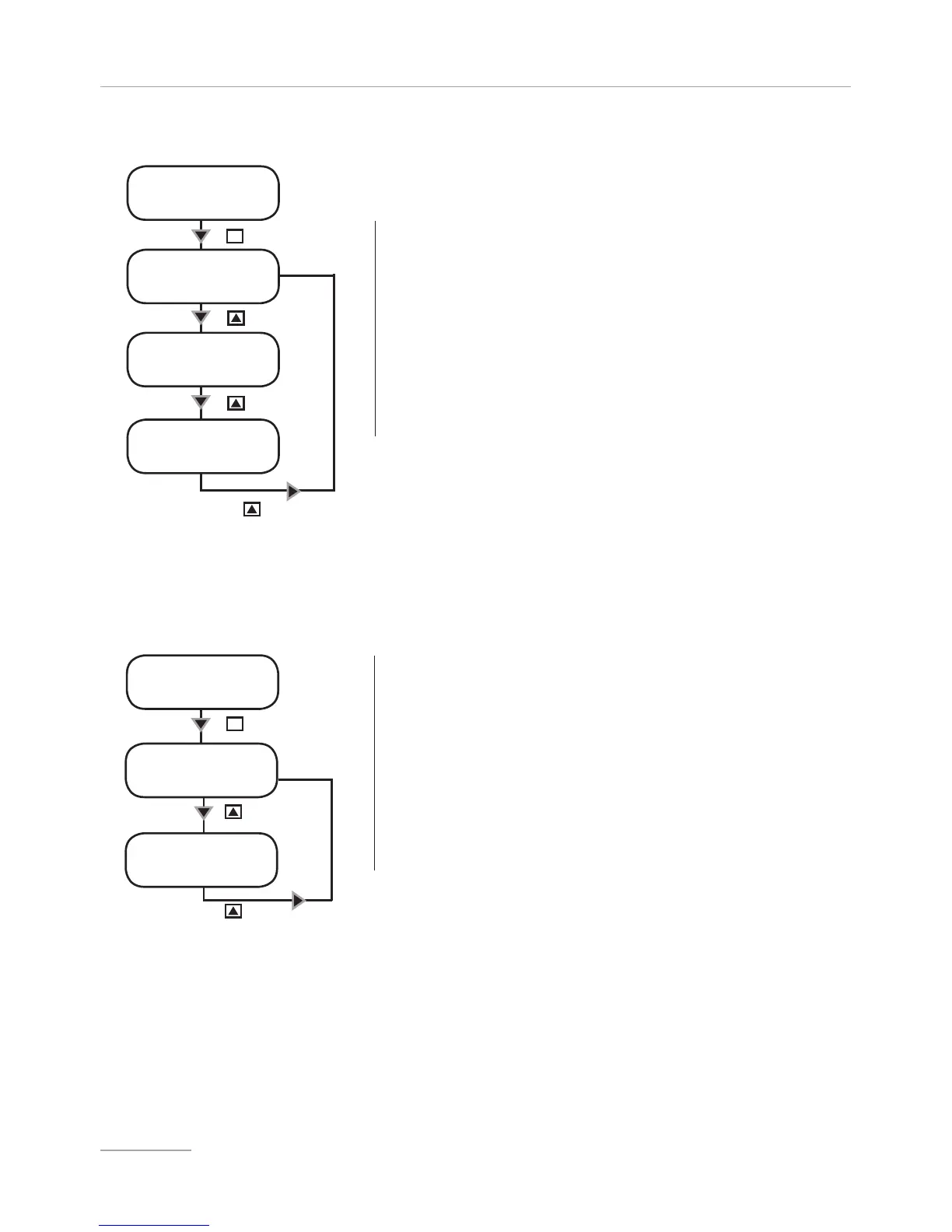
This function allows the pump to dose only when an external signal is received
from “Stand-by” input. This signal can be enabled as a N.O. contact (Normally
Opened) , N.C. contact (Normally Closed) or disabled.
- Use “UP” key to change working mode for
“Stand by” signal.
-Press “E” key to save data and “ESC” to exit to
main menu. Otherwise press “ESC” to discard data
and exit to main menu.
SET [05]
Stand-by
STand-by
disabled
Key
STand-by
NC
Key
Key
STand-by
NO
Key
E
SET [06]
out al
out alarm
n.c.
E
Key
Key
Key
out alarm
n.o.
“Out Alarm” signal.
This function allows to manage the alarm output contact . The alarm can be
set as “N.O.” contact (Normally Open) or “N.C.” contact (Normally Closed).
- Use “UP” key to change working mode for “Out
Al” signal.
-Press “E” key to save data and exit to main menu.
Otherwise press “ESC” to discard data and exit to
main menu.


 To Next Page