27
Options.
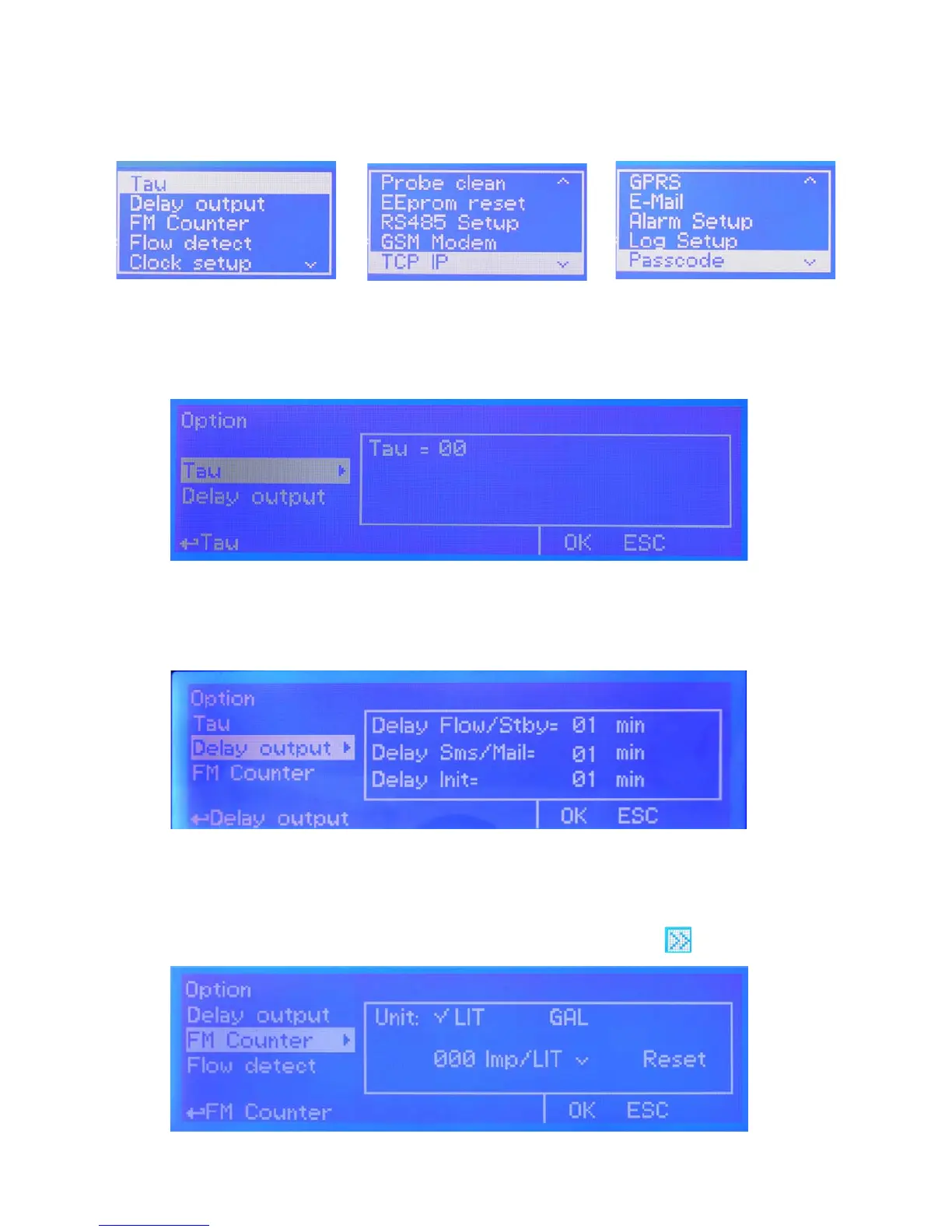
From setup menu (g.3) rotate wheel to highlight “Options” then press wheel. Main options are:
TAU : It determines how quickly reading on display follows the reading of the probe. It can be changed between 0 and
30. The more close to 0 this value is set and the more quickly the reading on the display will change, take in consideration
that quickly changes on the display will result in unstable readings.
DELAY : it’s the pump output activation delay. Can be set between 0 and 99 minutes and it takes effect on start up of
the instrument, quitting from stand-by condition and after a “Flow Alarm”. “Delay SMS”: sends warning message if alarm
condition persists after set time. Delay Init: countdown after instrument’s initialization (booting) before to return operative.
g. 18
g. 19
g. A
g. B g. C
FM Counter
Use this function to enable ow monitoring for connected pulse sender water meter (blocks 37 and 38). Set metering
control unit to Liters (LIT) or gallons (GAL). Move on Imp/LIt to choose between Pulses per liter or Liters per pulses and
counter value. Move on OK and press wheel to save parameters. To see counter status press twice from main menu.
g. 20


 To Next Page