13
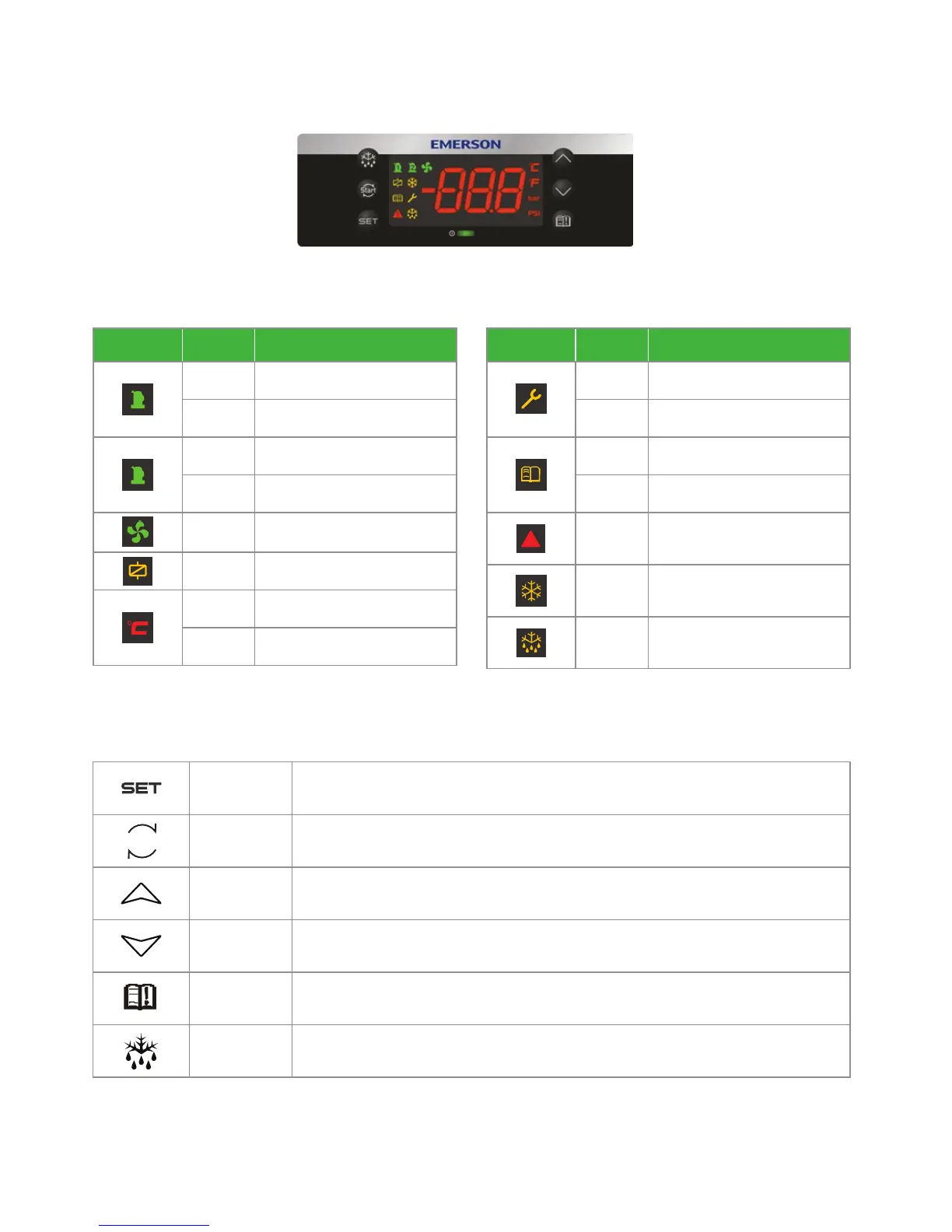
Keyboard descriptions - single button
Set Display target set point; In programming mode, select a parameter or confirm an operation.
Reset
Hold for 5 seconds to reset any lockouts if the current state of the controller allows for it to be
reset.
Up
Enter the fast access menu; In programming mode, browse the parameter codes or increases
the displayed value.
Down In programming mode it browses the parameter codes or decreases the displayed value.
Service Enter the service and alarm menu.
Defrost
Hold for 3 seconds to start a manual defrost or terminate an active defrost.
(Not available at the moment).
LED descriptions
LED Status Description
1
ON Compressor1 is running
Flashing Compressor1 is ready to start
2
ON Reserved
Flashing Reserved
ON Condensing fan is running
ON Reserved
ON Display with °C
Flashing Programmable mode
LED Status Description
ON Browsing the service menu
Flashing Browsing the fast access menu
!
ON A new alarm happened
Flashing Browsing the alarm menu
!
ON An alarm is occurring
ON Reserved
- Reserved
CoreSense
™
controller







 To Next Page