12
CONNECTIONS
CONNECTING AN EXTERNAL AUDIO COMPONENT
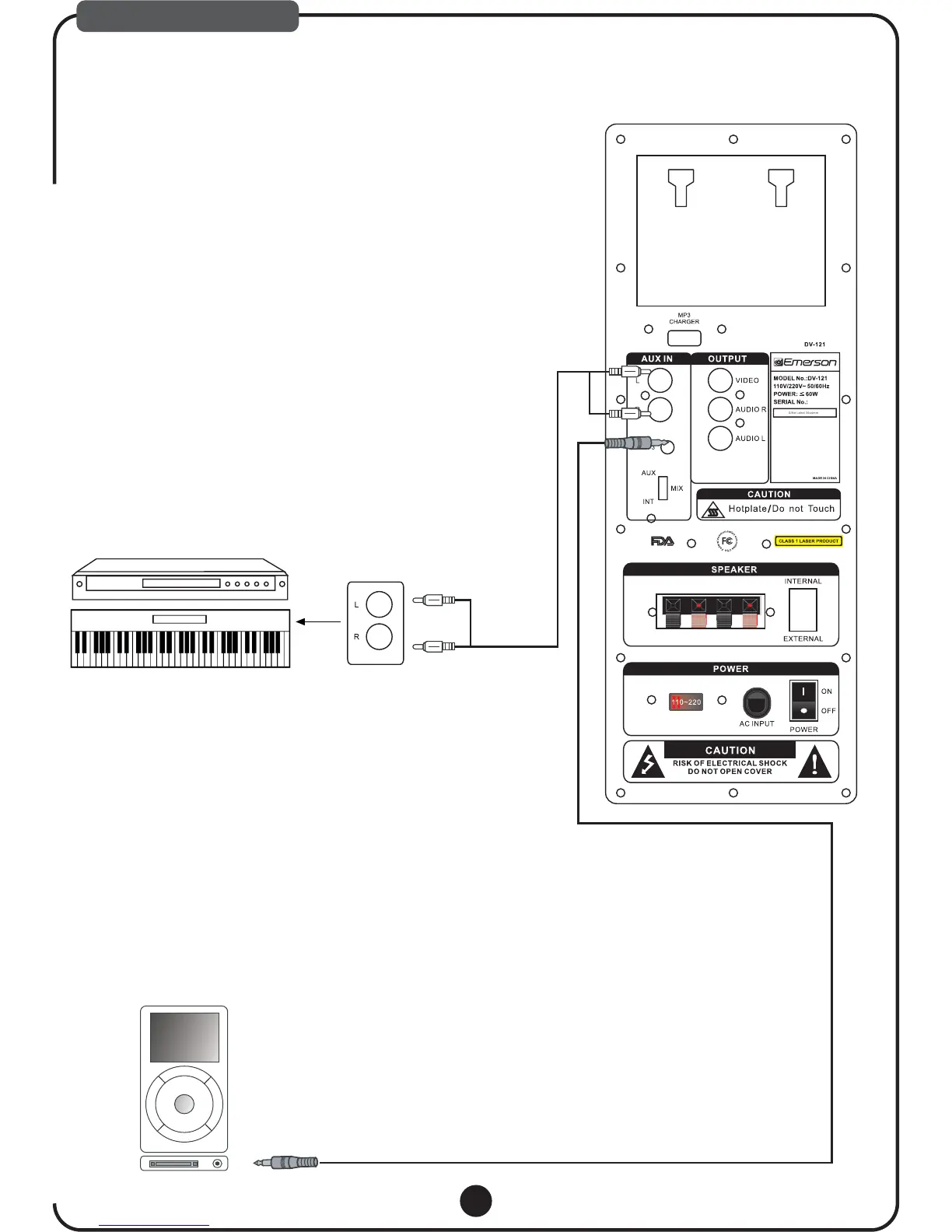
DV-121 has 2 AUX INPUT, you can use DV-121 as an amplifier system for your extra disc player, Digital
MP3 player , laptop or other audio device.
Keyboard,
Note: Ipod video can't be supported
IPOD
You can use the DV-121 as an amplifier system for your
player or digital keyboad
(1). Connect one end of the RCA cable to the output on
disc player or audio device;
(2). Connect the other end of the RCA cable to the RCA
the rear panel of DV-121;
(3). Set the AUX/MIX/INT selector switch on the rear panel
DV-121 to AUX or MIX’
To connect an extra disc player to the DV-121:
extra disc
the extra
input on
of
Note:
Note:
AUX: Only aux input source sound come out.
MIX : Internal and aux input source come out together.
For using 1/4" output device like digital keyboard, you need RCA to 1/4"
adapter or RCA to 1/4" cable.
You can use the DV-121 as an amplifier and speaker
your MP3 player, laptop or other audio device
(1). Connect one end of the 1/8" cable to the output on the
or audio device;
(2). Connect the other end of the 1/8" cable to the Mp3 input on the rear panel of DV-121;
(3). Set the AUX/MIX/INT selector switch on the rear panel of DV-121 to AUX or MIX;
To connect an MP3 player to the DV-121:
system for
with a 1/8" output .
Mp3
player
Note: AUX: Only aux input source sound come out.
MIX : Internal and aux input source come out together.
110~220
1.Connect extra audio player with RCA or 1/4" phone jack
ex) DVD PLAYER
ex) Digital Keyboard
2. Connect extra audio device with 1/8" pin jack



 To Next Page