DISC/USB
/SD
STOP
RECORDED
PLAYBACK
1
2
3
4
5
6
7
8
9
10
11
12
13
14
15
16
17
18
33
31
30
29
28
27
26
25
24
23
22
21
20
19
32
07
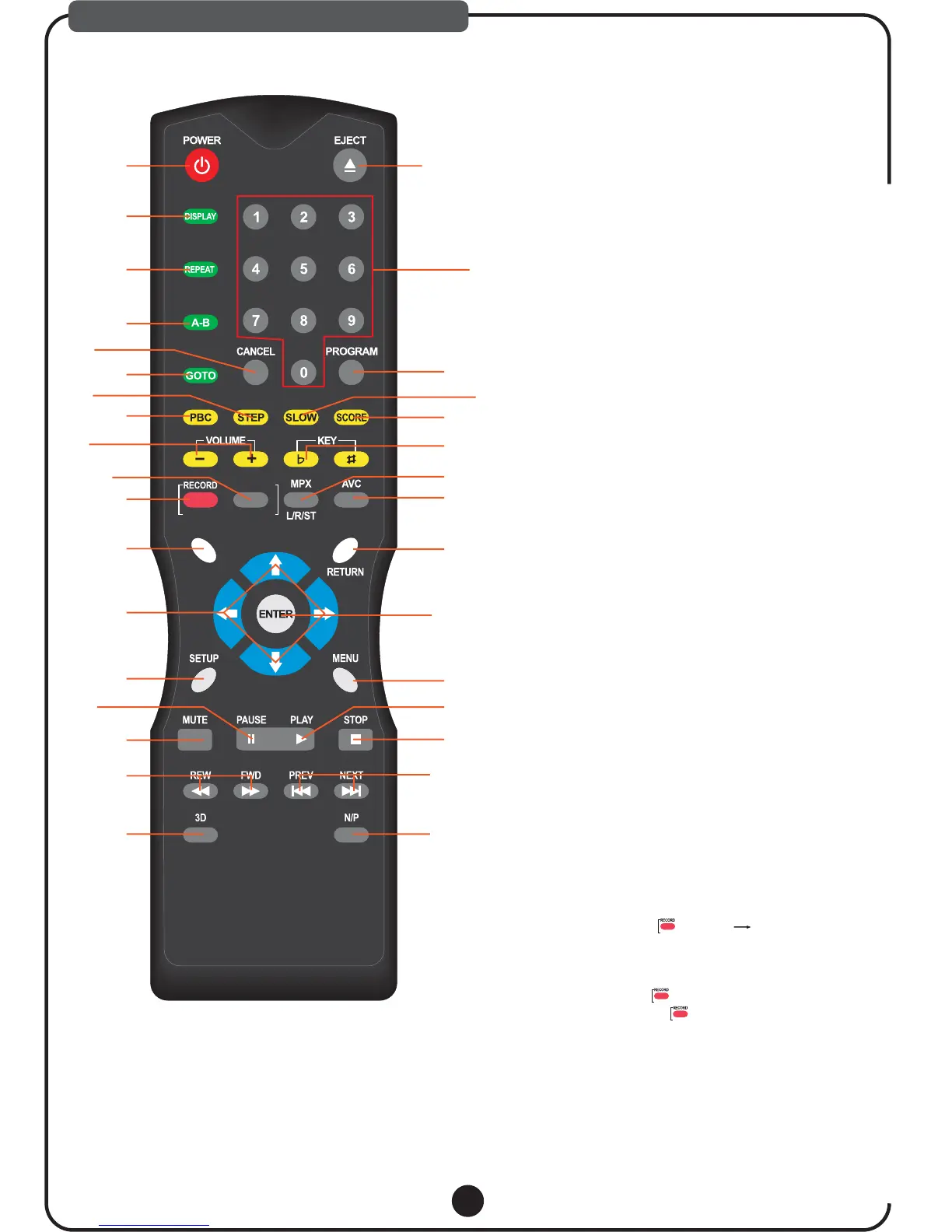
DESCRIPTIONS & FUNCTIONS
Turn on / off the Portable karaoke system.
1. POWER
Press DISPLAY, the screen shows as follows
according to the disc:
Press DISPLAY the first time, and the screen
shows the disc type, total item number, playing item,
PBC status and playing time of the item. When you
press DISPLAY again, the screen will shut down.
2. DISPLAY
Press this key to play selected item repeatedly.
The screen shows as below:(The function is only
valid when PBC is OFF.)
REP:[OFF] REP:[REP 1] REP:[REP ALL]
3. REPEAT
Press A-B first to set location A: REPEAT:A-,
press again to set location B, and then playback
will repeat during the two locations:REPEAT:A-B.
Press A-B the third time to cancel the function
and return normal playback: REPEAT: CANCEL.
4. A-B
Use to remove menus or status displays from the
screen.
5. CANCEL
During optical playback, press to perform a
chapter, title or time search.
6. GOTO
Press to play picture by picture, press PLAY to
return to normal playback.
7. STEP
This function is only available for Video-CD
version 2.0 or higher. The PBC function may differ
by disc.with PBC ON, you can select items in the
menu list using the PREVIOUS/NEXT keys and
numeral keys. When PBC OFF, you cannot select
items in the menu list but you can use the numeral
keys directly or the PREVIOUS and NEXT keys.
8. PBC
Increase or decrease the volume of analog audio
output.
9. VOLUME+/-
REMOTE CONTROL
press to play latest Recorded song Automatically.
10. RECORDED PLAYBACK
11. RECORD
Note: USB or SD CARD must be inserted before start
Play & Record Operation Procedures:
1).MP3G MODE
2).CD+G/CD MODE
a. At MP3+G mode, load DISC, USB or SD
CARD select song title from the song list
and press [PLAY];
b. If user wants to sing the song and record
his vocal with the music then press
record button screen shows
[CARD Ready] or [USB Ready];
User can start singing into the microphone
and record. when finish;
c. Press to stop recording. If user not
to press it will go back to MP3G
menu automatically after finishing song.
a. At CD+G/CD Mode, load & play DISC
then press [RECORD/STOP] to start
recording.
b. Press [RECORD/STOP] to stop
recording.
STOP
STOP
STOP
recording.



 To Next Page