DV-121
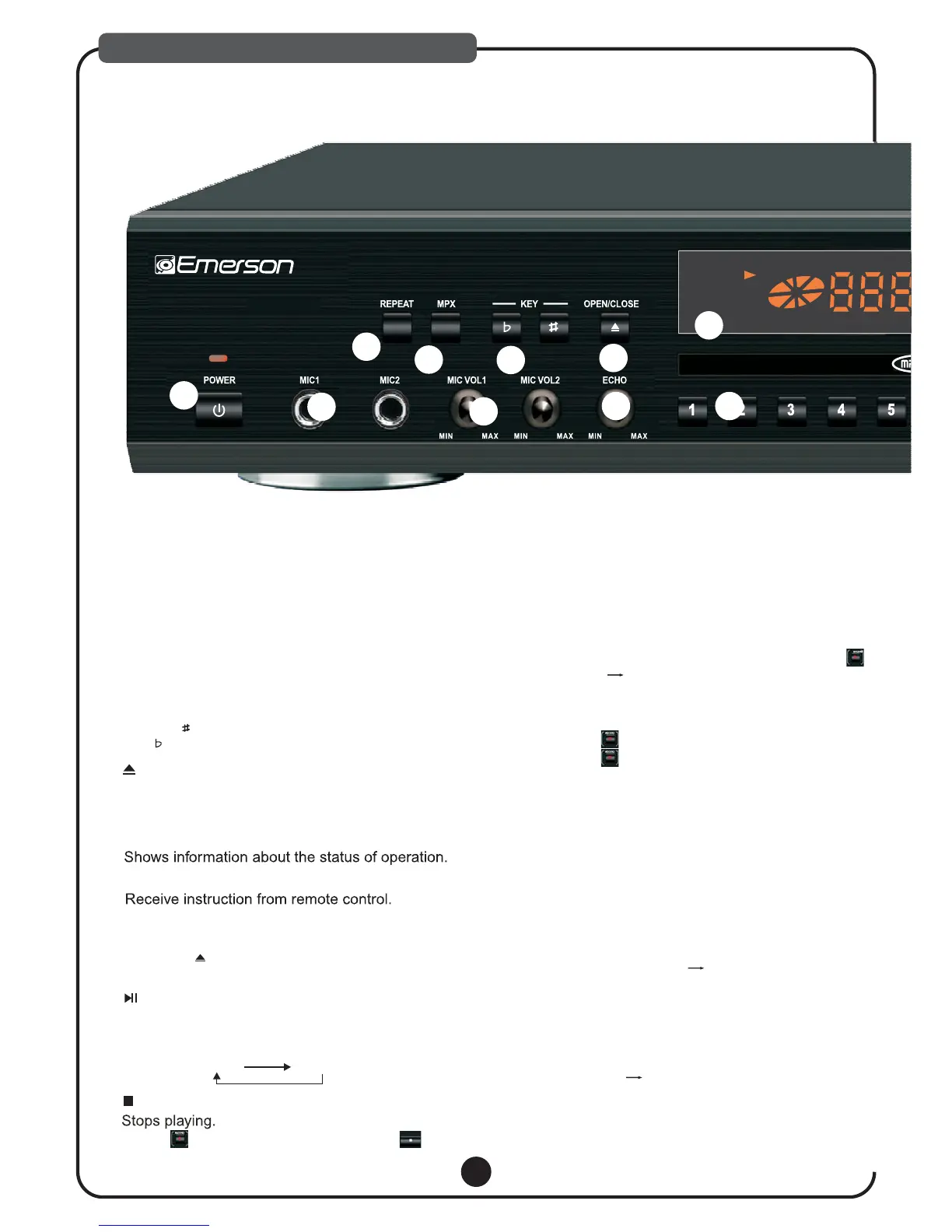
Press this key to play selected item repeatedly.
The screen shows as below:
(The function is only valid when PBC is OFF.)
REP:[OFF] REP:[REP1] REP:[REP ALL]
1. REPEAT
2.MPX
Activates the multiplex function, which switches
to NORMAL (stereo), L-ch monaural and R-ch
monaural.
10. RECORD
STOP
STOP
STOP
9. STOP
8. PLAY/PAUSE
Starts to play the disc or temporary suspends
playing. By pressing this button consecutively.
Play/Pause mode changed so shown below:
PLAY PAUSE
6. REMOTE SENSOR WINDOW
5. DISPLAY WINDOW
3. KEY CONTROL BUTTONS
Transposes the music key.
DOWN button: used to flatten by a half tone.
UP button: used to sharpen by a half tone.
7. DISC TRAY
OPEN/CLOSE
Used to load a disc. To insert/remove a disc,
press the button located at the
right of the tray.
STOP
Play & Record Operation Procedures:
1).MP3G MODE
2).CD+G/CD MODE
Play Back The Recorded File:
1).FOLDER ACCESS
a. At MP3 +G mode, load DISC, USB or SD
CARD select song title from the song list
and press [PLAY]:
b. If user wants to sing the song and record
his vocal with the music then press record
button screen shows [CARD Ready] or
[USB Ready]:
User can start singing into the microphone
and record. When finish;
c. Press to stop Recording. If user not to
press it will go back to MP3G menu
automatically after finishing song.
a. At CD+G/CD Mode, load & play DISC then
press [RECORD/STOP] to start recording.
b. Press [RECORD/STOP] to stop recording.
a. Press [DISC/SD/USB] button to select USB
or SD CARD mode screen will show Read
USB or SD CARD, then Loading File;
b. Select [RECORDED SONG] then press
[ENTER] all Track#!
c. Pick the identical Track Number when the
Song /Vocal was recorded, follow by [PLAY]
to play back the recorded track.
Note:
Note:
USB or SD CARD must be inserted before start
recording.
If USB and SD card are inserted, recorded file saved at
SD card automatically.
STOP
STOP
4. OPEN/CLOSE
Used to open and close disc tray.
Note: In USB or SD mode, if you press OPEN/CLOSE it
will switch to DISC.
*Press to stop recording, don’t press *.
1
2
3
4
5
13
14
15
16
17
DESCRIPTIONS & FUNCTIONS



 To Next Page