资料版本 V1.4 归档日期 2009-07-14 BOM 编码 31011979
IRM-S02TH Intelligent Temperature
and Humidity Sensor User Manual
1 Overview
IRM-S02TH intelligent temperature and humidity sensor (sensor for short) is
used to measure and display environment temperature and humidity. It
supports MODBUS protocol through RJ45 port in RS-485 mode to configure
and collect data. It is applicable for indoor sites which need temperature and
humidity control such as communication rooms and IT data centers.
1.1 Product Introduction
1.1.1 Appearance
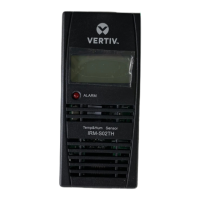
The sensor’s appearance is shown as the following figure.
ALARM
Temp&Hum Sensor
IRM-S02TH
DIP switch
RJ45 port
LCD display panel
Alarm indicator
Front view Right view
12345678
RJ45 port
Size (height × width × depth): 97mm × 44mm × 22mm Weight: about 100g
1.1.2 RJ45 Port
Two RJ45 ports are used in the electric connection of the sensor for power
supply, communication and equipment connection in series. The definition of
RJ45 ports is shown in the following table.
1.1.3 DIP Switch
The DIP switch is used to set sensor address to communicate with upper
equipment through MODBUS protocol. The sensor address is composed of
group number and serial number within the group. The DIP1 ~ DIP4 are used
to set the group number and the DIP5 ~ DIP6 are used to set the serial
number within the group. For example, the sensor address of 71 is set as
shown in the following figure, among which 0111 means group number 7 and
01 means serial number 1 within the group.
Group
Num
1 2 3 4 5 6
DIP ON
0 1 1 1 0 1
Note: 1. DIP switch in the ON position means 1,
or it means 0;
2. The sensor address cannot be set as 00,
which is the broadcast address.
The settings of DIP1 ~ DIP6 are listed in the following table.
1.1.4 LCD Display Panel
The LCD display panel can display sensor address, temperature and humidity
data in real time. Temperature and humidity are displayed by turns every 2
seconds. For example, when the sensor address is 71, and the temperature
data is 23.6°C, the LCD display panel indicates the data as shown in the
following figure.
Temperature data
Sensor address
Data unit
1.1.5 Alarm Indicator
When the temperature data is outside the the configured data range or the
sensor fails, the alarm indicator flashes; when the temperature data is in the
range of the configured data, the alarm indicator extinguishes.
1.2 Technical Specification
Measurable temperature range
Measurable humidity range
Temperature measuring precision
±2°C (other temperature range)
Humidity measuring precision
±20%RH (other humidity range)
2 Installation
2.1 Environment Requirement
1. Operating environment should be free of conductive dust and
metal-corrosive & insulation-breaking gases.
2. Avoid using the sensor in watery or foggy places.
3. Keep a clearance of more than 20mm around the sensor’s airway to
ensure ventilation inside and outside of the sensor.
4. Operating temperature: -10°C ~ +50°C; storage temperature: -30°C ~
+70°C; humidity: 5% ~ 95% RH (non-condensing).
2.2 Unpacking Inspection
Unpack the sensor and visually inspect the sensor’s appearance. If any
damage is found, please contact the carrier immediately.
Check against the consignment list to make sure the sensor and accessories
are complete and correct.
2.3 Mechanical Installation
Three modes are available for the sensor’s mechanical installation. The
installation accessories and modes are shown in the following figure.
Back installation hole
Magnet pothook
L pothook
T pothook
Sensor
Back installation hole
Mode one: Insert the magnet pothook into the sensor’s back installation hole,
and the sensor can absorb on iron surface.
Mode two: Insert the L pothook into the sensor’s back installation hole, and
hang the pothook in the square hole of rack’s column with care.
Mode three: Insert the T pothook into the sensor’s back installation hole,
insert the bulge of the T pothook into the installation slot of the rack’s basic
frame, and rotate the sensor 90 degree clockwise with care.
Note
The sensor can not only be installed through the three kinds of accessories above, but
also can hang on fixed screws directly through the installation hole.
2.4 Cable Connection
Insert one end of the standard straight network cable into the sensor’s RJ45
port, and insert the other end into the sensor appropriative port of upper
equipment or sensor in series.
3 Maintenance
1. To clean the sensor, you should cut off the power and use a piece of soft
cloth to wipe it.
2. Do not disassemble the sensor, or the inside subtle parts may be damaged.
Emerson Network Power Co., Ltd.
Address: No.1 Kefa Rd., Science & Industry Park, Nanshan District 518057,
Shenzhen China
Homepage: www.emersonnetworkpower.com.cn
E-mail: support@emersonnetwork.com.cn
Copyright © 2009 by Emerson Network Power Co., Ltd.
All rights reserved. The contents in this document are subject to change
without notice.
Version V1.4 Revision date July 14, 2009 BOM 31011979

 Need help?
 General



 To Next Page