44 User Manual 10H52188UM60 - Rev. 2 - 09/2012
Operation And Display Panel Liebert NXC
5.1.3 Control Buttons
The operation and display panel provides five control buttons, the functions of which are described in Table 5-3.
Table 5-3 Description of control buttons
Control button Silk print Description
EPO switch EPO
Used to disconnect the load power and close the rectifier, inverter, static bypass
and battery
Inverter on ON Used to start the inverter
Inverter off OFF Used to stop the inverter
Fault recovery on/off FAULT CLEAR Restore the UPS function (clear fault in advance)
Alarm sound silence on/off ALARM CLEAR
When an audible alarm is active, press this button to silence the audible alarm.
Press this button again can restart the buzzer
5.1.4 LCD And Menu Buttons
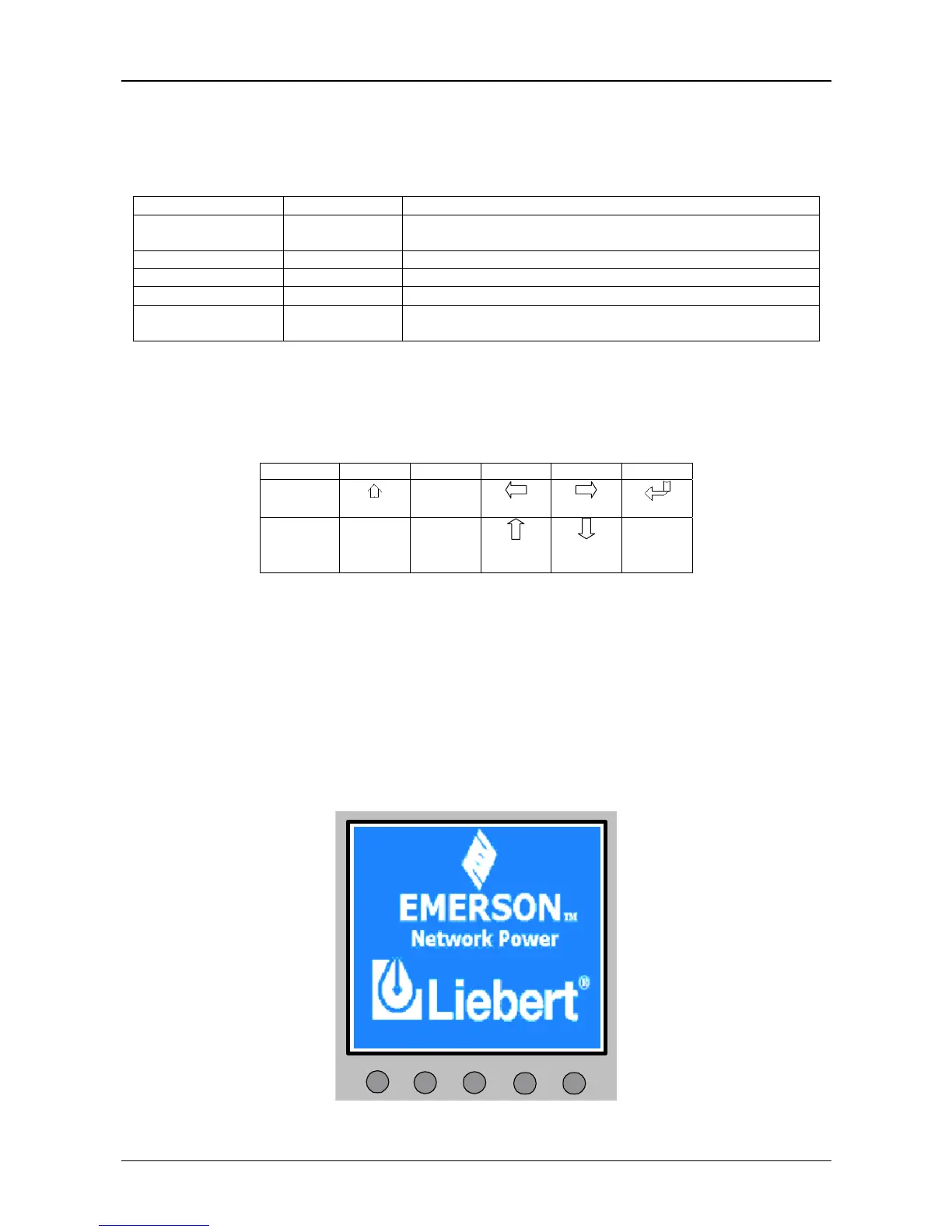
The operation and display panel is composed of an LCD and five menu buttons (F1, F2, F3, F4, HELP). Table 5-4 gives the menu
buttons function description.
Table 5-4 Menu buttons function description
Button F1 F2 F3 F4 HELP
Function 1
HOME
ESC
Escape
Left
Right
Enter
Function 2
Up
Down
LCD provides you with the user-friendly interface and the 320 × 240 dot matrix image display. The menu-driven LCD allows
you to easily browse through the input, output, load and battery parameters, learn about the current UPS status and alarm
message, perform functional setting and control operation. The LCD also stores up to 512 historical alarm records that can be
retrieved for reference and diagnosis.
5.2 LCD Screen Types
5.2.1 Start Screen
Upon UPS start, the UPS executes the system self-test, and the start screen will appear and remain about 15 seconds, as
shown in Figure 5-2.
F1
F2 F3 F4
HELP
Figure 5-2 Start screen






 To Next Page