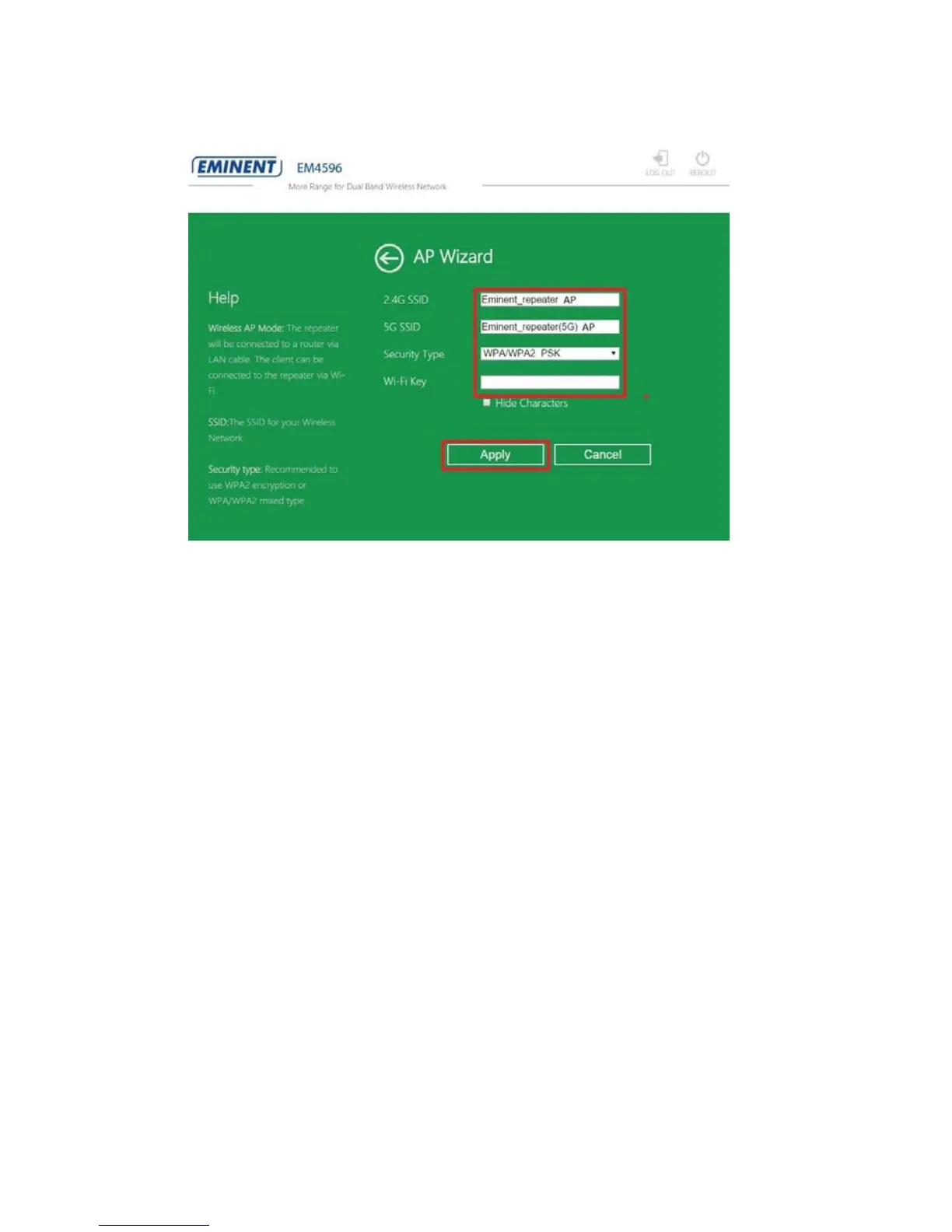
8. The following screen will appear:
9. You will notice that the repeater will automatically fill in the default SSID name
from repeater in to SSID field. It is not necessarily needed but we suggest to
rename the SSID name to: SSID name + AP so you will always know that you are
connected as Access Point.
10. You also have the option to secure the Wi-Fi network by adding an encryption key.
Click in the “Security Type” field to change the security. We recommend to use
“WPA/WPA2 PSK” security. Now enter an encryption key in the “Wi-Fi Key” field.
11. Click “Apply” to confirm. The repeater will reboot and make the changes. This will
take approximately 1 minute.
12. Remove the repeater from the power socket or switch off the repeater by
switching the “On/Off” button to “Off”.
13. Install your Ethernet cable from modem/router or router into the “LAN/WAN” port
of the repeater.
14. Connect the EM4596 back to the wall outlet and make sure the “On/Off” button is
switched to “ON”
15. Wait until the “signal indicator” lights up the three leds. This will take
approximately 1 minute.
16. You can now make wireless connection with new made SSID as Access Point. If
you would like to make connection with a PC, you have to repeat step 12 to 15
only now by plugging in a Ethernet cable into “LAN” port from your Access point to
the LAN port from your PC.



 To Next Page