°C
°F
VV
PO
AO1
AO2
A
AT PSET ASET1 ASET2
M
SET
P
AT A/M
°C
°F
VV
PO
AO1
AO2
A
AT PSET ASET1 ASET2
M
SET
P
AT A/M
PSET
°C
°F
VV
PO
AO1
AO2
A
AT ASET2
M
SET
P
AT A/M
ASET1
PSET
°C
°F
VV
PO
AO1
AO2
A
AT
M
SET
P
AT A/M
ASET1 ASET2
°C
°F
VV
PO
AO1
AO2
A
AT PSET ASET1 ASET2
M
SET
P
AT A/M
34
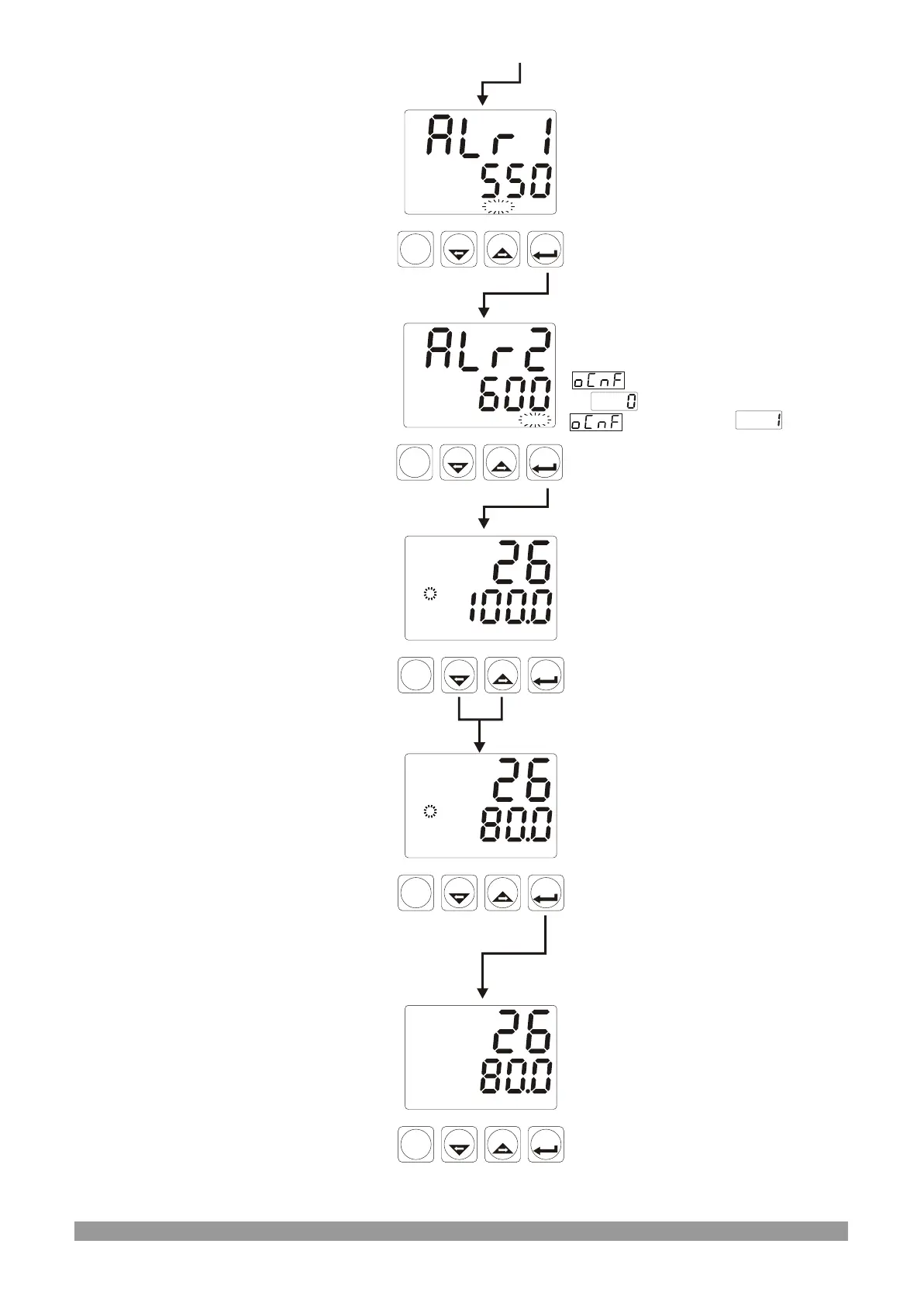
ASET2 Led flashes
Manual Led flashes
Alarm-1 Set Screen
Press SET button
ASET1 Led flashes
This parameter is accessible if
parameter in PCnF menu
is . It is not accessible if
Parameter is
Alarm-2 Set Screen
Press SET button
Operation Screen
%Output value can be changed
with increment and decrement
buttons.
Operation Screen
Press Set button to confirm the
value and turn to operation
screen
Manual Led stops flashing
Operation Screen



 To Next Page