ENEN
11
4. FIRST START-UP
4.2.1 System without HP
By deselecting the MIRAI-SMI 4.0 HP, the screens related to the
Heat Pump and the Sanitary Hot Water are no longer accessible,
and the relative values are no longer displayed on the Home page.
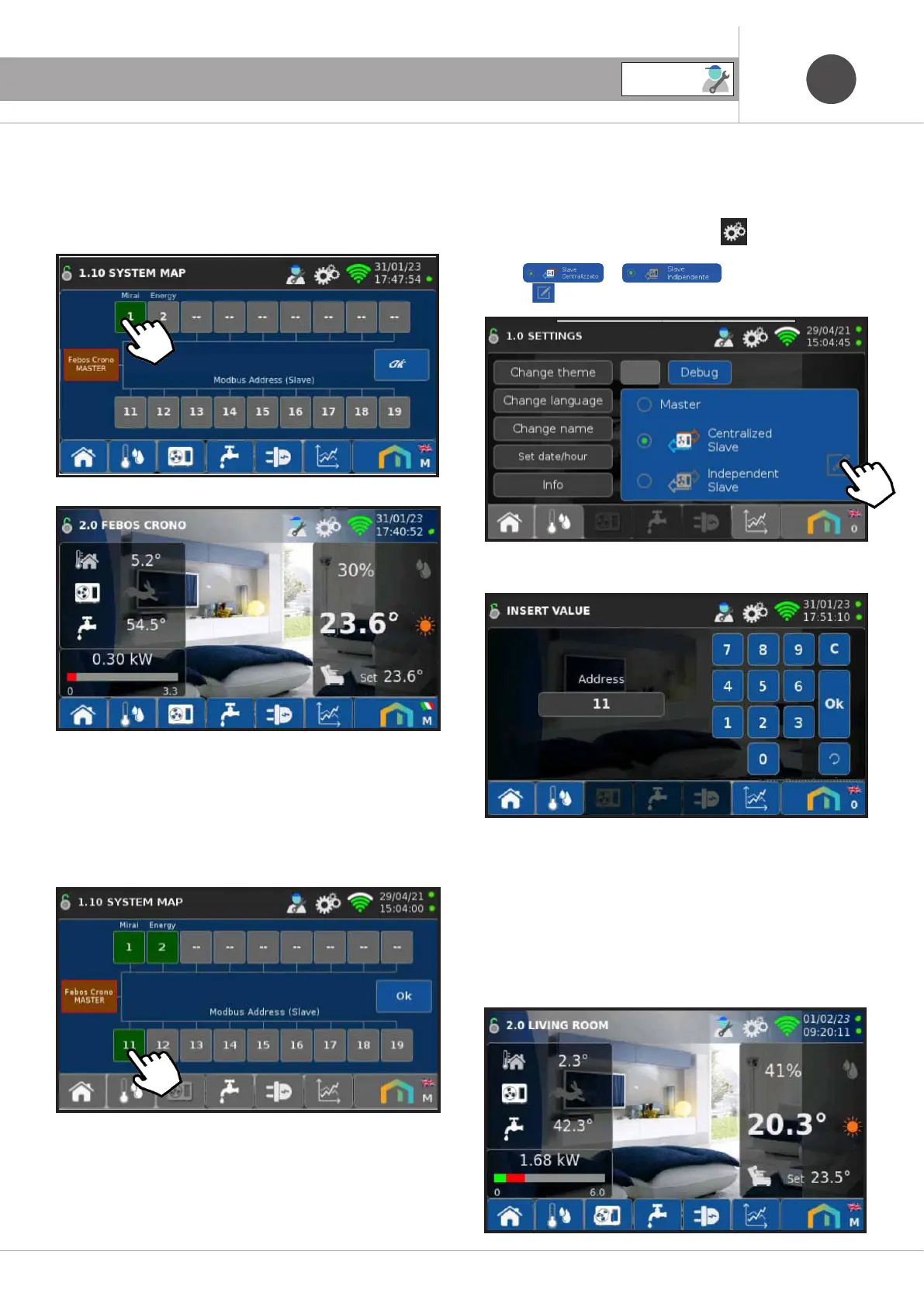
4.2.2 System with Febos-Crono Slave.
On the Febos-Crono Master it is possible to configure up to a max-
imum of 9 Febos-Crono Slaves, assigning each of them a Modbus
address between 11 and 19.
ATTENTION:
There must be a unique match between the Modbus (Slave)
addresses assigned on the Master and the Modbus addresses
configured on each Slave.
It is absolutely forbidden to configure more than one Slave with
the same Modbus address, in which case the company declines
any civil liability and proper operation of the systems built.
Access the settings by pressing the icon
Select or , then press
the icon
Enter the Modbus address of the Slave, then press OK.
On the Febos-Crono Slave only the Room Set screens are
accessible, and the relative values on the Home.
The Modbus address must be configured on each Febos Crono-
Slave.
SERVICE



 To Next Page