Page 14
You have several possibilities for
the schedule (Mon-Fri, weekend,
every day, or single days). The
schedules will be repeated every
week. Once you have set the
schedule, use (top left) lit
button to go back. Ensure that
you have selected the desired
Water Care option in the main Water Care menu.
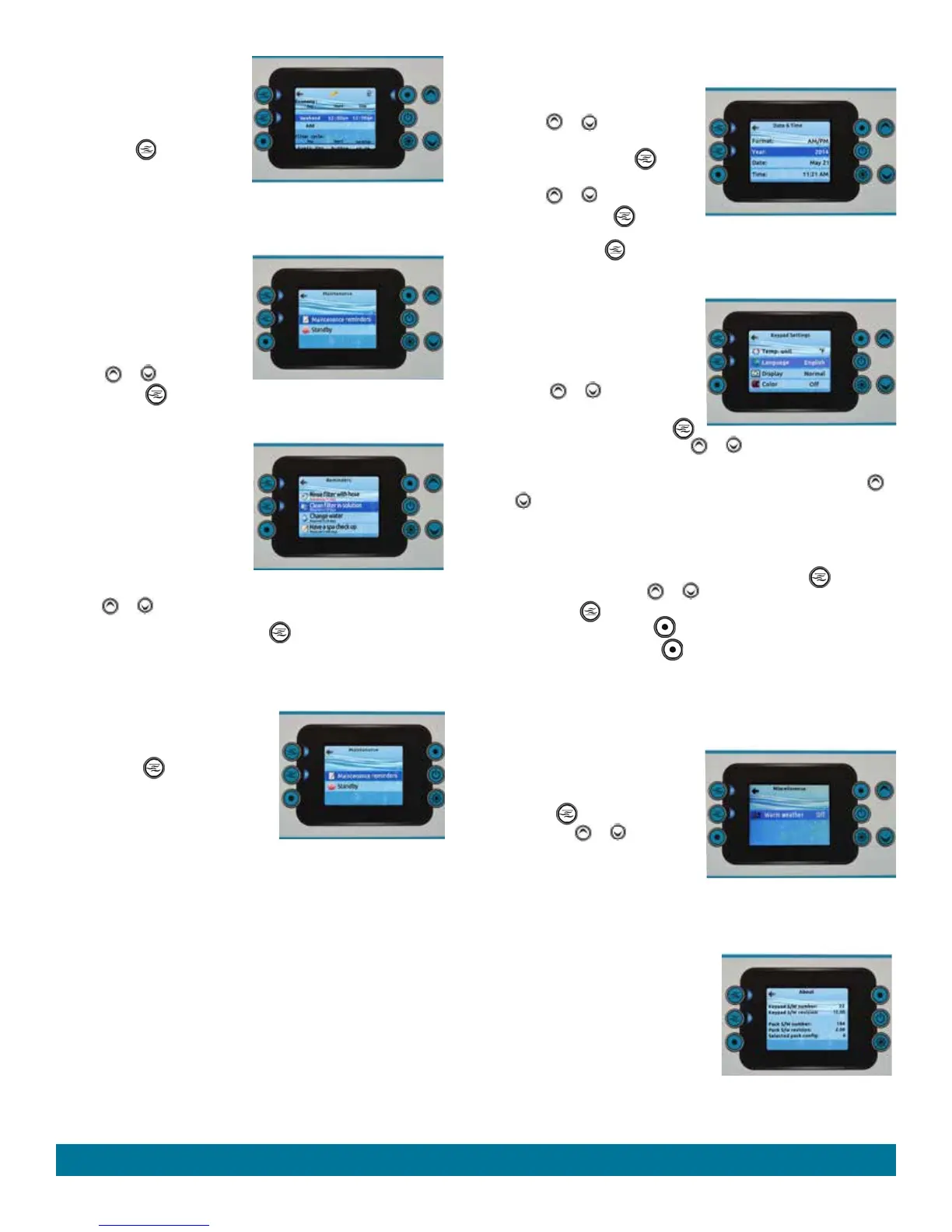
MAINTENANCE
From the Settings page you can
access the Maintenance menu,
which gives you access to the
following options:
• Maintenance reminders
• Standby
Use the or buttons to make
a selection, and (middle left) lit button to select.
MAINTENANCE REMINDERS
The control panel will remind you of
maintenance required in your
swim
area
, like rinsing or cleaning the
filter. Each task has its own duration,
based on normal use.
The Maintenance reminders menu
allows you to verify the time left
before maintenance is required, as
well as to reset the time once a task is completed.
Use the or buttons to move through the list.
To reset a task select it by pressing the (middle left) lit button, then
confirm by pressing the lit button next to confirm when prompted. Once
you have confirmed the task will be reset.
STANDBY
The Standby mode allows you to service
your swim side. Pump will stop for 30
minutes, and automatically restart after
this time. Press (middle left) lit
button to activate Standby mode.
Once Standby mode has been activated
a screen will appear to show that pumps
are stopped. The normal page will
return at the end of maintenance.
Press on the button next to cancel to leave Standby mode and restart the
swim area
.
DATE AND TIME
Here you can adjust the time format,
change the year, date, and time.
Use the or buttons to choose
the setting that you want to adjust,
and select it by pressing
(middle left) lit button.
Use the or buttons to change
the parameters, and (middle
left) lit button to move between
parameters. Press (top left) lit button to take you back to the main
Settings menu.
KEYPAD SETTINGS
In this section, you can change the
temperature unit, language, display
orientation, rim control panel light
color, and lock the control panel.
Use the or buttons to
choose the setting that you want to
adjust. Select it by pressing the
(middle left) lit button then use the or buttons again to change the
setting.
When you change the display orientation, the contextual options and
or
buttons adjust to the chosen orientation. The Audio and Setting
buttons remain unchanged, as well as the jets and lights buttons in the
home page.
Security settings allow you a Partial (Temperature) lock or Full (entire
control panel) lock. Select Security screen by pressing the
(middle
left) lit button then use the or buttons to change to Full, Partial or
Unlock. Press
(top left) lit button to display an information screen
telling you to
press and hold button for 5 seconds to lock.
To unlock Full, press and hold button for 5 seconds.
MISCELLANEOUS
In this section, you can turn the Warm weather mode ON or OFF. When
ON the circulation pump will shut OFF whenever the water temperature
gets 1°C (2°F) above the set point.
Because of the swim area's large
body of water it is recommended to
keep the Warm weather mode OFF.
Press the (middle left) lit button,
then use the or buttons to
change the Warm weather mode.
ELECTRICAL
CONFIGURATION
Please do not make changes to this screen!
ABOUT
This section shows information about
the control panel software number, and
the revision numbers of the different
components of your system.
Operating Instructions


 To Next Page