EasyManua.ls Logo

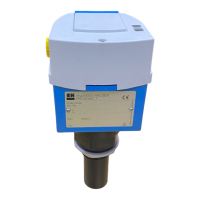
Endress+Hauser Flowphant T DTT31 - User Manual

Endress+Hauser Flowphant T DTT31
48 pages
Print Icon
To Next Page IconTo Next Page
Loading...
Products Solutions Services
Operating Instructions
Flowphant T DTT31, DTT35
Flow switch
BA00235R/09/EN/18.20
71509929
2020-11-30
Valid as of version
01.00 (device version)

Other manuals for Endress+Hauser Flowphant T DTT31

Questions and Answers

  • N
    npowellAug 20, 2025
    What to do if the fluid temperature is outside the specification for Endress+Hauser Flowphant T DTT31?
    • R
      Rebecca JohnsonAug 20, 2025
      If the fluid temperature exceeds 85 °C, which is outside the specification, check the fluid temperature and adapt it to the specification if necessary.
  • A
    Arthur JohnsonAug 22, 2025
    What to do if the output current cannot be generated on Endress+Hauser Flowphant T DTT31 Switch?
    • J
      Jeremiah HunterAug 22, 2025
      If the output current cannot be generated (only for 4 to 20 mA output, e.g. load at analog output too high or open analog output), check the load and switch off the analog output.
  • M
    misty98Aug 25, 2025
    What to do for short-circuit and overload at output 1 on Endress+Hauser Flowphant T DTT31?
    • K
      Kimberly DavisAug 25, 2025
      In case of a short-circuit or overload at output 1, check the output wiring.
  • J
    jenniferdiazAug 26, 2025
    What to do for short-circuit and overload at output 2 on Endress+Hauser Switch?
    • H
      howardmichaelAug 26, 2025
      In case of a short-circuit or overload at output 2, check the output wiring.
  • R
    Rachel PhillipsAug 28, 2025
    What to do if the power supply is outside specification on Endress+Hauser Flowphant T DTT31?
    • D
      dsmithAug 28, 2025
      If the power supply is outside the specification, check the operating voltage.
  • J
    Jerry MeyersAug 30, 2025
    What to do if the measured flow rate is outside the range on Endress+Hauser Switch?
    • K
      keithshermanAug 30, 2025
      If the measured flow rate is outside the range between set Low and High Flow (< -10% or > 110%), set High and Low Flow again, reset device to factory setting where necessary (PRES function).
  • K
    Kevin PhillipsSep 1, 2025
    What if High Flow or Low Flow values cannot be determined on Endress+Hauser Flowphant T DTT31?
    • W
      Wesley HardingSep 1, 2025
      If values for High Flow (HIF) or Low Flow (LOWF) could not be determined with certainty, set High and Low Flow again, keeping the flow velocity constant.
  • W
    William McbrideSep 3, 2025
    What to do if there is an error in measurement or medium temperature outside measurable range for Endress+Hauser Switch?
    • J
      Jasmine WardSep 3, 2025
      Check the medium temperature and, if necessary, return the Endress+Hauser Switch device.
  • M
    Mr. Justin OrtizSep 5, 2025
    Why Endress+Hauser Switch displays error E019?
    • J
      Jamie HughesSep 5, 2025
      Error E019 on your Endress+Hauser Switch indicates that the power supply is outside of the specified range. To resolve this, check the operating voltage to ensure it meets the device's requirements.
  • K
    Kevin JonesSep 7, 2025
    What to do if Endress+Hauser Flowphant T DTT31 shows error E042?
    • M
      Martin TannerSep 7, 2025
      If your Endress+Hauser Switch displays error E042, it means the output current cannot be generated. This usually occurs with 4 to 20 mA outputs due to the load at the analog output being too high or the analog output being open. You should check the load and switch off the analog output to resolve this issue.

Summary

About This Document

Document Function and Symbols

Explains the document's scope and defines safety, electrical, and information symbols used throughout.

Basic Safety Instructions

Personnel, Designated Use, and Workplace Safety

Covers requirements for personnel, intended use, and general workplace safety guidelines.

Operational Safety and Hazardous Area Limitations

Addresses functional safety standards and restrictions on use in hazardous areas.

Product Safety, IT Security, and Incoming Acceptance

Details product safety, IT security measures, and the procedure for device incoming acceptance.

Product Identification and Nameplate Details

Explains methods for identifying the device, focusing on nameplate information and online tools.

Mounting and Installation

Mounting Requirements and General Installation

Covers essential mounting criteria, general installation guidance, precautions, and orientation.

Hygienic Process Installation

Provides specific instructions for hygienic-compliant installation using various process connection types.

Inlet and Outlet Run Requirements

Specifies minimum inlet/outlet runs for accurate measurements and avoiding flow disturbances.

Electrical Connection

Connection Requirements and Wiring Diagrams

Details connection requirements, including DC voltage versions, M12x1 and valve connectors, and wiring diagrams.

Operating the Device

Overview of Operations and Menu Navigation

Introduces device operation, menu structure, navigation, and key elements like display and LEDs.

Calibration and Learn Functions

Guides through calibration procedures, including setting learn functions for flow rates (HIF/LOWF) and switch points (SPL).

Operating Menu Structures for Different Outputs

Presents the operating menu structures for devices with 2 switch outputs and 1 analog/1 switch output.

Basic Settings and Calibration Options

Details basic device settings and calibration procedures for various output configurations.

Output Settings for Switch Outputs

Covers specific settings for 2 switch outputs, including switch points, hysteresis, and contact types.

Output Settings for Analog and Switch Outputs

Defines settings for analog output (4-20mA) and switch outputs, including failure current and modes.

Service and Function Settings

Explains how to configure service functions like locking, reset, and simulation modes.

PC Tool Configuration and Operation

Guides on using PC software (FieldCare) for device configuration, parameter management, and visualization.

Troubleshooting and Diagnostics

General Troubleshooting and Error Codes

Provides methods for diagnosing issues, interpreting status LEDs, and understanding error/warning codes with remedies.

Firmware and Software History

Details device release numbers and a log of software versions, modifications, and documentation updates.

Maintenance, Return, and Disposal

Maintenance, Return, and Disposal Procedures

Covers cleaning, device return process for repairs, and guidelines for safe product disposal.

Accessories and Documentation

Device-Specific and Communication Accessories

Lists accessories like welding bosses, fittings, and communication cables/couplings.

Configuration Kits and Software

Describes kits and software for PC-based configuration, including FieldCare.

Technical Specifications

Input, Output, and Power Supply Details

Defines input variables, output signals, switching capacity, and power supply requirements.

Environmental Conditions and Safety

Lists environmental operating parameters, electrical safety standards, and resistance to shock/vibration.

Process Conditions and Limits

Defines process-related technical data including temperature, pressure, flow limits, and operational ranges.

Mechanical Design and Process Connections

Provides mechanical design details, dimensions, and process connection specifics for DTT31 and DTT35.

Weight, Materials, and Certifications

Details device weight, materials used, and lists certifications and approvals like CE mark.

Standards, Guidelines, and Food Contact Compliance

References additional standards, guidelines, hygiene compliance, and materials in contact with food.

Supplementary Documentation

Lists related technical information and operating instructions for the device.

Endress+Hauser Flowphant T DTT31 Specifications

General IconGeneral
Device TypeFlow Switch
Process Temperature-40°C to +150°C
Process PressureMax. 40 bar
Output SignalPNP/NPN
ConnectionM12 connector, terminal box
Supply Voltage10 to 30 V DC
Process ConnectionG 1/2, G 1, 1/2" NPT, 1" NPT
Response Time< 1 second
Protection RatingIP67
Operating Temperature-40 to +60 °C

Related product manuals