
 Need help?
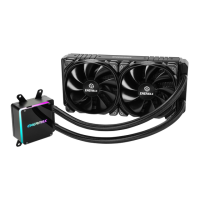
Do you have a question about the ENERMAX LiqTech TR4 240 and is the answer not in the manual?
Attach the fan and the radiator to the chassis for initial setup.
Tighten the AMD TR4/SP3 screws to the motherboard for secure mounting.
Apply thermal grease evenly on the CPU surface for optimal heat transfer.
Remove the protective film from the cold-plate before installation.
Place the pump on the CPU and tighten spring screws until corners are secured.
Connect the pump power connector to the motherboard or PSU via adapter.
Connect the fan connector to the motherboard using the PWM Y cable.
 General
| Socket Compatibility | AMD TR4 |
|---|---|
| Radiator Size | 240 mm |
| Fan Size | 120 mm |
| Radiator Material | Aluminum |
| Fan Dimensions | 120 x 120 x 25 mm |
| Tube Length | 400 mm |
| Warranty | 2 years |
| Type | Liquid CPU Cooler |
| Pump Speed | 2800 RPM |

 To Next Page