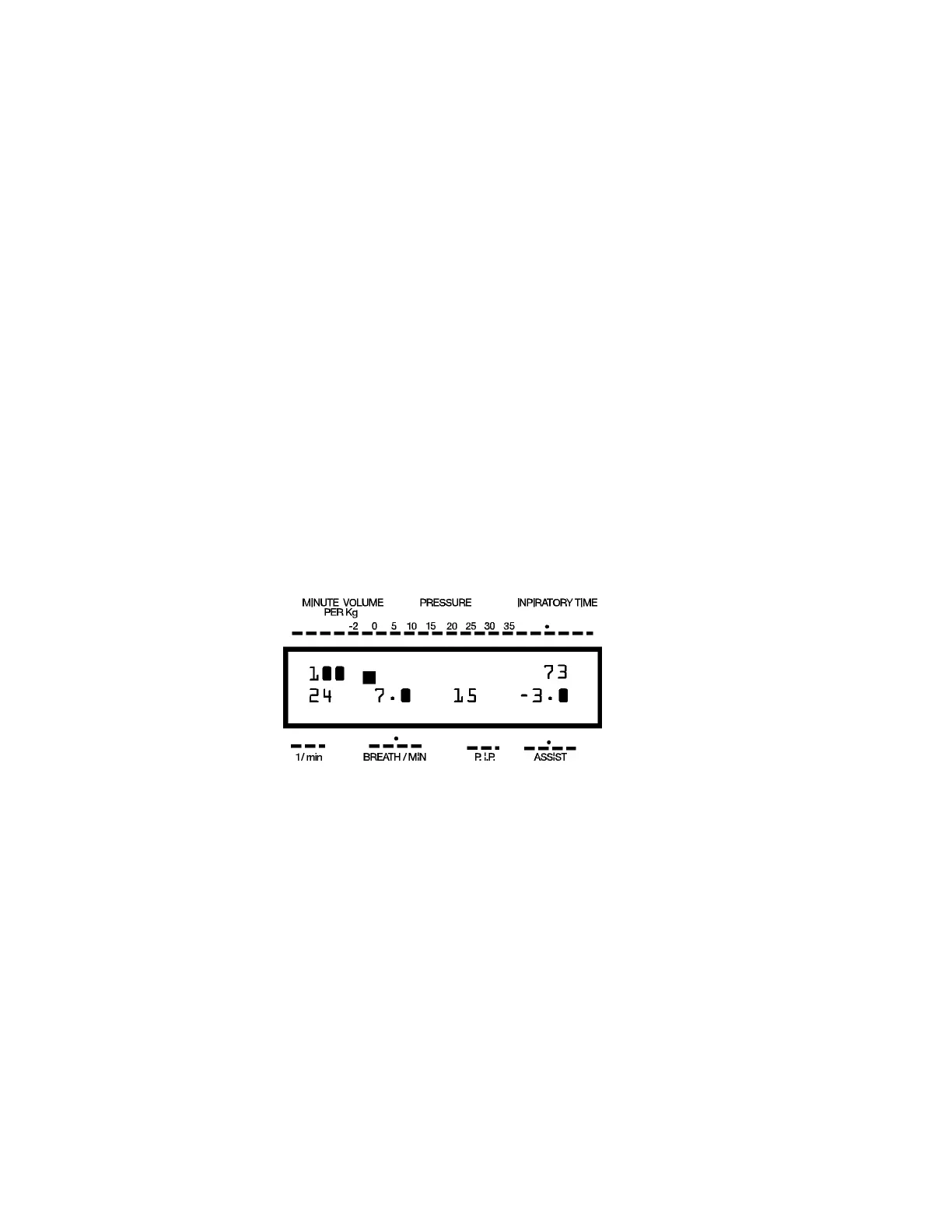
THE LCD DISPLAY in RUN MODE
NOTE: We suggest that you practice with the provided TEST LUNG, until you feel
confident that you fully understand the proper operation of the ADS 2000. Throughout
the manual whenever the word "patient(s)" is used, you will also see the words, “TEST
LUNG”, this means that you should first familiarize yourself with this function by using
the TEST LUNG first.
NOTE: When using the TEST LUNG you should always keep the vaporizer OFF.
1. Now that you have entered in the patients' weight (the TEST LUNG simulates a 20
Kilogram patient), you are ready to begin delivering anesthesia or ventilating your
patient (TEST LUNG).
2. If you haven't done so already, connect the end of the Breathing Circuit to your
patient (TEST LUNG).
3. Place the SET / RUN switch to "RUN". The patient's (TEST LUNG) chest
should begin to fill up to the preset P.I.P. (Peak Inspiratory Pressure)
4. After the patient (TEST LUNG) has reached the preset P.I.P. the exhale valve will
open and the patients' (TEST LUNG) chest will exhale (deflate). The LCD display
should look similar to the display below.
NOTE: Numbers used in section 5 and 6 of pages 11 and 12 are examples only.
5. The upper line of the LCD readout is now displaying, from left to right, the
following information:
a. Minute Volume Per Kilogram, (100 in this case). This number will be
updated with each breath.
b. Peak Inspiratory Pressure Graph, (A square black cursor moving
across a white background).
NOTE: The cursor starts at 0 cm. of H
2
O and moves up to the selected Peak
Inspiratory Pressure (15 cm. of H
2
O in this case).
14 Engler Engineering Corporation ADS 2000


 To Next Page