GETTING FAMILIAR WITH THE ADS 2000
In order to operate the ADS 2000 properly, you need know its controls.
Front View:
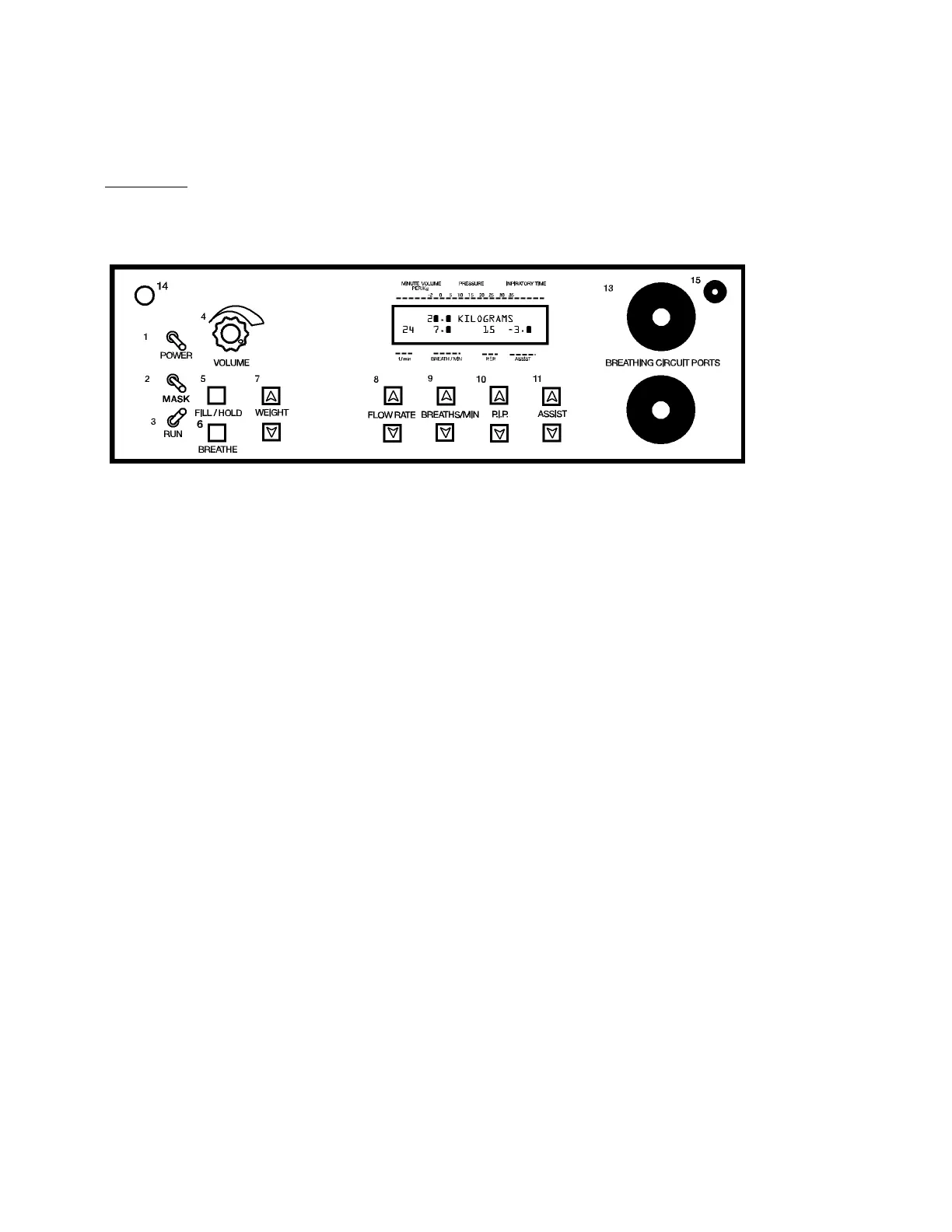
LCD DISPLAY - Displays Minute Volume, Inspiratory Time, Proximal Airway Pressure, Flow Rate,
Breaths Per Minute, Peak Inspiratory pressure, and Assist Pressure.
12
SET
POWER switch - This switch turns the power to the ADS 2000 ON and OFF.
MASK switch - This switch is used for enabling and disabling the Mask Mode
SET / RUN Switch - When in the SET, this switch allows the operator to enter in
the patients' weight. When switched to RUN the ADS 2000 begins ventilating the
patient.
VOLUME Knob - This knob controls the volume of the audible warning alarm. We suggest that you
start with it turned fully clockwise, i.e. full volume and adjust it as necessary.
FILL / HOLD Button - When this button is pressed, the ADS 2000 will fill the lungs of the patient to
the indicated peak inspiratory pressure and hold it until the button is released.
BREATHE Button - When this button is pressed, the ADS 2000 will initiate a breath to the
indicated peak inspiratory pressure to the patient.
WEIGHT UP / DOWN Buttons - When the ADS 2000 is in the SET MODE these buttons allow the
operator to enter the weight of the patient, from below 1.0 Kg. to 68 Kg.
FLOW RATE UP / DOWN Buttons - Depressing these buttons cause the FLOW RATE to increase
or decrease, from 0.2 LPM to 60 LPM.
BREATHS PER MINUTE UP / DOWN Buttons - These buttons control the minimum number
of times that the ADS 2000 will breathe per minute, from 1 to 95 B.P.M.
P.I.P. UP / DOWN Buttons - These buttons control the Peak Inspiratory Pressure in cm of
H
2
O, that the ADS 2000 will deliver to the patient, from 5.0 cm to 35 cm./ H
2
O
ASSIST UP / DOWN Buttons - These buttons set the sensitivity of inspiratory effort
necessary for the ADS 2000 to facilitate an assisted breath, from –0.3 to 6.0 cm. /
H
2
O They also allow the ASSIST feature to be turned off.
8 Engler Engineering Corporation ADS 2000


 To Next Page