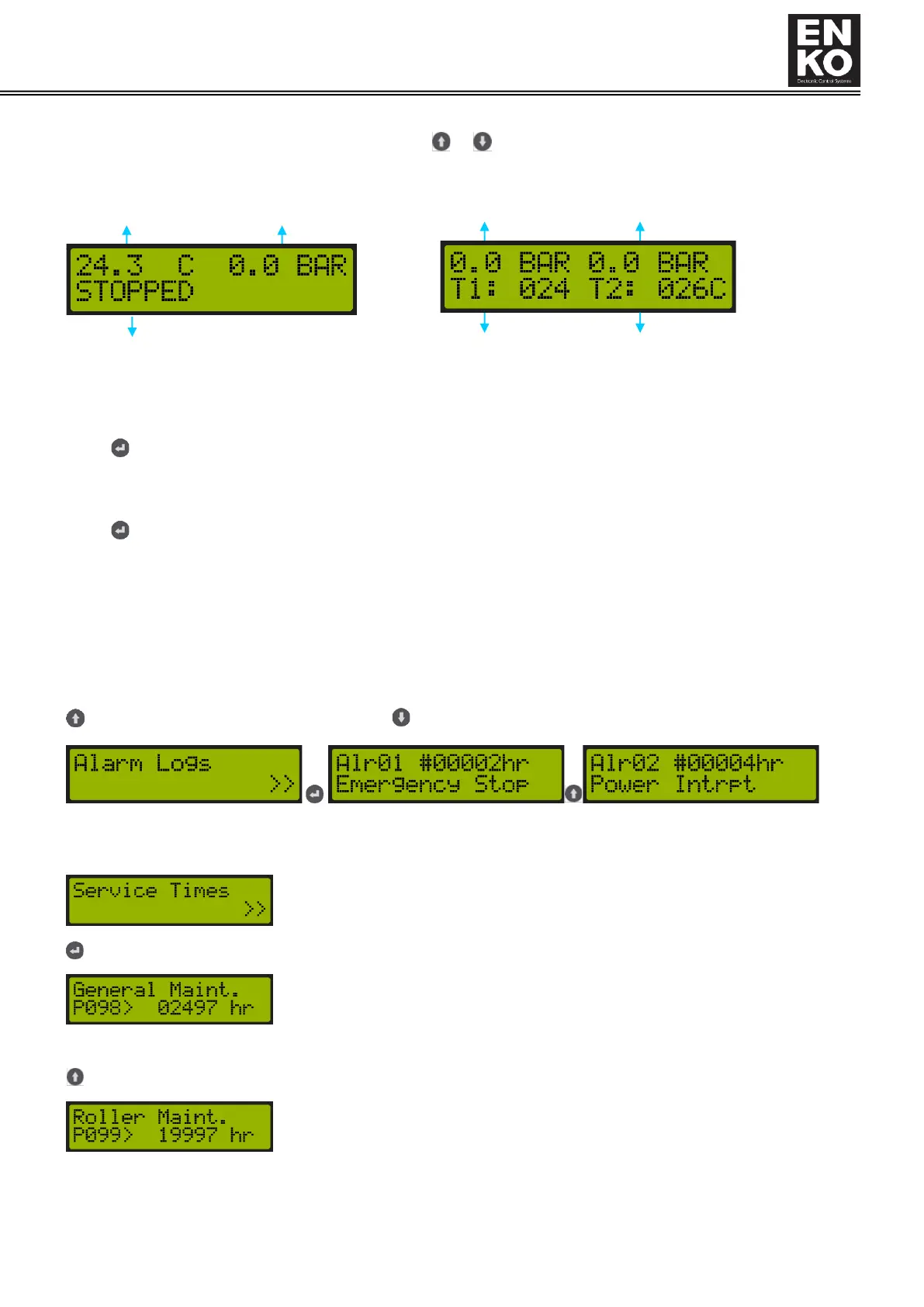
sensors connected to the device, screw temperature sensor and second temperature sensor values are displayed. It
is possible to switch between the display pages with or buttons.
wwwwwwwwwww
1.4.3 Information Menu
When button is pressed on the main operation screen of device, the information screen is accessed. Information
and details displayed on the information screen are as follows.
1.4.3.1 Fault Logs
When button is pressed in the fault logs menu, below screen is accessed.
Alr01 expression indicates the number of the alarm. You can see the last 15 alarms, the first alarm entering to the list
leaves the list first.
The expression #00002h indicates the number of total operating hours at the time of alarm occurrence.
The line at the bottom provides the alarm definition. For the alarm detail you see, see “2.6 Alarm and Warning
Descriptions and solution advices”.
or you can navigate through fault logs with button.
1.4.3.2 Service Times
When button is pressed in the Service Times menu, the following screens are accessed.
Shows how much time is left for the general maintenance service. The duration is set
with P098 General maintenance parameter among the service times parameters.
Indicates how much time is left for bearing maintenance service. The duration is set
with P099 Bearing maintenance parameter among the service times parameters.



 To Next Page