RAK112B_ENG / 2023-06-27
38 / 40
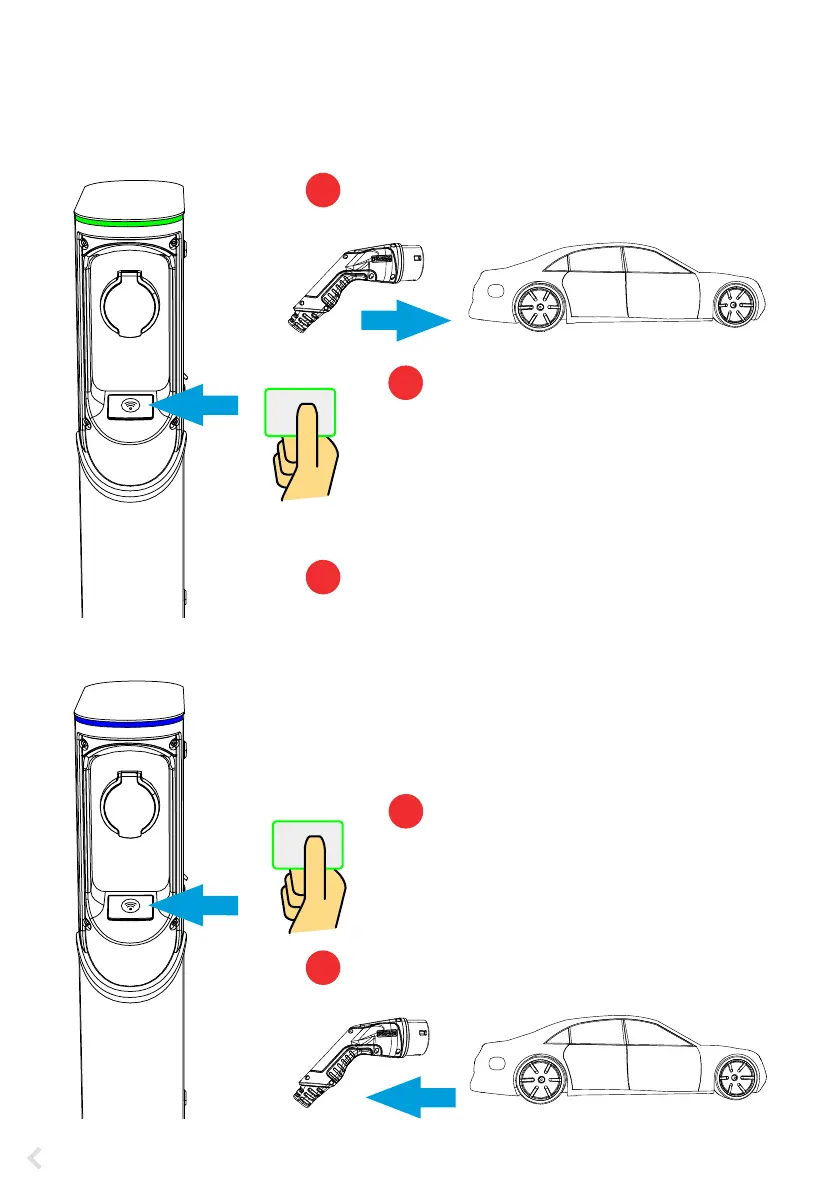
21.2. Charging with RFID
You must have an RFID tag which has a permission to access the charging point.
Start Charging with RFID
Plug the charging cable to your electric vehicle.
Plug the charging cable to the charging point.
Stop Charging with RFID
Show the RFID tag to the RFID reading area.
While the RFID tag is read, the LED indicator
ashes green and veries the user permission to
charge.
• If the user authorization is rejected, the LED
indicator ashes red.
• If the user authorization is accepted, the indi-
cator light turns to waving green.
Charging event starts.
• The LED indicator turns to stable blue.
Show the RFID tag to the RFID reading area.
Charging event ends.
• The LED indicator turns to waving green.
Unplug the charging cable from the charging point.
Unplug the charging cable from your electric vehicle.
1
2
3
4
5


 To Next Page