Setting Up and Collecting Off Route Phase/Magnitude/Speed
dataPAC User’s Guide 139
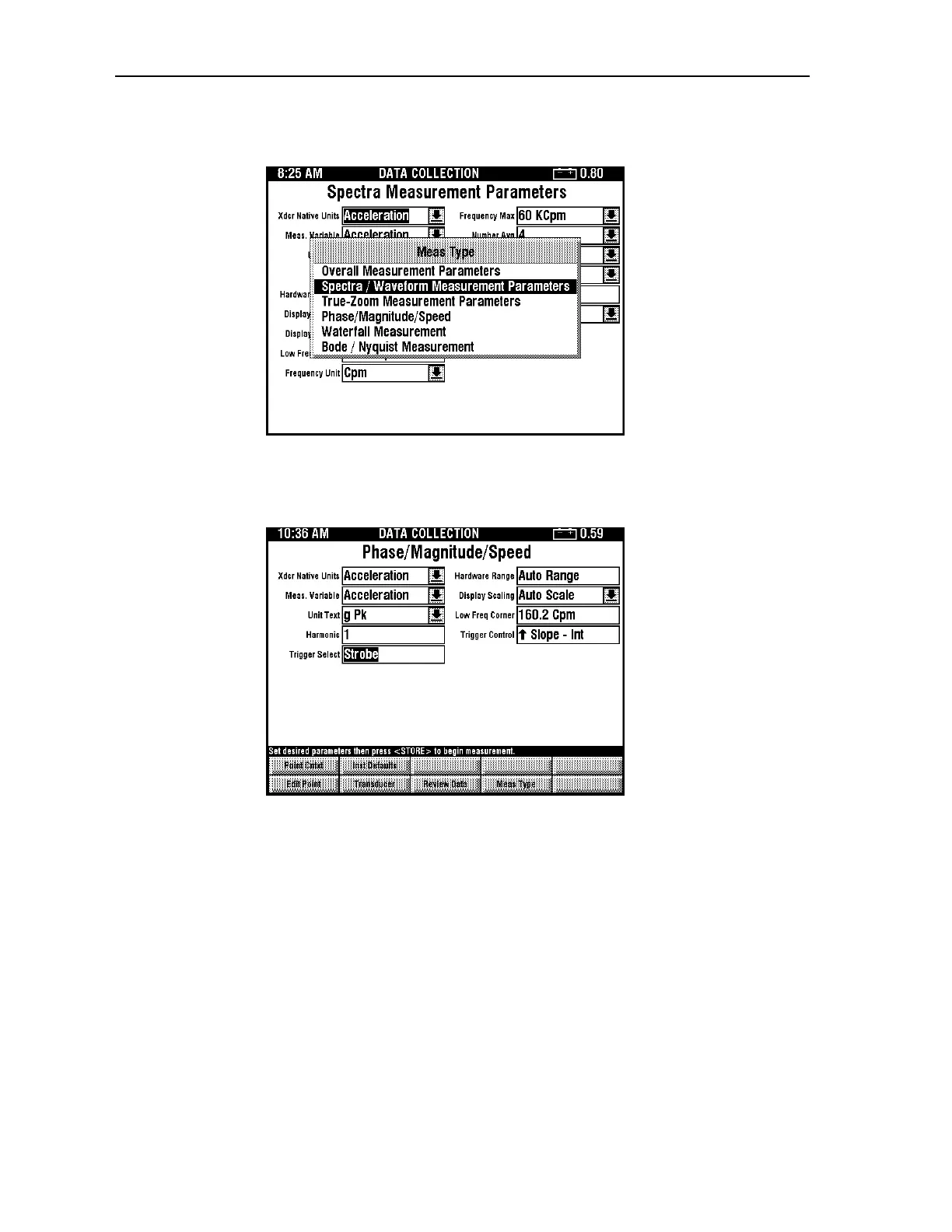
2. Press <F4> (Meas Type) to display the Measurement Type selection window.
3. Use the up and down arrow keys to select Phase/Magnitude/Speed, then press
<SELECT>. The dataPAC displays the setup parameters window for the selected
measurement type.
4. Press <F1> (Edit Point) to change the measurement setup. You can press
<SHIFT><F1> (Point Context) to copy the current point setup to your off route
measurement. Alternatively, you can press <SHIFT><F2> (Instrument Defaults) to
select the instrument defaults for your off route measurement. Use the field descriptions
below to set up the measurement.
Xdcr Native Units
The Transducer Native Units parameter allows you to specify the type of transducer
connected to your dataPAC 1500. The choice of this parameter controls the list of possible
selections available for the Measurement Variable parameter.
Artisan Technology Group - Quality Instrumentation ... Guaranteed | (888) 88-SOURCE | www.artisantg.comArtisan Technology Group - Quality Instrumentation ... Guaranteed | (888) 88-SOURCE | www.artisantg.com



 To Next Page