Collecting Programmed Data
dataPAC User’s Guide 69
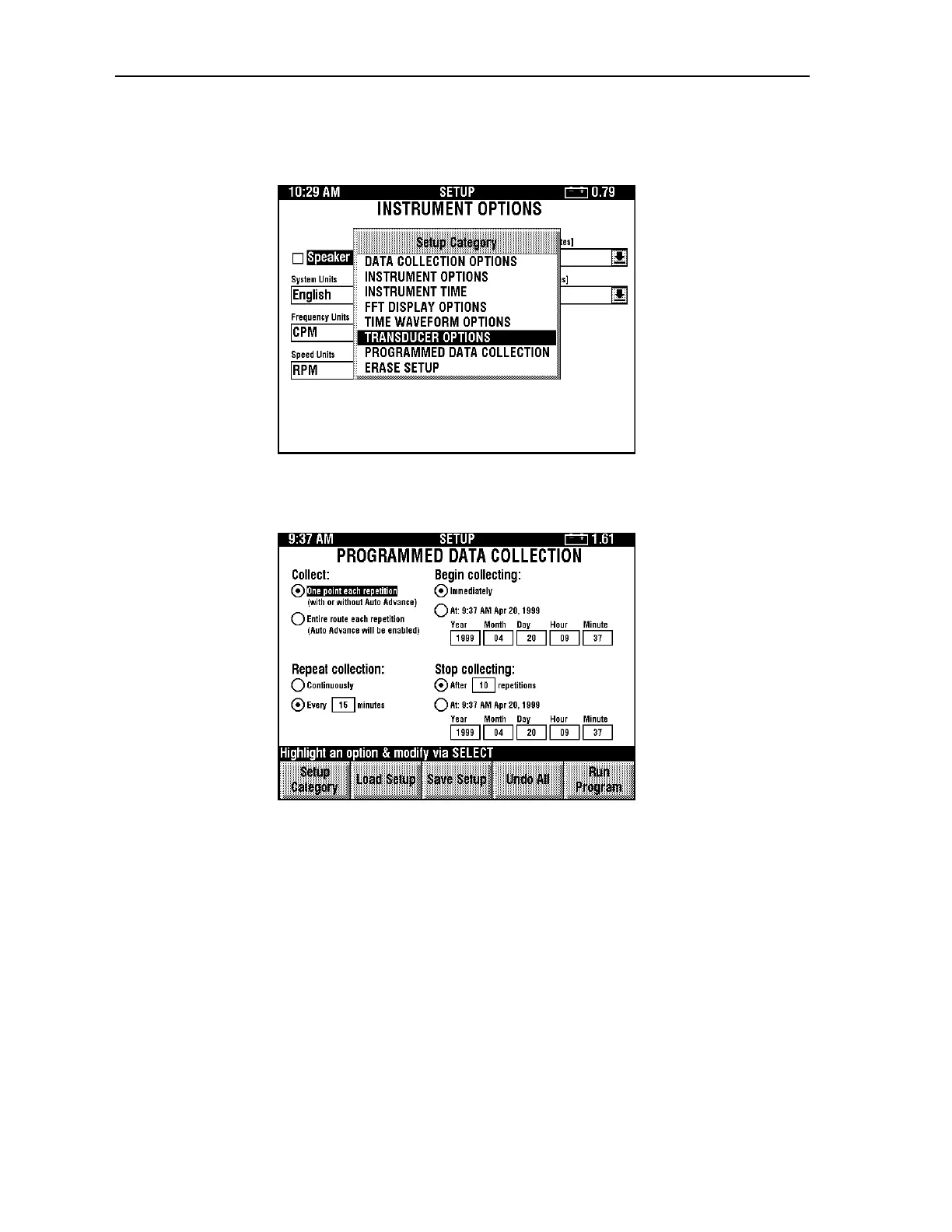
2. Switch to the desired setup category by pressing <F1> (Setup Category). The Setup
Category window appears.
3. Use the arrow keys to select Programmed Data Collection and press <SELECT>. The
following screen appears.
4. Use the arrow keys and <SELECT> button to choose the settings for programmed data
collection. Each setting is explained below.
Collect
Select One point each repetition to collect just one point at each of the programmed
collection times. If Auto Advance is disabled, then the same point is collected at each
programmed collection time. If Auto Advance is enabled, then the next point is collect at
each collection time. This option is identical to pressing <STORE> each time the program is
run. See “Setting Up Data Collection Options” on page 38 for more detailed information
about setting the Auto Advance option.
Artisan Technology Group - Quality Instrumentation ... Guaranteed | (888) 88-SOURCE | www.artisantg.comArtisan Technology Group - Quality Instrumentation ... Guaranteed | (888) 88-SOURCE | www.artisantg.com



 To Next Page