18
Troubleshooting
SYMPTOM PROBABLE CAUSE REMEDY
Transceiver not switching on
Battery needs charging or
battery is exhausted
Charge the battery pack
replace the battery pack
The scan key does not start
the scan
No channels memorised
(MEM) Squelch is not adjusted
Use the MEM key to enter
desired channels into scan
memory. Adjust the squelch to
threshold or to the point
where the white noise just
disappears.
Cannot change any function Key lock is switched on Turn key lock off
The LED on the charger does
not illuminate when charging
Defective battery or charger.
Dirty terminal contact on
battery or charger
Contact your dealer Clean
contacts with dry clean cloth
No transmit or cannot select
high power
Some channels are low power
only Battery pack exhausted
Change to high power channel
Charge / replace the battery
Transceiver transmits without
pressing PTT button Buttons
seem to work intermittently
VOX has been enabled
Hold MEM button for 2 secs,
use UP or DOWN button &
select “off” to turn VOX
off
17
Controls
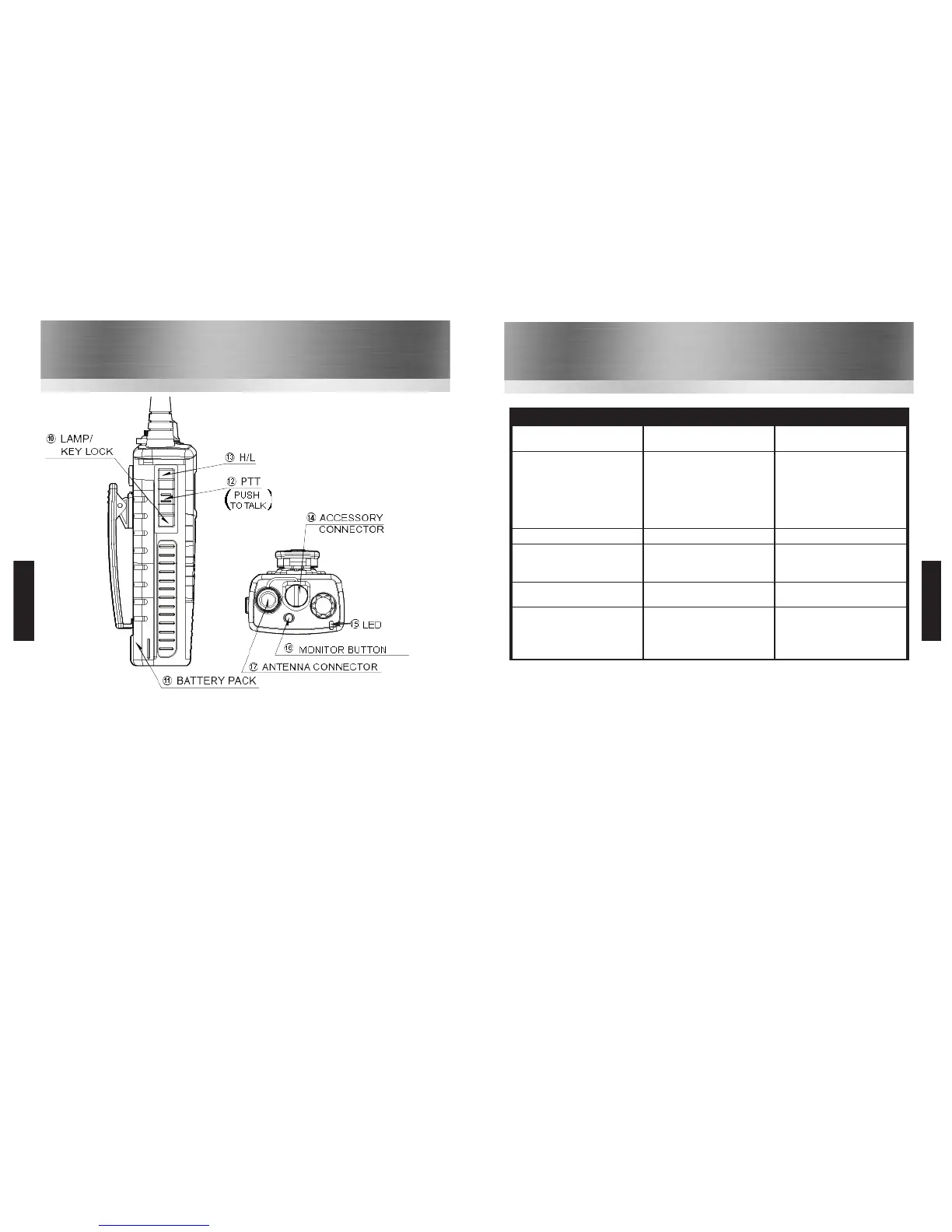
10 Lamp / Key lock Button: Momentarily pressing this button illuminates the LCD display.
Holding this button for over 1 second activates the key lock. To deactivate the key lock
press & hold the button again until the lock removes.
11 The Radio’s Battery Pack: Rechargeable lithium-ion battery pack.
12 PTT (Push To Talk Switch): Hold down to transmit, release to receive.
13 H/L Button: Press and hold this button for 1 second to toggle between high and low
power (1 & 5 Watts).
14 The Accessory Connector: Used to attach any HT544 approved accessory.
15 LED Indicator: Indicates the status of the radio:
• RED Steady = Transmitting
• RED Flashing slowly = Battery needs re-charging
• GREEN Steady = Receiving
16 Monitor Button: Press to monitor the channel without the squelch mute.
17 Antenna Connector: Use to attach the antenna of the radio.
HT544
HT544



 To Next Page