Battery Charging
1. Connect the AC adapter to the charger
pod. The LED status light will illuminate
green indicating ready for charge
2. Turn the transceiver off
3. Insert the battery pack into the charger
pod, either with or without the
transceiver attached. The LED status light
changes from green to RED & trickle
charge begins
4. A fully discharged battery pack will take
approximately 6 hours to charge,
depending on the remaining power
condition. When charge is complete, the
LED status light turns green.
Overcharging:
The battery pack has an over-current
protection circuit fitted. When charging a
completely discharged battery i.e. first charge,
ensure the battery is removed from the radio
and then re-attached (if fitted to radio when
charging). This will reset the protection
circuitry and ensure normal operation.
6
Battery Care / Information
This process will need to be repeated if the
battery is allowed to completely discharge in
the future. In normal use this is unlikely.
Battery Indicator
For your safety and con-
venience your
transceiver continually
monitors the battery pack and gives an
indication on the LCD:
• 3 Segments: 12 hours
• 2 Segments: 1 hour
• 1 Segment: 20 mins
Note: Only genuine Entel batteries should be
used. Customer satisfaction is assured as you
can not be supplied with sub standard,
potentially dangerous battery packs from 3rd
party manufacturers, ensuring it delivers the
expected capacity and endurance.
On HT series batteries a breathable
membrane is used. This is clearly marked on
the battery label. Piercing the membrane will
allow water ingress to the battery, & will
invalidate the warranty.
Optional Accessories
Attaching & Removing Accessories
To attach an accessory: Remove the accessory cover by unscrewing the
locking screw anti-clockwise (leave cover attached or store in a safe place).
Attach accessory plug to the socket. Carefully tighten the locking screw
clockwise until finger tight (do not tighten with a screwdriver etc).
To remove an accessory: Unscrew the locking screw of the accessory by
hand in an anti-clockwise direction (carefully use a coin or screwdriver if too
tight). Ensure you re-fit the accessory cover so as to protect the socket.
Common
Introduction
Your Entel radio is supplied with a high
performance Lithium-Ion (Li-Ion) battery.
These batteries:
• Extend talk time
• Reduce the battery’s size and weight
• Do not suffer from ‘memory effect’ that
reduces the life of Ni-Cad and NiMH batteries
• Have a low toxicity, therefore reducing the
impact on the environment
Battery Pack
• If a battery is not to be used for an extended
period of time (e.g. several months) remove
the battery pack from the equipment and
store in a cool and dry location (around
0°C) part charged.
Do not fully discharge the battery before
storage
• Each charge cycle reduces the battery’s life.
Minimise the number of times you charge
your battery especially in hotter environ-
ments which further shortens a battery’s life
Battery Pack Precautions
• Switch the transceiver OFF before charging
• Charge the battery pack before use
• Do not recharge the battery pack if it is
already fully charged.
• Charge the battery in accordance with the
instructions enclosed with your charger
• Do not charge the transceiver and /or
battery pack if they are wet.
The battery pack includes potentially
hazardous components. Please:
• Do Not disassemble or reconstruct battery
• Do Not short-circuit the battery
• Do Not incinerate or apply heat to the
battery
5
Battery Care / Information
• Do Not immerse the battery in water unless
attached securely to the radio or get it wet
by other means
• Use only the specified charger and observe
charging requirements
• Do Not pierce the battery with any object
or strike it with an instrument
• Do Not use the battery pack if it is damaged
in any way
• Do Not reverse-charge or reverse connect
the battery
• Do Not touch a ruptured or leaking battery.
If liquids from the battery get into your eyes,
immediately:
• Wash your eyes out with fresh water &
avoiding rubbing them.
• Seek medical treatment.
Common
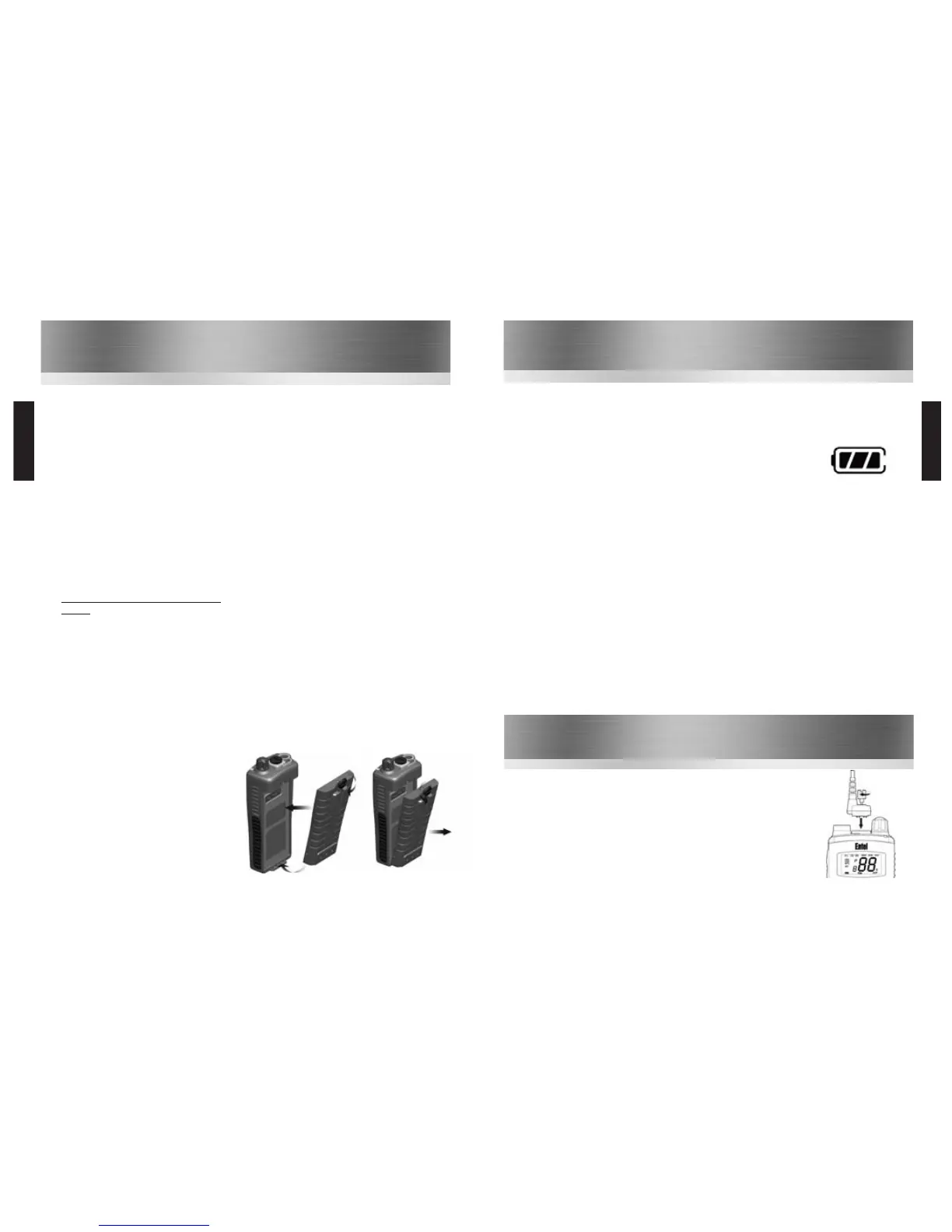
Attaching / Removing the Battery Pack
1
To attach, locate the pegs on the bottom of the
battery into the slots on the radio and press
the top of the battery against the radio. Secure
battery by tightening the screw clockwise by
hand. (Do not over tighten)
2
To remove, unscrew the locking screw
anticlockwise & pull the battery away from the
top of the radio.
1
2


 To Next Page
 Loading...