LANVIEW LEDs
2-4
2.3.2 Fan Tray LED
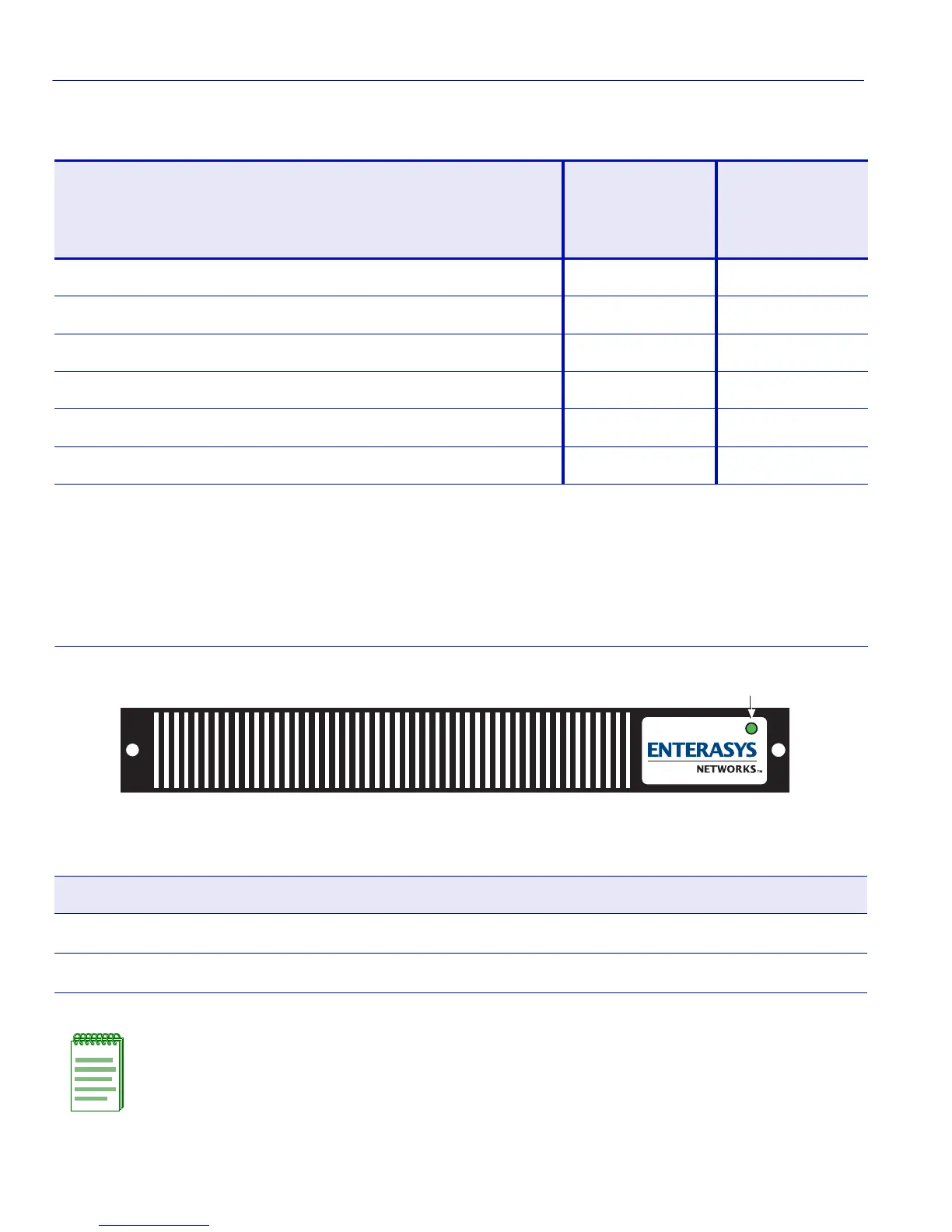
Refer to Figure 2-3 for the location of the fan tray LED. Table 2-2 describes the different states of
the fan tray LED.
Figure 2-3 Fan Tray LED
Table 2-1 Power Supply (PS) LED Status Definitions
Condition PS1 PS2 Load PS1 LEDs PS2 LEDs
PWR FAN PWR FAN
1 ON OFF Amber Green Red Red
2 OFF ON Red Red Amber Green
3 ON Out of chassis Green Green Off Off
4 Out of chassis ON Off Off Green Green
5 ON ON <50% Green Green Green Green
6 ON ON >50% Amber Green Amber Green
Table 2-2 Fan Tray LED States and Their Definitions
LED Color Status
Green All fans are operating normally.
Red One or more fan failures have occurred.
NOTE: When the Matrix E7 is first powered up, the Fan Tray LED will display red briefly,
until the fans are operating at the proper speed.
Fan Tray LED
3280-01-03


 To Next Page