8 About the Printer
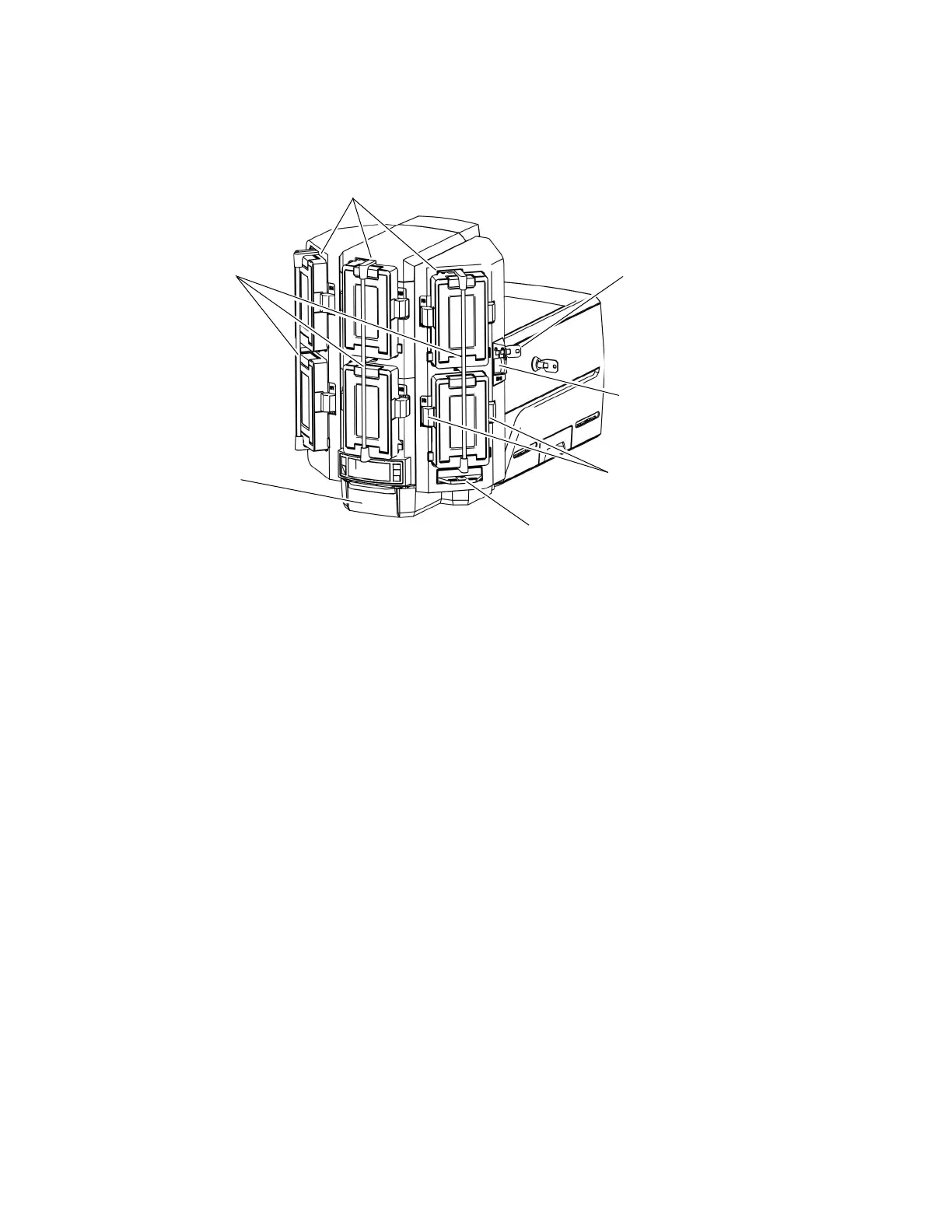
Multi-Hopper Printer
Input Hoppers 1–6 Each hopper cartridge in the multi-hopper holds up to 125 cards
(0.030 in. or 0.762 mm thickness).
The hopper cartridges can be removed from the printer for secure
storage.
Hopper Lock Bars The lock bars rotate to the left to allow access to the hopper
cartridge doors, so that you can load cards into the cartridges.
Output Hopper The output hopper holds up to 25 completed cards.
Multi-Hopper Lock The multi-hopper lock secures all six input hoppers. The lock can be
opened using a key or a command from your card personalization
software.
Sending a command to open the lock opens all locks on the printer
and on any attached component.
Lock Bar Release
Button (B1)
The release button (B1) releases the lock bars in front of the input
hopper cartridges. Slide the button to the left to release the bars.
You must have unlocked the multi-hopper using the key or a
software command before the lock bars can be released.
Cartridge Release
Buttons
Exception Slide
Input Hoppers 1–6
Hopper Lock
Bars
Output
Hopper
Lock Bar Release
Button (B1)
Multi-Hopper
Lock





 To Next Page