Connecting the PRO Mk2
USB
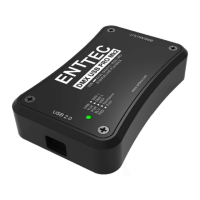
Once the driver has finished installing, you may now plug in the micro usb cable to connect
the PRO Mk2 device to your computer. One end, the micro usb (smaller connector) plug,
will fit the USB port in the PRO Mk2. The other end, which is wider and almost flat in
comparison, goes to any available USB port in your computer. You may also plug it into a
USB hub, but when doing so be sure that enough power exists on that hub to provide for the
device and all other power-over-USB devices plugged there as well.
When you make the connection to your computer, the LED on the PRO Mk2 will start
blinking white, notifying the user that it's powered up and ready. After that, a message
should appear (usually a few seconds later in Windows) saying your computer has detected
new hardware.
It will be correctly identified as ENTTEC USB PRO Mk2 by your computer.
Power supply
The PRO Mk2 draws its power from the USB connection.
You can also use a 5v USB Power adaptor (Part No. 50327) to power the PRO Mk2 and use
it in standalone mode only.
However to use a software application to talk to PRO MK2 you will need to plug it into the
USB port of the computer.
17


 To Next Page