22
AlcoQuant® 6020 – Breathalyser – Operating Instructions
12:34
Select
4.1 Contrast
OK
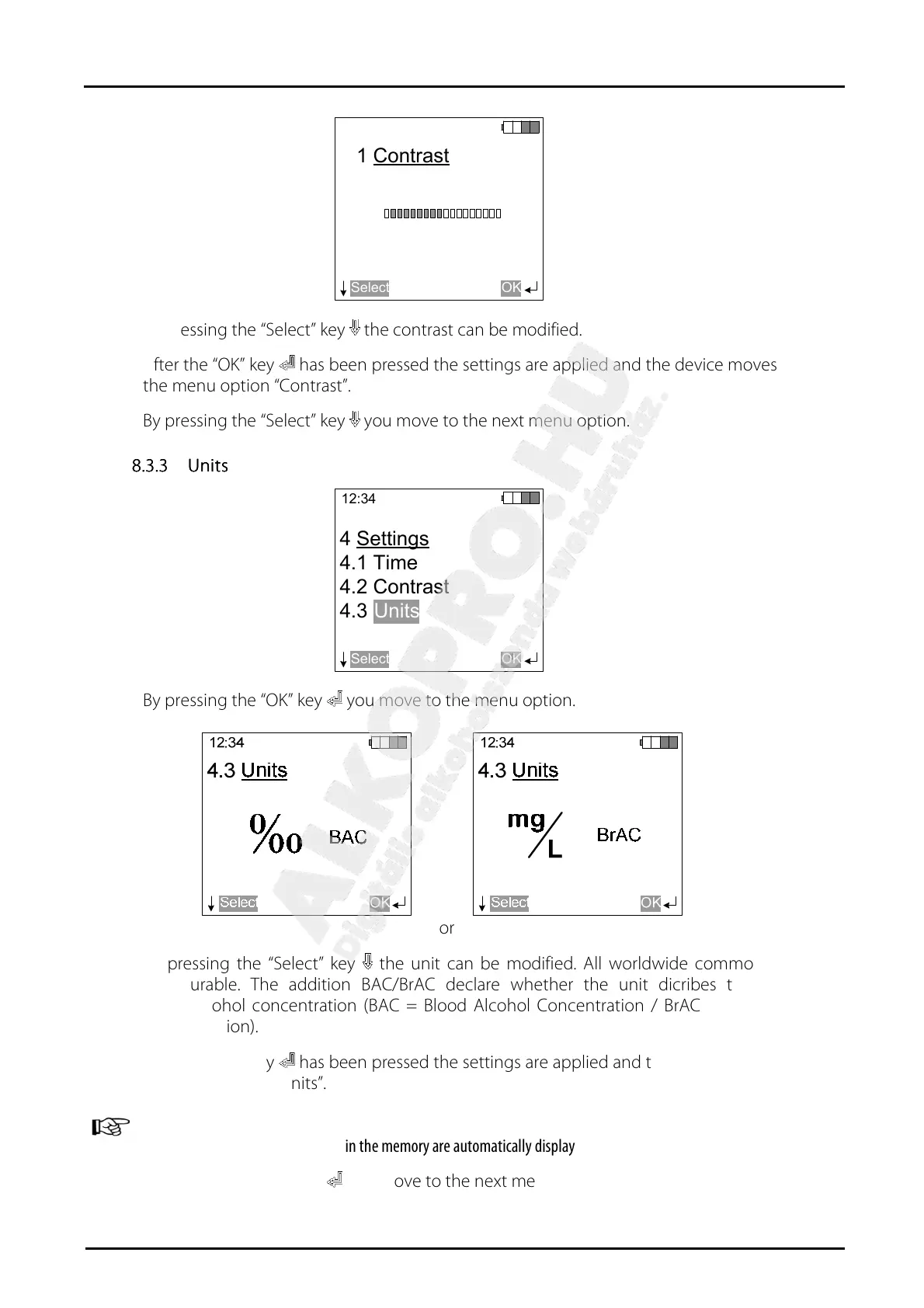
By pressing the “Select” key the contrast can be modified.
After the “OK” key has been pressed the settings are applied and the device moves back to
the menu option “Contrast”.
By pressing the “Select” key you move to the next menu option.
8.3.3
8.3.38.3.3
8.3.3 Units
UnitsUnits
Units
12:34
Select
4 Settings
4.1 Time
4.2 Contrast
4.3
OK
Units
By pressing the “OK” key you move to the menu option.
or
By pressing the “Select” key the unit can be modified. All worldwide common units are
configurable. The addition BAC/BrAC declare whether the unit dicribes the Blood- or
Breathalcohol concentration (BAC = Blood Alcohol Concentration / BrAC = Breath Alcohol
Concentration).
After the “OK” key has been pressed the settings are applied and the device moves back to
the menu option “Units”.
ATTENTION:
After modifying the unit the values in the memory are automatically displayed in the selected unit.
By pressing the “OK” key you move to the next menu option.


 To Next Page