3. Drivers Installation
3.1. Driver List
Folder/File File Description
<CD>:\Odysse.htm Odysse Driver List
<CD>:\Common\INTEL\Chipset Chipset Driver
<CD>:\Common\INTEL\VGA\i85x VGA Driver
<CD>:\Common\Ac97_codec\RealteK\ALC202A Audio Driver
<CD>:\Common\Lan_driver\R8139_810x
10/100Mb LAN Driver
<CD>:\Common\INTEL\USB20 USB 2.0 Driver
<CD>:\Common\Elo_Touch ELO Touch Screen Driver
<CD>:\Common\POS_Touch POSTouch Touch Screen Driver
The following procedures are for Windows 2000/XP, other platforms are similar.
3.2. Chipset Driver Installation
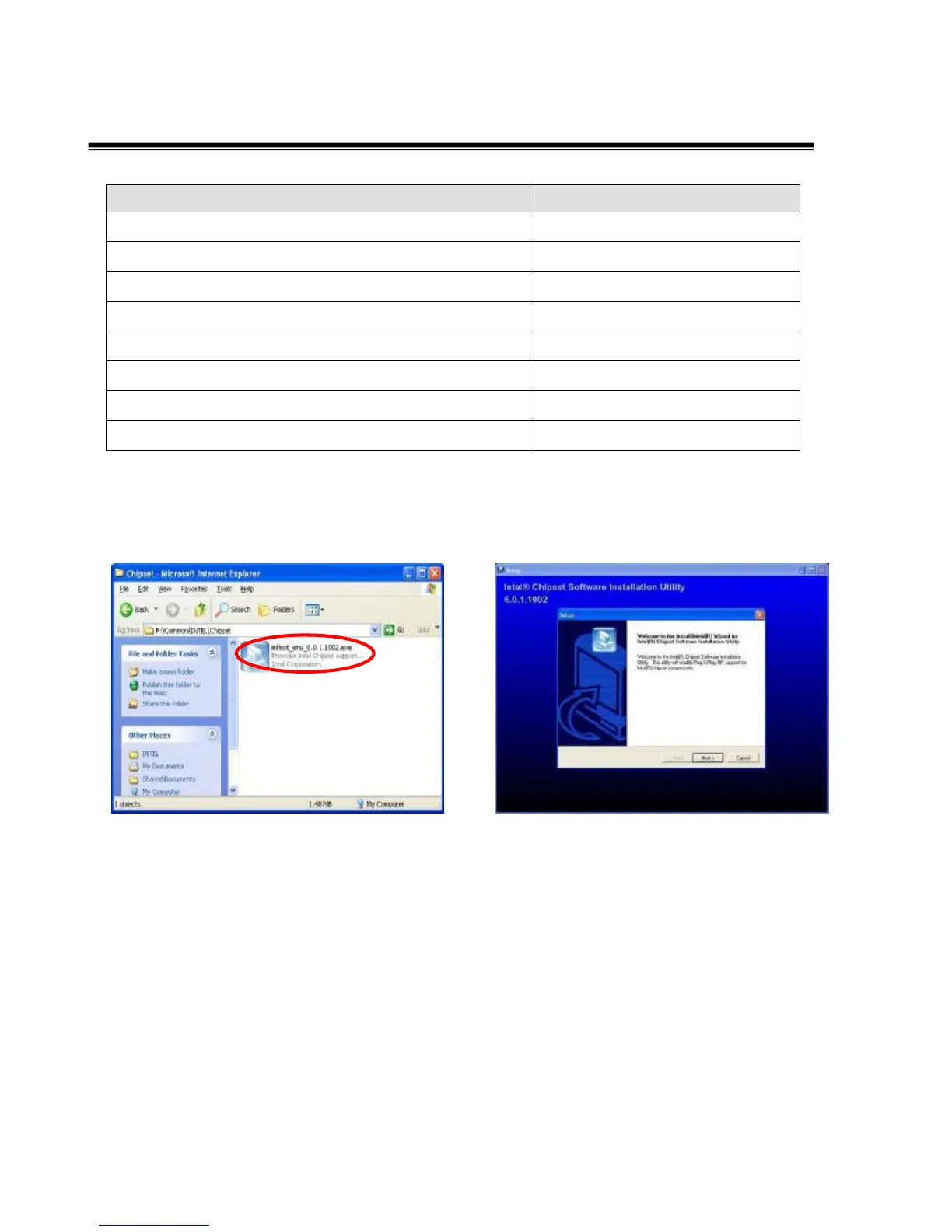
a. Double click the “infinst_enu_6.0.1002”
on the “My Computer” window.
b. Click the “Next” button on the “Welcome”
window.


 To Next Page