9. BIOS Updating Procedure
To update the BIOS, you will need the new BIOS file and a flash utility, AF832A.
EXE. You can download them from the web site or contact technical support or
your sales representative.
1. Prepare one bootable device with DOS OS, save the new BIOS file along with
the flash utility AF832A. EXE to this boot device.
2. Reboot the system and enter the Award BIOS Setup Utility to set the first boot
drive to your boot device.
3. Save the setting and reboot the system.
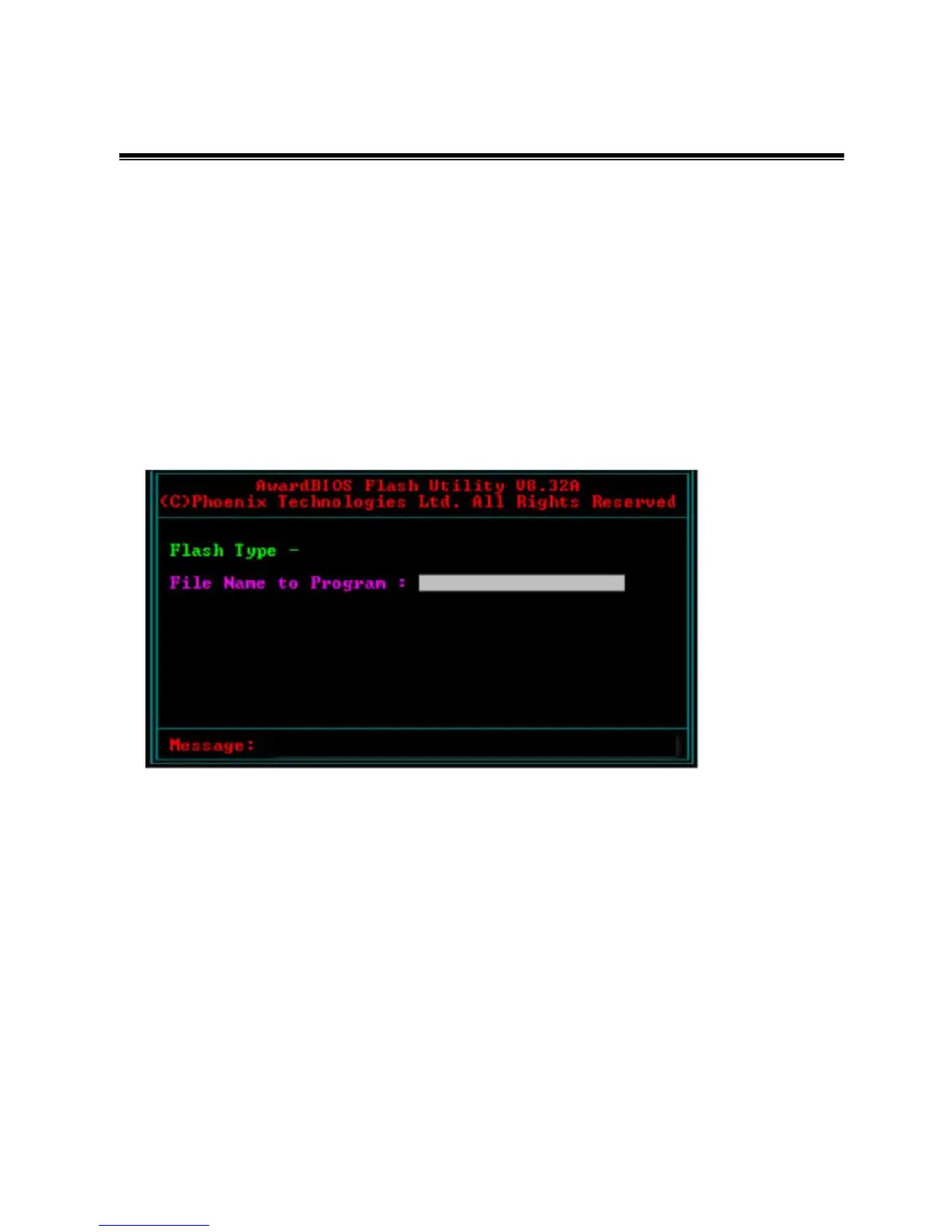
4. After the system booted from the boot device, execute the flash utility
by typing AF832A.EXE in DOS prompt. The following screen will appear.
5. Type the new BIOS file name onto the gray area that is next to “File
Name to Program” then press <Enter>.
6. The following will appear.
Do You Want to Save BIOS (Y/N)
This question refers to the current existing BIOS in your system. We
recommend that you save the current BIOS and its flash utility; just in
case you need to reinstall the BIOS. To save the current BIOS, press
<Y> then enter the file name of the current BIOS. Otherwise, press
<N>.
7. The following will then appear.
Press “Y” to Program or “N” to Exit.
8. Press <Y> to flash the new BIOS.


 To Next Page