Page 28
3) Ctr Para Set
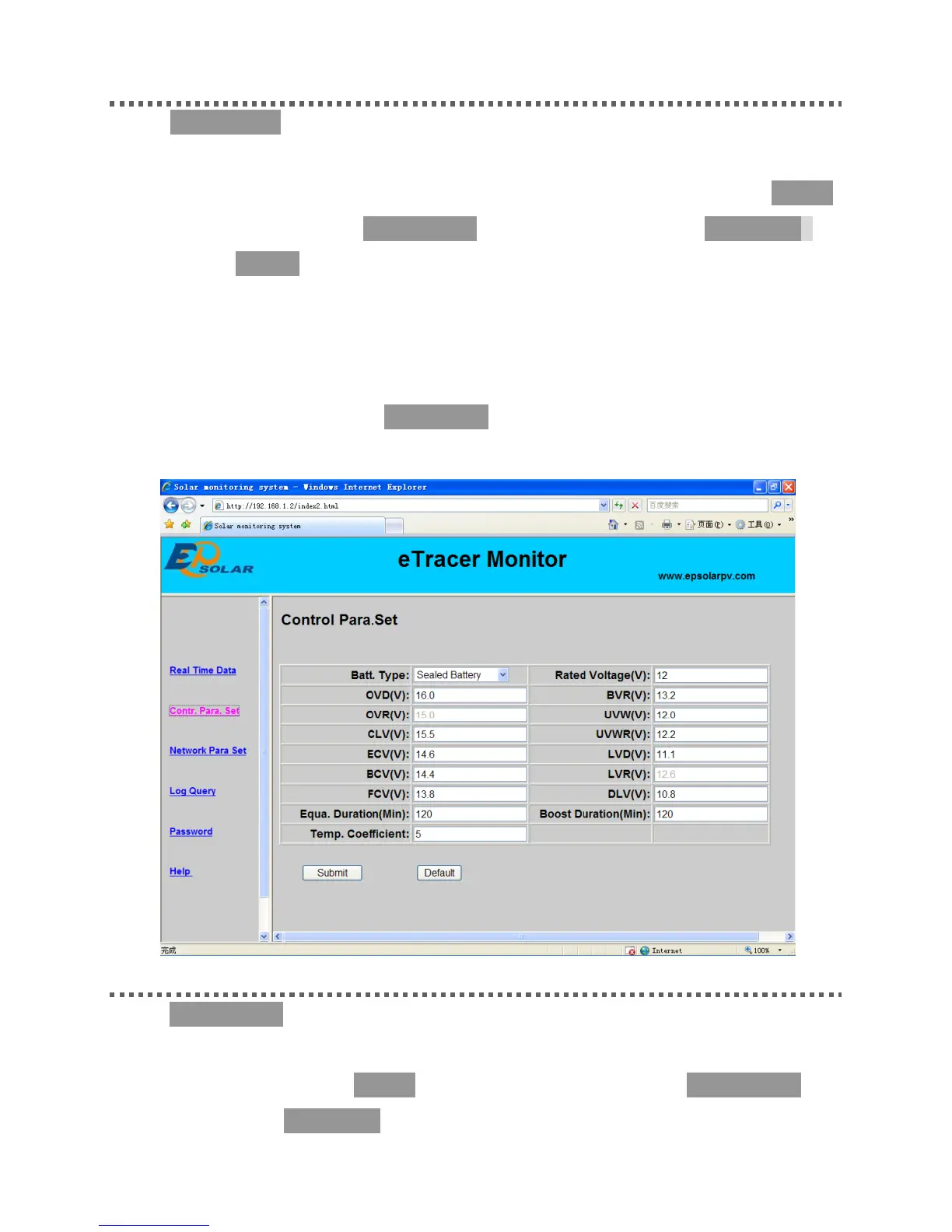
Click ‘Ctl Para Set’ on the left side to enter Control Parameter Set page and the
system will display the current control parameter configuration. Users can also
modify control parameters. After users modify control parameters and click ‘Submit’,
if it is successfully adjusted, ‘Save Success’ will pop out; otherwise, ‘Illegal para’ will
appear. Click ‘Default’, control parameters will recover to default values in line with
current system voltage.
Notes: ‘Batt Rate Voltage’ as battery rated voltage is displayed according to the real
system value, it is not changeable. If parameter modified in the period is not up to the
standard range, dialogue box ‘Illegal para’ will pop out and at the same time, the
parameter will change to the previous value.
4) Net Para Set
Click ‘Net Para Set’ on the left side to enter Network Parameter Set page and the
system will display the current network parameter configuration. After users modify
control parameter and click ‘Submit’, if it is successfully adjusted, ‘Save Success’ will
pop out; otherwise, ‘Illegal para’ will appear.



 To Next Page