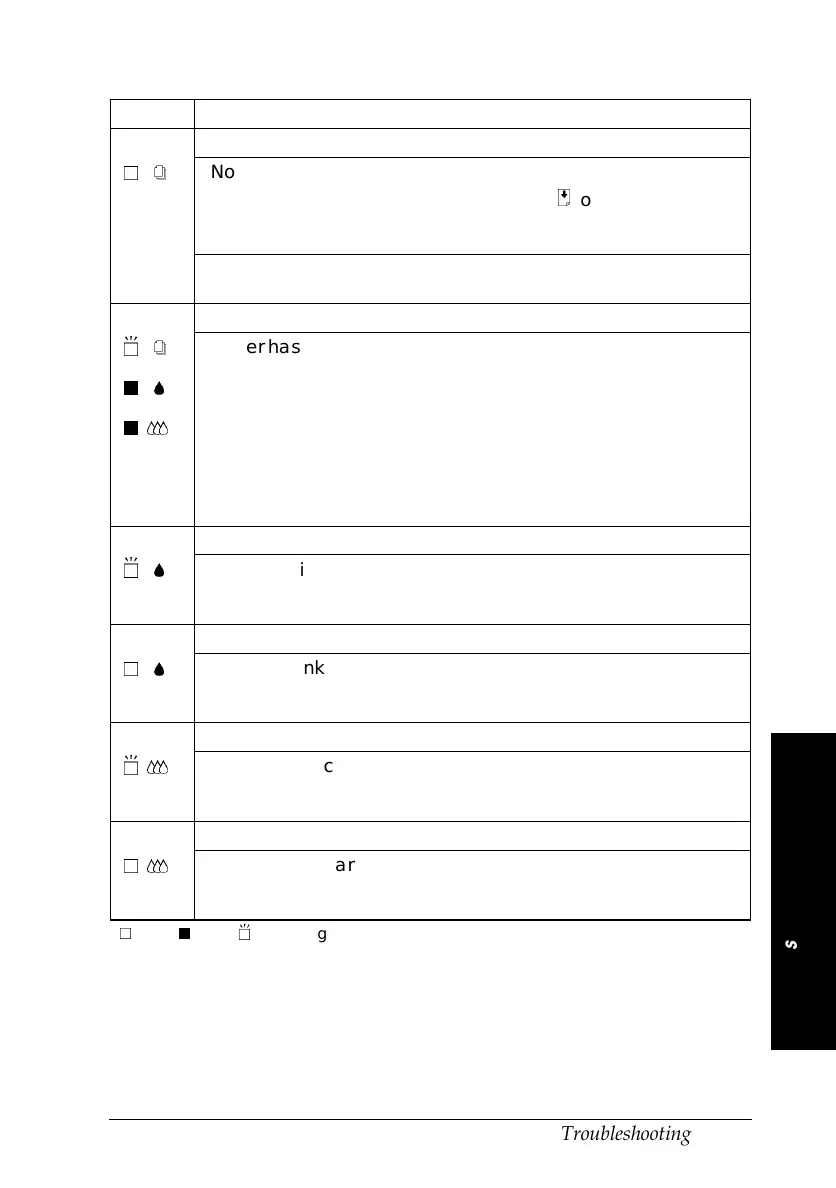
Lights Problem and Solution
Paper Out
nS
No paper is loaded in
the printer.
Load paper in the sheet feeder;
then press the
E
load/eject button
to turn this light off. The printer
resumes printing.
The paper is not
loaded correctly.
Remove and reload the paper.
See “Loading Paper” in Chapter 2.
Paper Jam
fS
oB
oI
Paper has jammed in
the printer.
Take all the paper out of the
feeder, and reload the paper. If
the light continues to flash, turn off
the printer and gently pull all the
paper out of the printer. If it tears
and pieces remain inside the
printer, open the printer cover and
remove the pieces of paper. Turn
on the printer and try again.
Ink Low (black ink cartridge)
fB
The black ink cartridge
is nearly empty.
Obtain a replacement black ink
cartridge (S020093). See page 5-2
for details.
Ink Out (black ink cartridge)
nB
The black ink cartridge
is empty.
Replace the black ink cartridge
with a new one (S020093). See
page 5-2 for details.
Ink Low (color ink cartridge)
fI
The color ink cartridge
is nearly empty.
Obtain a replacement color ink
cartridge (S020089). See page 5-2
for details.
Ink Out (color ink cartridge)
nI
The color ink cartridge
is empty.
Replace the color ink cartridge
with a new one (S020089). See
page 5-2 for details.
n
= on,
o
= off,
f
= flashing
6
Troubleshooting
R
Hawaii2 Ref. Guide
Rev.b
A5 size Chapter 6
06-02-97 DR, pass 0
Troubleshooting
6-3












 To Next Page