15
Flexible connectivity
• Two HDMI ports (including one MHL-compatible port) for computer or video device connection
• Plug-and-play 3-in-1 USB projection, audio, and mouse control for instant setup
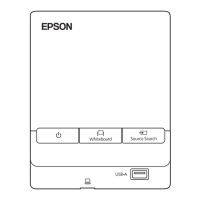
• Connected control pad for USB connection and frequently used operations
• Wired and wireless network support for projection
• Screen mirroring to connect your mobile device wirelessly using Miracast technology
• Projector monitoring and control via remote network computer
• PC Free photo slide shows via connected USB memory devices or Epson document camera
• DVI-D and VGA ports for connecting an external display
• Use Epson iProjection (Windows/Mac) to simultaneously project up to four images from network
computers or mobile devices using the Epson iProjection app
• Projection from iOS or Android devices with the included wireless LAN module and free Epson
iProjection app; visit epson.com/iprojection (U.S.) or epson.ca/iprojection (Canada) for more
information
Innovative display and operation features
• Long-life laser light source
• Support for side-by-side projector mounting with continuous annotation
• High digital zoom ratio for larger images in shorter projection distances
• 2500000:1 contrast ratio and Dynamic Contrast control for sharp, detailed images
• Built-in closed captioning decoder
• Powerful 16 W speaker system with audio out port for connecting external speakers
• Epson's Direct Power On and Auto Power On features for quick and easy setup
• Support for Crestron RoomView network monitoring systems
• Network message broadcast system to project timely messages to all networked projectors
Product Box Contents
Additional Components
Optional Equipment and Replacement Parts
Warranty and Registration Information
Parent topic: Introduction to Your Projector






 To Next Page


