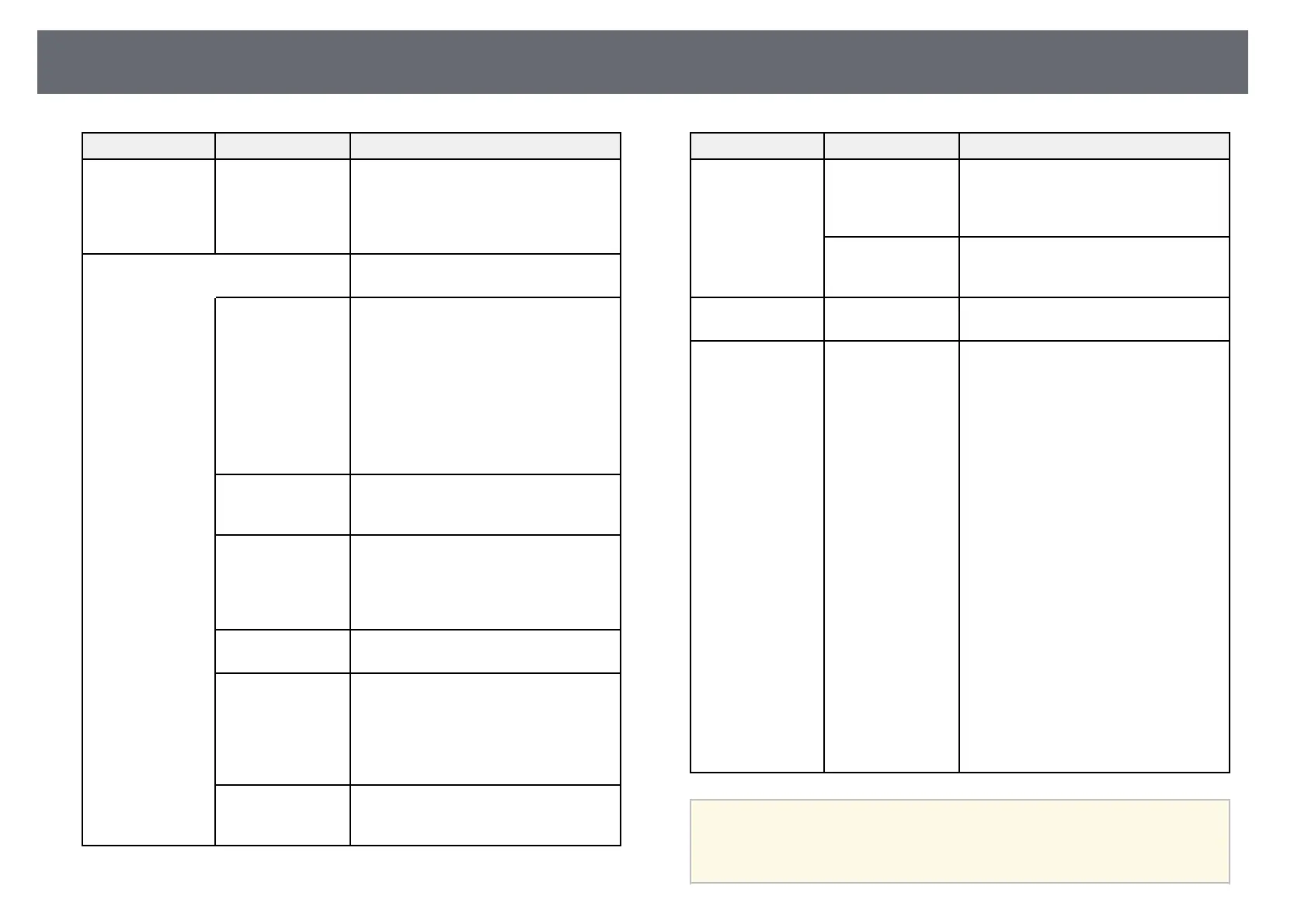
Projector Setup Settings - Extended Menu
179
Setting Options Description
Wireless
Mouse/USB
Display
Wireless Mouse/USB Display: select to
use the Wireless Mouse function and
USB Display. You cannot use the
interactive features to operate computers
(computer interactive mode).
Multi-Projection Make settings when projecting from
multiple projectors:
Multi-Projection Multi-Projection: set to On to match the
display quality of multiple projectors.
When set to On, the following are
automatically set to prevent unevenness
on the right and left screens.
s Image > Auto Iris > Off
s ECO > Power Consumption >
Normal
s ECO > Light Optimizer > Off
Projector ID Projector ID: assigns an ID for the
projector when you use multiple
projectors.
Color Mode Color Mode: adjusts the vividness of
image colors for various image types and
environments. When using multiple
projectors, make sure you select the same
color mode for all of the projectors.
Color Uniformity Color Uniformity: adjusts the color tone
balance for the whole screen.
Brightness Level Brightness Level: sets the lamp
brightness level between 1 and 5 when
the brightness of each lamp differs. This
item can be adjusted only when Power
Consumption is set to Normal in the
ECO menu.
Color Matching Color Matching: corrects the difference
between the tint and brightness of each
projected image.
Setting Options Description
RGBCMY RGBCMY: adjusts the Hue, Saturation,
and Brightness for R (Red), G (Green), B
(Blue), C (Cyan), M (Magenta), and Y
(Yellow) color components.
Reset Reset: resets all adjustment values for the
Multi-Projection menu to their default
settings.
Language Various languages
available
Select the language for projector menu
and message displays.
Reset — Resets all adjustment values on the
Extended menu to their default settings,
except for the following:
• Easy Interactive Function
• Toolbars
• Pen Mode Icon
• Projector Control
• User's Logo
• Projection
• High Altitude Mode
• Auto Source Search
• Connect ELPCB02
• Date & Time
• A/V Output
• USB Type B
• Multi-Projection
• Projector ID
• Color Mode
• Color Matching
• Language
a
When you set User's Logo Protection to On in the Password
Protection screen, you cannot change settings related to user's logo
display (Display Background, Startup Screen, A/V Mute in the
Display setting). Set User's Logo Protection to Off first.



 To Next Page