Projector Parts and Functions
16
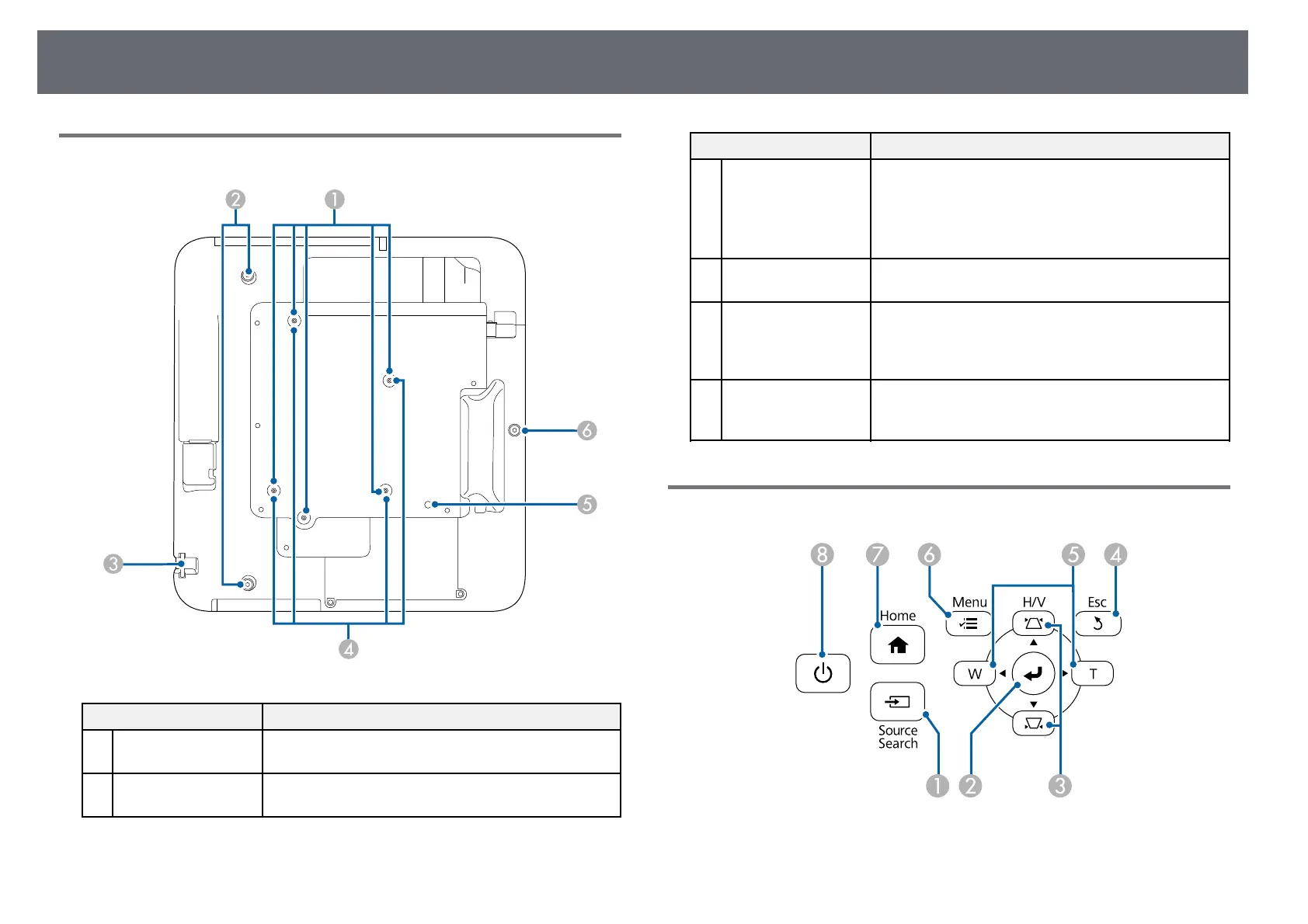
Projector Parts - Base
Name Function
A
Ceiling mount fixing
points (five points)
Attach the optional ceiling mount here when
suspending the projector from a ceiling.
B
Rear foot fixing
points (two points)
Attach the feet when using the projector on a surface
such as a desk. (Only models with feet supplied)
Name Function
C
Security cable
attachment point
Pass a commercially available wire lock through here
and lock it in place.
Do not pass drop-prevention wires through here when
mounting the projector on a wall or suspending it from
a ceiling.
D
Wall mount fixing
points (four points)
Attach the supplied or optional setting plate when
mounting on a wall.
E
Illumination sensor Detects the brightness of the surroundings, and
automatically adjusts the brightness of the screen. Set
Power Consumption to Auto in the projector's ECO
menu.
F
Front foot fixing
point
Attach the foot with a spacer when using the projector
on a surface such as a desk. (Only models with feet
supplied)
Projector Parts - Control Panel



 To Next Page