12-Menu operation
Advanced.fm7/22/03
Configuration Menus
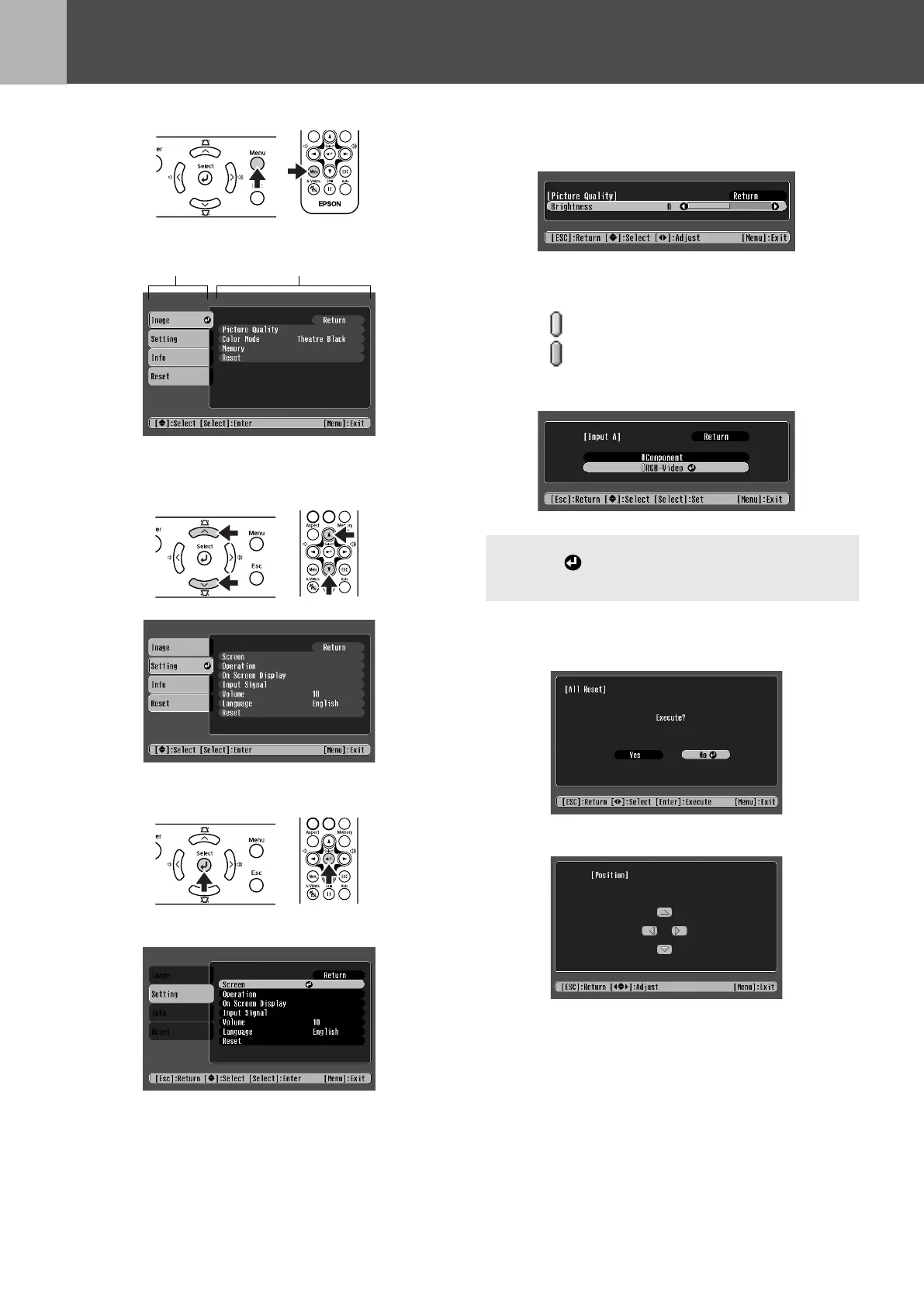
Menu operation
1
Press the [Menu] button.
The top configuration menu is displayed.
2
Press the [u] or [d] buttons to select
the Top Menu item.
3
Press the [e] button.
A Sub Menu is displayed.
4
Press the [u] or [d] buttons to select
the Sub Menu items, then press the
[e] button.
5
Settings can be changed in the
follwing ways:
(a)Press the [l] or [r] buttons to change the
setting values.
(b)Press the [u] or [d] buttons to select the
menu item.
Then press the [e] button.
(Green): Item currently set.
(Orange): Item currently selected.
Press the [e] button to confirm the
selection.
(c)Press the [l] or [r] buttons to select the
value.
Then, press the [e] button.
(d)Press the [u] [d] [l] [r] buttons to move
the image display position.
6
Set other items in the same way.
Press the [Esc] button to return to the previous
item or menu, or select "Return".
7
Press the [Menu] button to finish.
Top Menu
Sub Menu
p
The mark is displayed after items which perform a
setting or lead to a sub menu.
USERS_E.BOOK Page 12 Tuesday, July 22, 2003 3:37 PM










 To Next Page