Keyboard Shortcuts Page 67
Keyboard Shortcuts
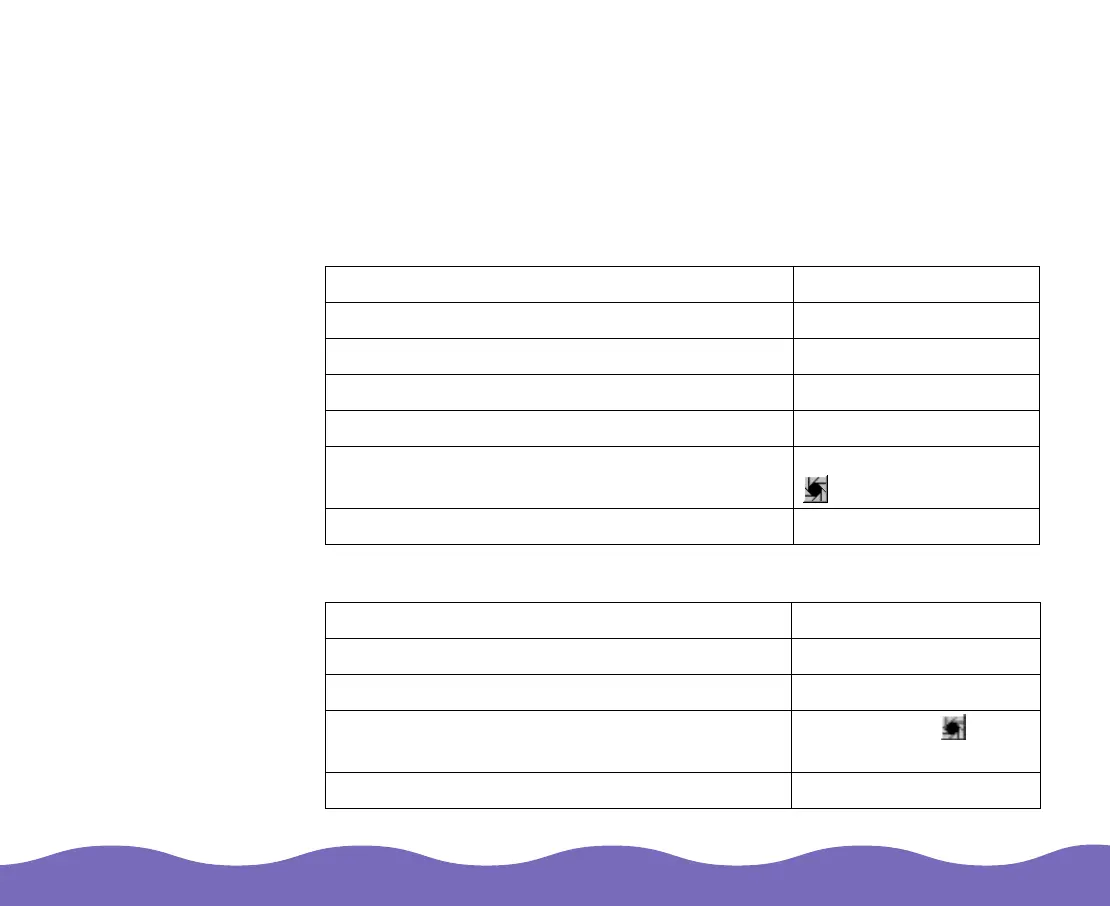
Windows 95, 98, and NT Shortcuts
Tool and dialog box access
Setting and resetting controls
Function Shortcut
Zoom into prescan image Ctrl + Alt + 2
Access Global Color Correction dialog box Ctrl + Alt + 3
Access Gradation Curves dialog box Ctrl + Alt + 5
Activate Auto Adjust feature Ctrl + Alt + 7
Activate Auto Adjust without correcting the
color casts
Shift key + click the
Auto Adjust button
Exit any dialog box Esc
Function Shortcut
Reset all settings Alt + click Reset
Reset all settings and reset frame border Shift + click Reset
Reset the Auto Adjust settings Alt + click the Auto
Adjust button
Delete custom settings from list boxes Shift + click the setting













 To Next Page