XP-600 Series
Menu Setting and Options
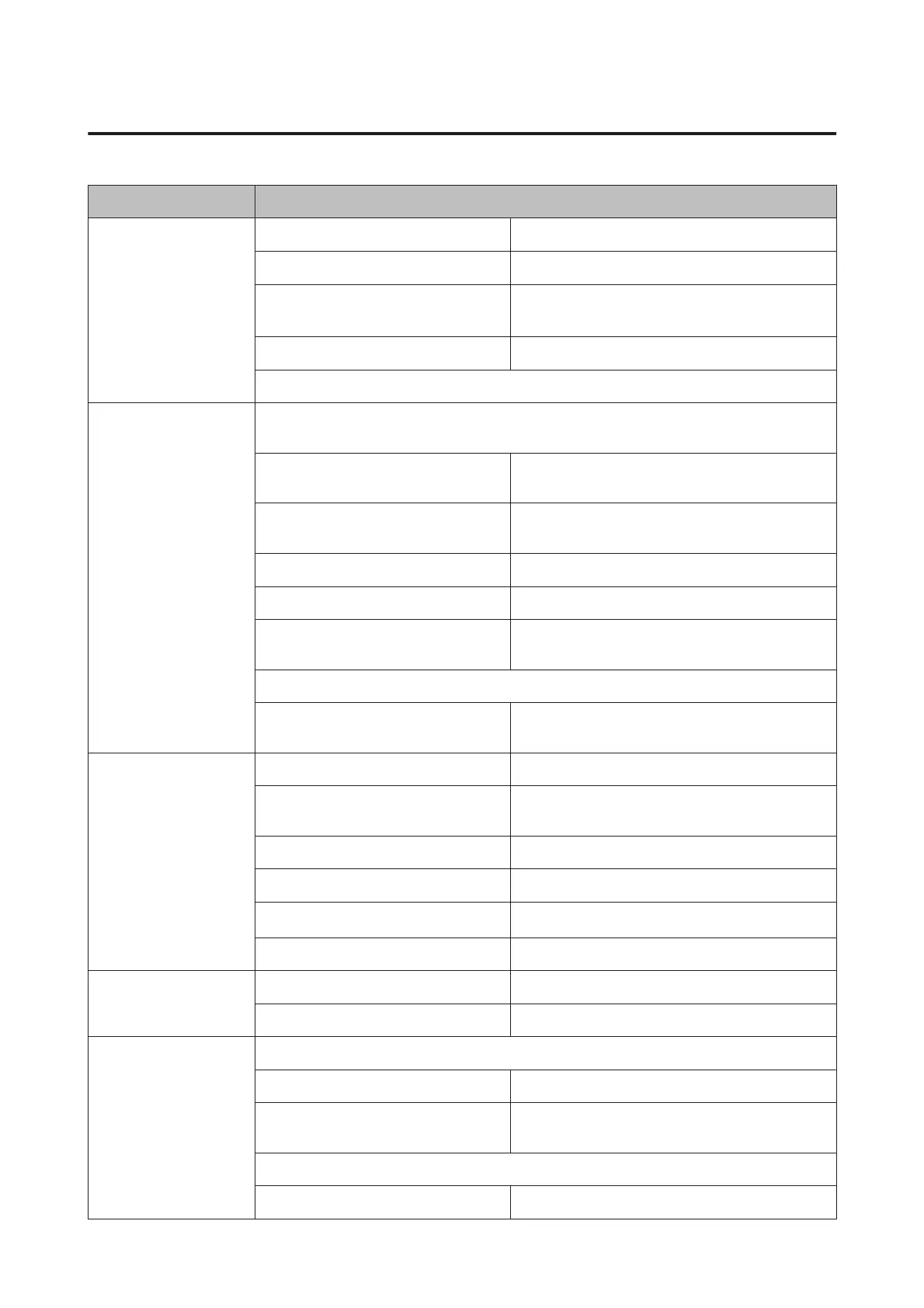
Copy/Restore Photos
*1
Color Restoration Off, On
Display Mode 1-up, 1-up without Information
Paper and Copy Settings
Paper Size, Paper Type, Paper Source, Borderless
*2
,
Expansion
Photo Adjustments Enhance, Filter
Crop/Zoom
Photo Layout Sheet
*1
2-up, 4-up, 8-up, 20-up, Sticker 16-up, Upper 1/2, Lower 1/2, Photo ID, Jewel Upper, Jewel Index,
P.I.F.
Paper Size 10x15cm(4x6in), 13x18cm(5x7in), 16:9 wide, A4, A6,
100x148mm
Paper Type Prem. Glossy, Ultra Glossy, Glossy, Photo Paper, Plain
Paper, Matte, Photo Sticker, PhotoSticker16
Layout Method Automatic layout, Place photos manually
Display Mode 1-up, 1-up without Information, 9-up
Photo Adjustments Enhance, Scene Detection, Fix Red-Eye, Filter,
Brightness, Contrast, Sharpness, Saturation
Crop/Zoom
Print Settings Quality, Expansion, Date, Print Info. On Photos, Fit
Frame, Bidirectional, Paper Source
Print Photo Greeting
Card
*1
Display Mode 1-up, 1-up without Information, 9-up
Photo Adjustments Enhance, Scene Detection, Fix Red-Eye, Filter,
Brightness, Contrast, Sharpness, Saturation
Paper Size 10x15cm(4x6in)
Paper Type Prem. Glossy, Ultra Glossy, Glossy, Photo Paper
Layout
Borderless
*2
, Upper 1/2, Lower 1/2
Frame Off, Oval, Oval - Soft Edge
Copy to CD/DVD
*1
Document Type Text&Image, Photo
Quality Standard Quality, Best
Print on CD/DVD
*1
CD/DVD 1-up, CD/DVD 4-up, CD/DVD Variety
Display Mode 1-up, 1-up without Information, 9-up
Photo Adjustments Enhance, Scene Detection, Fix Red-Eye, Filter,
Brightness, Sharpness, Saturation
Crop/Zoom
Print Settings CD Density
User’s Guide
Menu List of Control Panel
108











 To Next Page