Commands 5-9
•
d
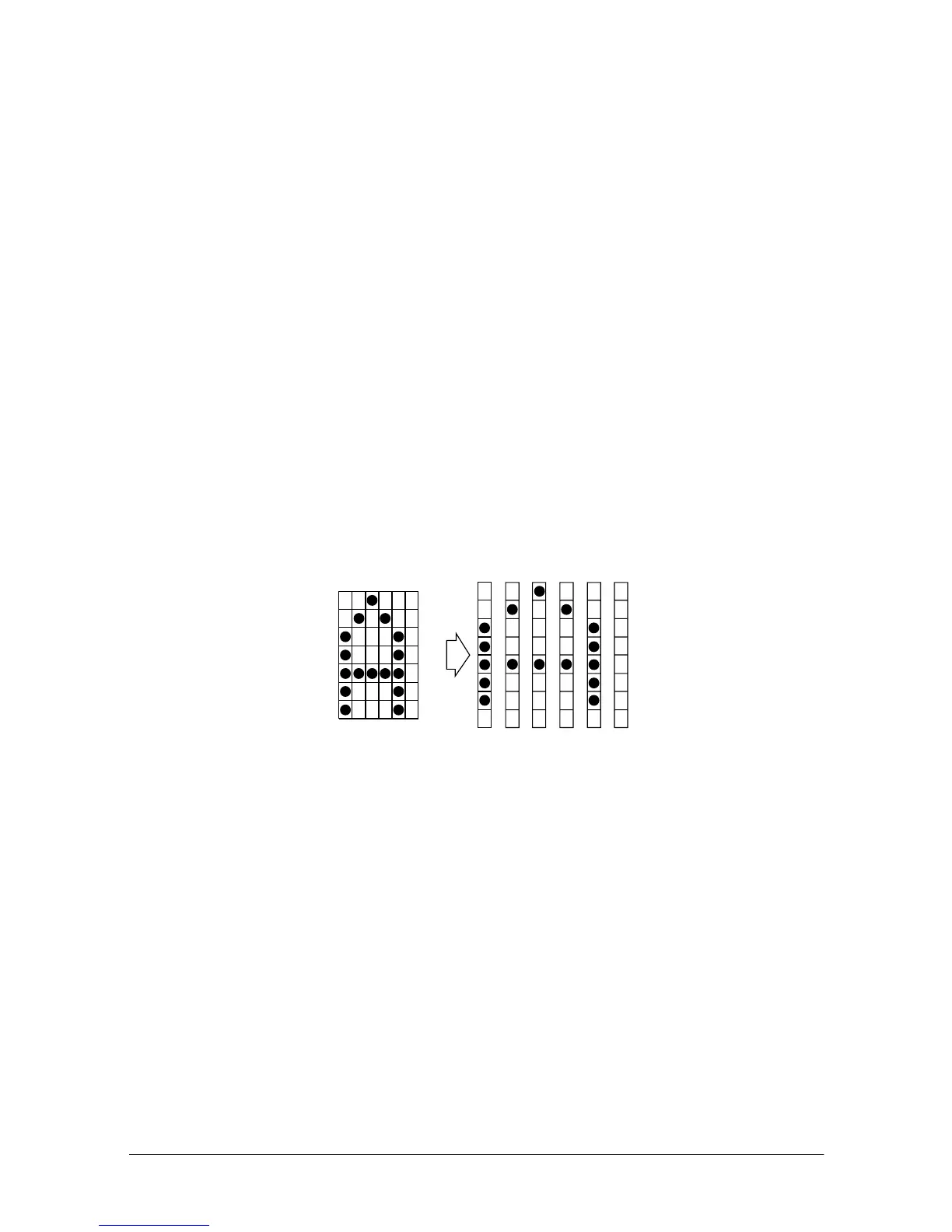
is the dot data for the characters. The dot pattern is in the
horizontal direction from the left side. Any remaining dots on
right side are blank.
• The data to define a user-defined character is (
y
×
x
) bytes.
• Set a corresponding bit to 1 to print a dot or to 0 to not print a dot.
• It is possible to define multiple characters for consecutive
character codes.
[Notes] • After user-defined characters are defined, they are available until
another definition is made; ESC @ is executed; the printer is reset;
or the power is turned off.
• If the values of
y
,
c1
,
c2
, or
x
are out of the specified range, the
printer ignores the command and processes the following data as
normal data.
•In 7 × 7 font, horizontally adjacent dots cannot be printed. Define
the character so that it does not include horizontally adjacent dots.
[Default] The internal character set
[Reference] ESC %
[Example]
•5 × 7 font when the dot pattern for code 32 (20H) is defined as shown below:
p1 p2 p3 p4 p5 p6
MSB
LSB
ASCII code ESC &
y c1 c2 x p1 p2 p3 p4 p5
Hex code 1B 26 01 20 20 05 3E 48 88 48 3E













 To Next Page