49
SECTION 6 TROUBLESHOOTING
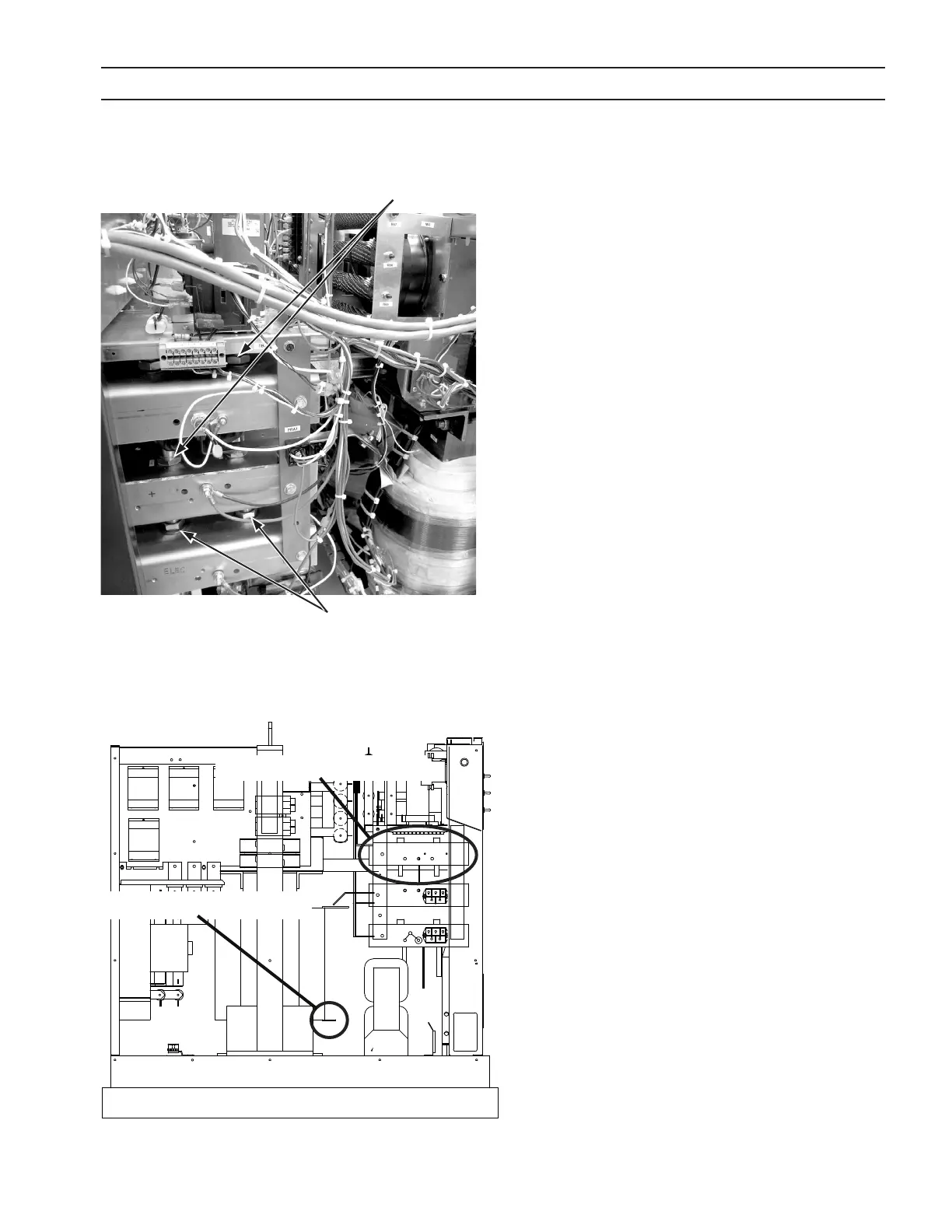
6.4.1 Power Rectiers and Blocking Diodes
1. Removetopcoverandsidepanels
2. Locateanddisconnectpluginrearofammeter(attached
toneredandoneblackwire)
3. Removepilotarcswitch
4. Disconnectvoltmeter
5. DisconnectorangeandyellowwiresfromrelayK4.
6. Removetwoboltsholdingtheleftsideofthefrontpanel
tothebase.
7. Removethreeboltsholdingacrossthecenterbaseofthe
frontpanel.Theseareaccessedfromunderneath.
8. Removeoneoftheboltsholdingtherightsideofthe
front panel to the base. Loosen the second bolt. Of
thesetwobolts,removetheboltontheleftandloosen
theboldontheright.
9. Swingthefrontpanelouttogainaccesstopowerrecti-
ercomponents.
Troubleshooting Procedures –Negative Plate
1. VisuallyinspectfusesF8andF9.Replaceiftheyshowsigns
ofbeingblownormelted.Inspectdiodes.Ifruptured
orburned,replacealldiodesontheNEGPlate.Ifdiodes
appeartobeOK,proceedtonextstep.
LocationofNeg.Plate
LocationoffusesF8andF9
PowerRectiers
Proceduretoaccessbehindthefrontpanel
BlockingDiodes
PowerRectiers



 To Next Page